


Since version 1.1 this workbench is disabled by default. See Workbenches.
The Robot Workbench is unmaintained. If you have experience with the topic and are interested in maintaining it, please state your intention in the developer's section of the FreeCAD forum.
The reason this workbench is still in the master source code is because this workbench is programmed in C++. If this workbench could be programmed in Python, then it could be made an external workbench and it could be moved to a separate repository.

Introduction
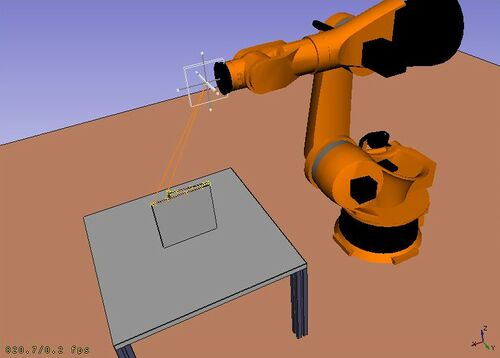
The Robot Workbench is a tool to simulate a standard 6-axis industrial robot, like Kuka.
You can do the following tasks:
- Set up a simulation environment with a robot and work pieces.
- Create and fill up movement trajectories.
- Decompose features of a CAD part to a trajectory.
- Simulate the robot movement and reaching distance.
- Export the trajectory to a robot program file.
To get started try the Robot tutorial, and see the programming interface in the RobotExample.py example file.
Tools
Robot toolbar
 Place Robot: Places a robot in the model.
 Trajectory: Creates an empty trajectory.
 Insert in Trajectory: Inserts a robot tool position into a trajectory.
 Insert in Trajectory (vertex): Inserts a preselected position into a trajectory.
 Edge to Trajectory: Generates a trajectory from selected edges.
 Dress-Up Trajectory: Creates a dress-up object that overrides aspects of a trajectory.
 Trajectory Compound: Groups and connects multiple trajectories into one.
 Set Home Position: Sets the home position of a robot.
 Move to Home: Moves a robot to its home position.
 Simulate Trajectory: Simulates robot movement along a selected trajectory.
Other tools
- Insert Robot:
 Tool: Adds a tool shape to a robot.
- Set Default Orientation: Sets the default orientation for subsequent waypoint creation.
- Set Default Values: Sets the default values for speed, acceleration, and continuity for subsequent waypoint creation.
- Export Trajectory:
 Kuka Compact Subroutine: Exports a trajectory as a compact KRL subroutine.
 Kuka Full Subroutine: Exports a trajectory as a full KRL subroutine.
Scripting
See the Robot API example for a description of the functions used to model the robot displacements.
Tutorials
This page is retrieved from https://wiki.freecad.org/Robot_Workbench