


Since version 1.1 this workbench is disabled by default. See Workbenches.
{{{1}}}

Introduction
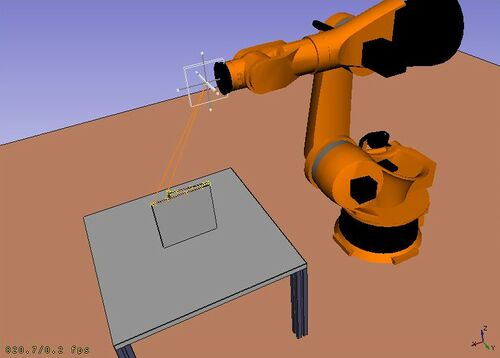
ロボットワークベンチはKukaのような産業用6軸ロボットのシミュレートのためのツールです。 以下の作業を行うことができます:
- ロボット、加工物とシミュレーション環境のセットアップ
- 軌道の作成と書き込み
- CAD部品形状を軌道に分解
- ロボットの動作と到達可能範囲のシミュレート
- ロボットプログラムファイルへの軌道のエクスポート
You can do the following tasks:
- Set up a simulation environment with a robot and work pieces.
- Create and fill up movement trajectories.
- Decompose features of a CAD part to a trajectory.
- Simulate the robot movement and reaching distance.
- Export the trajectory to a robot program file.
以下で例を見ることができます: サンプルファイル または ロボットのチュートリアル
Tools
Robot toolbar
 Place Robot: Places a robot in the model.
 Trajectory: Creates an empty trajectory.
 Insert in Trajectory: Inserts a robot tool position into a trajectory.
 Insert in Trajectory (vertex): Inserts a preselected position into a trajectory.
 Edge to Trajectory: Generates a trajectory from selected edges.
 Dress-Up Trajectory: Creates a dress-up object that overrides aspects of a trajectory.
 Trajectory Compound: Groups and connects multiple trajectories into one.
 Set Home Position: Sets the home position of a robot.
 Move to Home: Moves a robot to its home position.
 Simulate Trajectory: Simulates robot movement along a selected trajectory.
Other tools
- Insert Robot:
 Tool: Adds a tool shape to a robot.
- Set Default Orientation: Sets the default orientation for subsequent waypoint creation.
- Set Default Values: Sets the default values for speed, acceleration, and continuity for subsequent waypoint creation.
- Export Trajectory:
 Kuka Compact Subroutine: Exports a trajectory as a compact KRL subroutine.
 Kuka Full Subroutine: Exports a trajectory as a full KRL subroutine.
スクリプト処理
このセクションは以下のスクリプトから生成されています: http://free-cad.svn.sourceforge.net/viewvc/free-cad/trunk/src/Mod/Robot/RobotExample.py?view=markup 必要であればこのファイルを直接使用することもできます。
See the Robot API example for a description of the functions used to model the robot displacements.
Tutorials
チュートリアル
このページは以下から取得されています https://wiki.freecad.org/Robot_Workbench