


Since version 1.1 this workbench is disabled by default. See Workbenches.
{{{1}}}

Giriş
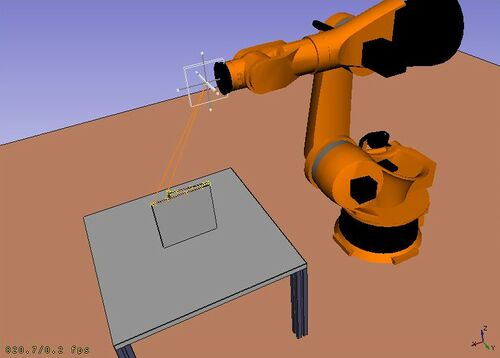
Robot Tezgahı, Kuka gibi bir standart 6 eksenli endüstriyel robot 'u simüle etmek için kullanılan bir araçtır.
Aşağıdaki görevleri yapabilirsiniz:
- Bir robot ve iş parçaları ile bir simülasyon ortamı kurun.
- Hareket yörüngelerini oluşturun ve doldurun.
- Bir CAD parçasının özelliklerini bir yörüngeye ayırın.
- Robot hareketini simüle edin ve mesafeye ulaşın.
- Yörüngeyi bir robot program dosyasına aktarın.
Başlamak için Robot klavuzunu deneyin ve RobotExample.py örneğindeki programlama arayüzünü görün.
Tools
Robot toolbar
 Place Robot: Places a robot in the model.
 Trajectory: Creates an empty trajectory.
 Insert in Trajectory: Inserts a robot tool position into a trajectory.
 Insert in Trajectory (vertex): Inserts a preselected position into a trajectory.
 Edge to Trajectory: Generates a trajectory from selected edges.
 Dress-Up Trajectory: Creates a dress-up object that overrides aspects of a trajectory.
 Trajectory Compound: Groups and connects multiple trajectories into one.
 Set Home Position: Sets the home position of a robot.
 Move to Home: Moves a robot to its home position.
 Simulate Trajectory: Simulates robot movement along a selected trajectory.
Other tools
- Insert Robot:
 Tool: Adds a tool shape to a robot.
- Set Default Orientation: Sets the default orientation for subsequent waypoint creation.
- Set Default Values: Sets the default values for speed, acceleration, and continuity for subsequent waypoint creation.
- Export Trajectory:
 Kuka Compact Subroutine: Exports a trajectory as a compact KRL subroutine.
 Kuka Full Subroutine: Exports a trajectory as a full KRL subroutine.
Betik
Robot yer değiştirmelerini modellemek için kullanılan işlevlerin açıklaması için Robot API örneği bölümüne bakınız.
Tutorials
Bu sayfa şu adresten alınmıştır https://wiki.freecad.org/Robot_Workbench