


Dalla versione 1.1 questo ambiente di lavoro è disabilitato per impostazione predefinita. Vedere Ambienti.
{{{1}}}
L'icona dell'ambiente Robot
Introduzione
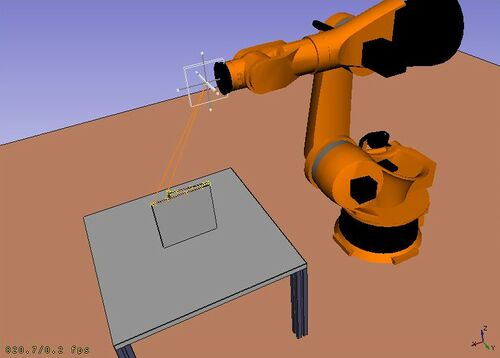
L'Ambiente Robot  è uno strumento per simulare un Robot a 6 assi di tipo industriale, come per esempio i robot Kuka.
È possibile eseguire le seguenti operazioni:
- Impostare un ambiente di simulazione con un robot e dei pezzi in lavorazione
- Creare e compilare traiettorie
- Scomporre le componenti di una Parte CAD in una traiettoria
- Simulare il movimento del robot e il raggio d'azione
- Esportare la traiettoria in un file di programma robot
Per iniziare, provare il tutorial Robot e consultare l'interfaccia di programmazione nel file di esempio RobotExample.py.
Tools
Robot toolbar
 Place Robot: Places a robot in the model.
 Trajectory: Creates an empty trajectory.
 Insert in Trajectory: Inserts a robot tool position into a trajectory.
 Insert in Trajectory (vertex): Inserts a preselected position into a trajectory.
 Edge to Trajectory: Generates a trajectory from selected edges.
 Dress-Up Trajectory: Creates a dress-up object that overrides aspects of a trajectory.
 Trajectory Compound: Groups and connects multiple trajectories into one.
 Set Home Position: Sets the home position of a robot.
 Move to Home: Moves a robot to its home position.
 Simulate Trajectory: Simulates robot movement along a selected trajectory.
Other tools
- Insert Robot:
 Tool: Adds a tool shape to a robot.
- Set Default Orientation: Sets the default orientation for subsequent waypoint creation.
- Set Default Values: Sets the default values for speed, acceleration, and continuity for subsequent waypoint creation.
- Export Trajectory:
 Kuka Compact Subroutine: Exports a trajectory as a compact KRL subroutine.
 Kuka Full Subroutine: Exports a trajectory as a full KRL subroutine.
Script
Vedere l'esempio Esempio di API Robot per una descrizione delle funzioni utilizzate per modellare gli spostamenti del robot.
Tutorials
Questa pagina è recuperata da https://wiki.freecad.org/Robot_Workbench