


Since version 1.1 this workbench is disabled by default. See Workbenches.
Верстак Robot в FreeCAD остался без поддержки. Если у Вас есть знания в этом вопросе и интерес к его поддержке, пожалуйста, заявите своё намерение в секции разработчиков на форуме FreeCAD.
Причина, по которой этот верстак все ещё находится в основном исходном коде, заключается в том, что этот верстак запрограммирован на C++. Если бы этот верстак можно было запрограммировать на Python, то его можно было бы сделать внешним верстаком и переместить в отдельный репозиторий.
Логотип верстака Robot
Введение
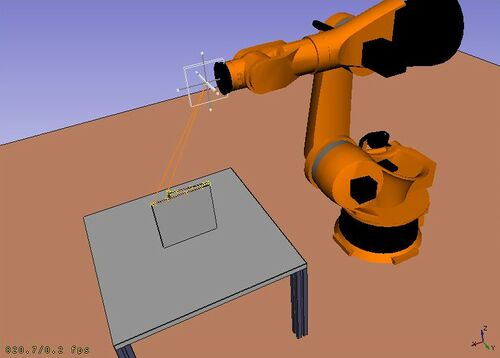
 Верстак Robot это инструмент для симуляции стандартного 6-ти осевого промышленного робота, такого как Kuka.
Вы можете выполнять следующие работы:
- создать среду моделирования с роботом и заготовкой
- создать и загрузить траекторию
- разложить часть детали САПР в траекторию
- имитировать движение робота и его пространственные ограничения
- экспортировать траекторию в программный файл робота
Начните с Учебника по роботам, и смотрите программный интерфейс в файле примера RobotExample.py.
Tools
Robot toolbar
 Place Robot: Places a robot in the model.
 Trajectory: Creates an empty trajectory.
 Insert in Trajectory: Inserts a robot tool position into a trajectory.
 Insert in Trajectory (vertex): Inserts a preselected position into a trajectory.
 Edge to Trajectory: Generates a trajectory from selected edges.
 Dress-Up Trajectory: Creates a dress-up object that overrides aspects of a trajectory.
 Trajectory Compound: Groups and connects multiple trajectories into one.
 Set Home Position: Sets the home position of a robot.
 Move to Home: Moves a robot to its home position.
 Simulate Trajectory: Simulates robot movement along a selected trajectory.
Other tools
- Insert Robot:
 Tool: Adds a tool shape to a robot.
- Set Default Orientation: Sets the default orientation for subsequent waypoint creation.
- Set Default Values: Sets the default values for speed, acceleration, and continuity for subsequent waypoint creation.
- Export Trajectory:
 Kuka Compact Subroutine: Exports a trajectory as a compact KRL subroutine.
 Kuka Full Subroutine: Exports a trajectory as a full KRL subroutine.
Составление скриптов
Смотрите на странице Robot API example описания функций, используемых для моделирования расположения робота.
Tutorials
Учебные материалы
Эта страница получена от https://wiki.freecad.org/Robot_Workbench