


Since version 1.1 this workbench is disabled by default. See Workbenches.
{{{1}}}
El icono del Ambiente de trabajo Robot
Introducción
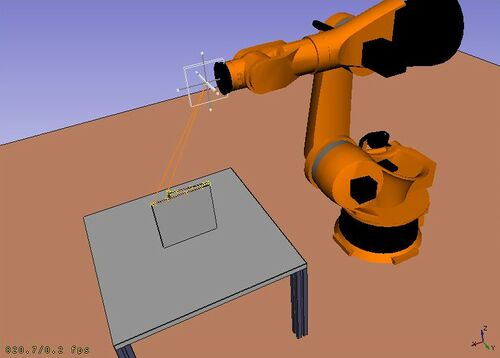
El  Ambiente de trabajo de robots es una herramienta para simular un Robot de 6 ejes industrial estándar, como Kuka.
Puede realizar las siguientes tareas:
- Configurar un entorno de simulación con un robot y piezas de trabajo.
- Crear y rellenar trayectorias de movimiento.
- Descomponer las características de una pieza CAD en una trayectoria.
- Simular el movimiento del robot y la distancia de alcance.
- Exportar la trayectoria a un archivo de programa de robot.
Para empezar, prueba el Tutorial de robots, y mira la interfaz de programación en el archivo de ejemplo RobotExample.py.
Tools
Robot toolbar
 Place Robot: Places a robot in the model.
 Trajectory: Creates an empty trajectory.
 Insert in Trajectory: Inserts a robot tool position into a trajectory.
 Insert in Trajectory (vertex): Inserts a preselected position into a trajectory.
 Edge to Trajectory: Generates a trajectory from selected edges.
 Dress-Up Trajectory: Creates a dress-up object that overrides aspects of a trajectory.
 Trajectory Compound: Groups and connects multiple trajectories into one.
 Set Home Position: Sets the home position of a robot.
 Move to Home: Moves a robot to its home position.
 Simulate Trajectory: Simulates robot movement along a selected trajectory.
Other tools
- Insert Robot:
 Tool: Adds a tool shape to a robot.
- Set Default Orientation: Sets the default orientation for subsequent waypoint creation.
- Set Default Values: Sets the default values for speed, acceleration, and continuity for subsequent waypoint creation.
- Export Trajectory:
 Kuka Compact Subroutine: Exports a trajectory as a compact KRL subroutine.
 Kuka Full Subroutine: Exports a trajectory as a full KRL subroutine.
Archivos de guión
Ver el Ejemplo de la API del Robot para ver una descripción de las funciones utilizadas para modelar los desplazamientos del robot.
Tutorials
Esta página ha sido recuperada de https://wiki.freecad.org/Robot_Workbench