


|
|
| Ubicación en el Menú |
|---|
| Modificación → Herramientas de Arreglo → Arreglo Polar |
| Entornos de trabajo |
| Borrador, Arquitectura |
| Atajo de teclado por defecto |
| Ninguno |
| Introducido en versión |
| 0.19 |
| Ver también |
| Borrador OrthoArray, Borrador ArregloCircular, Borrador ArregloRuta, Borrador ArregloEnlaceRuta, Borrador ArregloPunto, Borrador ArregloEnlacePunto |
Descripción
El  comando Borrador ArregloPolar crea un arreglo a partir de un objeto seleccionado colocando copias a lo largo de una circunferencia. El comando puede crear opcionalmente un arreglo Enlace, que es más eficiente que un arreglo normal.
El comando puede usarse en objetos 2D creados con el Ambiente de Trabajo Borrador o Ambiente de Trabajo Dibujo, pero también en muchos objetos 3D como los creados con el Ambiente de Trabajo Pieza, Ambiente de Trabajo DiseñoPieza o Ambiente de Trabajo Arquitectura.
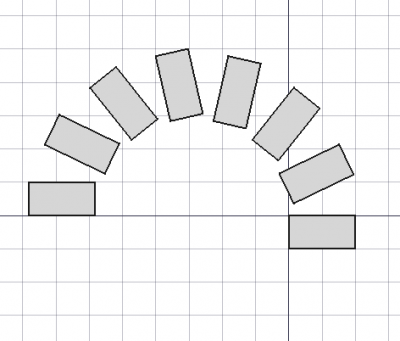
Borrador ArregloPolar
Utilización
Ver también: Borrador Atrapar
- Opcionalmente selecciona un objeto.
- Hay varias formas de invocar el comando:
- Pulsar el Borrador ArregloPolar.
- Seleccione la opción Modificación → Herramientas de matriz → Arreglo polar en el menú.
- Pulsar el
- Se abre el panel de tareas Arreglo polar. Ver Opciones para más información.
- Si aún no ha seleccionado ningún objeto: seleccione un objeto.
- Introduzca los parámetros necesarios en el panel de tareas.
- Para terminar el comando haga una de las siguientes cosas:
- Elija un punto en la Vista 3D para el Centro de rotación.
- Pulsa Entre.
- Pulsar el botón Aceptar.
Opciones
- Enter the Polar angle to specify the total angle of the array. The angle is positive in the counter-clockwise direction.
- Enter the Number of elements. Must be at least
2. - Pick a point in the 3D View, note that this will also finish the command, or type coordinates for the Center of Rotation. The rotation axis of the array will pass through this point. It is advisable to move the pointer out of the 3D View before entering coordinates.
- Press the Reset Point button to reset the Center of Rotation to the origin.
- If the Fuse checkbox is checked overlapping elements in the array are fused.
- If the Link array checkbox is checked a Link array instead of a regular array is created. A Link array is more efficient because its elements are App Link objects.
- Press Esc or the Cancel button to abort the command.
Notas
See Draft OrthoArray.
- introduced in 1.2: The array uses the Z-axis of the current working plane for the rotation axis. This can be changed by editing the DatosAxis property.
Propiedades
See Draft OrthoArray.
Guión
See also: Autogenerated API documentation and FreeCAD Scripting Basics.
Parametric array
To create a parametric polar array use the make_array method (introduced in 0.19) of the Draft module. This method replaces the deprecated makeArray method. The make_array method can create Draft OrthoArrays, Draft PolarArrays and Draft CircularArrays. For each array type one or more wrappers are available.
The main method:
array = make_array(base_object, arg1, arg2, arg3, arg4=None, arg5=None, arg6=None, use_link=True)
The wrapper for polar arrays is:
array = make_polar_array(base_object,
                         number=5, angle=360, center=App.Vector(0, 0, 0),
                         use_link=True)
base_objectis the object to be arrayed. It can also be theLabel(string) of an object in the current document.numberis the number of elements in the pattern, including the original object.angleis the angle of the polar arc in degrees.centeris the vector that defines the center of the pattern.- If
use_linkisTruethe created elements are App Links instead of regular copies. arrayis returned with the created array object.
Example:
import FreeCAD as App
import Draft

doc = App.newDocument()

tri = Draft.make_polygon(3, 600)
center = App.Vector(-1600, 0, 0)

array = Draft.make_polar_array(tri, 8, 270, center)
doc.recompute()
Non-parametric array
To create a non-parametric polar array use the array method of the Draft module. This method returns None.
array(objectslist, center, angle, number)
Ejemplo:
import FreeCAD as App
import Draft

doc = App.newDocument()

tri = Draft.make_polygon(3, 600)
center = App.Vector(-1600, 0, 0)

Draft.array(tri, center, 270, 8)
doc.recompute()
Esta página ha sido recuperada de https://wiki.freecad.org/Draft_PolarArray