


|
|
| Ubicación en el Menú |
|---|
| Modificación → Herramientas de Arreglo → Arreglo Punto |
| Entornos de trabajo |
| Borrador, Arquitectura |
| Atajo de teclado por defecto |
| Ninguno |
| Introducido en versión |
| 0.18 |
| Ver también |
| Borrador OrthoArray, Borrador ArregloPolar,
Borrador ArregloCircular, Borrador ArregloRuta, Borrador ArregloEnlaceRuta, Borrador ArregloEnlacePunto |
Descripción
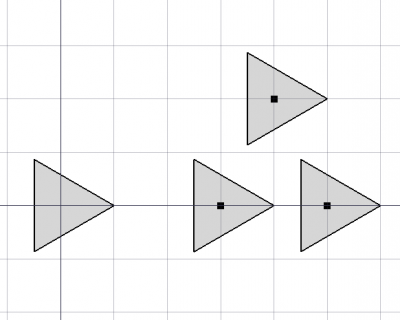
El comando  El comando Borrador ArregloPuntos crea una arreglo regular a partir de un objeto seleccionado colocando copias en los puntos de un compuesto puntos. Utilice el comando Borrador ArregloEnlacePunto para crear un arreglo Enlace más eficiente. Excepto por el tipo de arreglo que se crea, arreglo de enlace o matriz normal, el comando Borrador ArregloEnlacePunto es idéntico a este comando.
Ambos comandos pueden utilizarse en objetos 2D
creados con el Ambiente de Trabajo Borrador o Ambiente de Trabajo Dibujo, pero también en muchos objetos 3D como los creados con el Ambiente de Trabajo Pieza, Ambiente de Trabajo DiseñoPieza o Ambiente de Trabajo Arquitectura.
The point object can be any object with a shape and vertices (including a Std Part containing one or more of such objects), as well as a mesh and a point cloud. Duplicate points in the point object are filtered out.
Borrador ArregloPunto
Utilización
- Seleccione el objeto que desea formar un array.
- Añade el objeto punto compuesto a la selección.
- Hay varias formas de invocar el comando:
- Pulsar el Borrador ArregloPunto.
- Seleccione la opción Modificación → Herramientas de arreglo → Arreglo de puntos en el menú.
- Pulsar el
- Se crea el arreglo.
- Opcionalmente cambia las propiedades del arreglo en el Editor de propiedades.
Notes
- Fused Link arrays are not displayed properly, in the 3D View their elements always appear unfused.
Propiedades
Ver también: Editor de propiedades.
Un objeto Borrador ArregloPunto deriva de un objeto Pieza Función y hereda todas sus propiedades (con la excepción de algunas propiedades de la Vista que no son heredadas por los arreglos enlace). Las siguientes propiedades son adicionales a menos que se indique lo contrario:
Datos
Link
The properties in this group are only available for Link arrays. See Std LinkMake for more information.
- DatosScale (
Float) - Datos (Hidden)Scale Vector (
Vector) - DatosScale List (
VectorList) - Datos (Hidden)Visibility List (
BoolList) - Datos (Hidden)Placement List (
PlacementList) - Datos (Hidden)Element List (
LinkList) - Datos (Hidden)_ Link Touched (
Bool) - Datos (Hidden)_ Child Cache (
LinkList) - Datos (Hidden)_ Link Owner (
Integer) - Datos (Hidden)Colored Elements (
LinkSubHidden) - DatosLink Copy On Change (
Enumeration) - DatosLink Transform (
Bool)
Draft
- DatosAlways Sync Placement (
Bool)
Objetos
- DatosBase (
Link): specifies the object to duplicate in the array. - DatosCount (
Integer): (read-only) specifies the number of elements in the array. This number is determined by the number of points in the DatosPoint Object. - DatosExpand Array (
Bool): specifies whether to expand the array in the Tree View to enable the selection of its individual elements. Only available for Link arrays. - DatosExtra Placement (
Placement): : specifies an additional placement, translation and rotation, for each element in the array. - DatosFuse (
Bool): specifies if overlapping elements in the array are fused or not. introduced in 1.0 - DatosPlacement List (
PlacementList): the placement for each element. Appears in the Link group for Link arrays. introduced in 1.1 - DatosPoint Object (
Link): specifies the object whose points are used to position the elements in the array.
Vista
Enlace
The properties in this group, with the exception of the inherited property, are only available for Link arrays. See Std LinkMake for more information.
- VistaDraw Style (
Enumeration) - VistaLine Width (
FloatConstraint) - VistaOverride Material (
Bool) - VistaPoint Size (
FloatConstraint) - VistaSelectable (
Bool): this is an inherited property that appears in the Selection group for other arrays - VistaShape Material (
Material)
Base
The properties in this group, with the exception of the inherited property, are only available for Link arrays. See Std LinkMake for more information.
- Vista (Hidden)Child View Provider (
PersistentObject) - Vista (Hidden)Material List (
MaterialList) - Vista (Hidden)Override Color List (
ColorList) - Vista (Hidden)Override Material List (
BoolList) - Vista (Hidden)Proxy (
PythonObject): this is an inherited property.
Display Options
The properties in this group are inherited properties. See Part Feature for more information.
- VistaBounding Box (
Bool): this property is not inherited by Link arrays. - VistaDisplay Mode (
Enumeration): for Link arrays it can beLinkorChildView. For other arrays it can be:Flat Lines,Shaded,WireframeorPoints - VistaShow In Tree (
Bool) - VistaVisibility (
Bool)
Borrador
- VistaPattern (
Enumeration): not used. - VistaPattern Size (
Float): not used.
Object style
The properties in this group are not inherited by Link arrays.
Guión
Ver también: Documentación de la API autogenerada y Fundamentos de FreeCAD Guión.
To create a point array use the make_point_array method (introduced in 0.19) of the Draft module. This method replaces the deprecated makePointArray method.
point_array = make_point_array(base_object, point_object, extra=None, use_link=True)
base_objectis the object to be arrayed. It can also be theLabel(string) of an object in the current document.point_objectis the object containing the points. It can also be theLabel(string) of an object in the current document. It should have aGeometry,Links, orComponentsproperty containing points.extrais anApp.Placement, anApp.Vectoror anApp.Rotationthat displaces each element.- If
use_linkisTruethe created elements are App Links instead of regular copies.
Ejemplo:
import FreeCAD as App
import Draft

doc = App.newDocument()

polygon = Draft.make_polygon(3, radius=500.0)

p1 = Draft.make_point(App.Vector(1500, 0, 0))
p2 = Draft.make_point(App.Vector(2500, 0, 0))
p3 = Draft.make_point(App.Vector(2000, 1000, 0))

compound = doc.addObject("Part::Compound", "Compound")
compound.Links = [p1, p2, p3]

point_array = Draft.make_point_array(polygon, compound)
doc.recompute()
Esta página ha sido recuperada de https://wiki.freecad.org/Draft_PointArray