


|
|
| Menu location |
|---|
| Modification → Array Tools → Point Array Modify → Point Array |
| Workbenches |
| Draft, BIM |
| Default shortcut |
| None |
| Introduced in version |
| 0.18 |
| See also |
| Draft OrthoArray, Draft PolarArray, Draft CircularArray, Draft PathArray, Draft PathLinkArray, Draft PointLinkArray |
Description
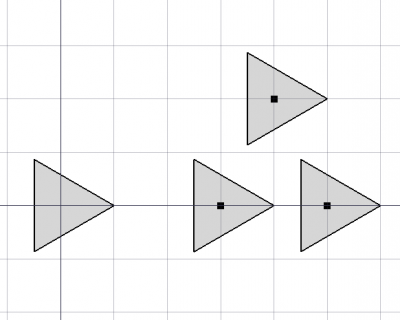
The  Draft PointArray command creates a regular array from a selected object by placing copies at the points from a point object. Use the Draft PointLinkArray command to create a more efficient Link array instead. Except for the type of array that is created, Link array or regular array, the Draft PointLinkArray command is identical to this command.
The object can be a 2D object created with the Draft Workbench or Sketcher Workbench, but also a 3D object such as those created with the Part Workbench, PartDesign Workbench or BIM Workbench.
The point object can be any object with a shape and vertices (including a Std Part containing one or more of such objects), as well as a mesh and a point cloud. Duplicate points in the point object are filtered out.
Draft PointArray
Usage
- Select the object you wish to array.
- Add the point object to the selection.
- There are several ways to invoke the command:
- Press the Point Array button.
- Draft: Select the Modification → Array Tools → Point Array option from the menu.
- BIM: Select the Modify → Point Array option from the menu.
- Press the
- The array is created.
- Optionally change the properties of the array in the Property View.
Notes
- Fused Link arrays are not displayed properly, in the 3D View their elements always appear unfused.
Properties
See also: Property View.
A Draft PointArray object is derived from a Part Feature object and inherits all its properties (with the exception of some View properties that are not inherited by Link arrays). The following properties are additional unless otherwise stated:
Data
Link
The properties in this group are only available for Link arrays. See Std LinkMake for more information.
- DataScale (
Float) - Data (Hidden)Scale Vector (
Vector) - DataScale List (
VectorList) - Data (Hidden)Visibility List (
BoolList) - Data (Hidden)Placement List (
PlacementList) - Data (Hidden)Element List (
LinkList) - Data (Hidden)_ Link Touched (
Bool) - Data (Hidden)_ Child Cache (
LinkList) - Data (Hidden)_ Link Owner (
Integer) - Data (Hidden)Colored Elements (
LinkSubHidden) - DataLink Copy On Change (
Enumeration) - DataLink Transform (
Bool)
Draft
- DataAlways Sync Placement (
Bool)
Objects
- DataBase (
Link): specifies the object to duplicate in the array. - DataCount (
Integer): (read-only) specifies the number of elements in the array. This number is determined by the number of points in the DataPoint Object. - DataExpand Array (
Bool): specifies whether to expand the array in the Tree View to enable the selection of its individual elements. Only available for Link arrays. - DataExtra Placement (
Placement): : specifies an additional placement, translation and rotation, for each element in the array. - DataFuse (
Bool): specifies if overlapping elements in the array are fused or not. introduced in 1.0 - DataPlacement List (
PlacementList): the placement for each element. Appears in the Link group for Link arrays. introduced in 1.1 - DataPoint Object (
Link): specifies the object whose points are used to position the elements in the array.
View
Link
The properties in this group, with the exception of the inherited property, are only available for Link arrays. See Std LinkMake for more information.
- ViewDraw Style (
Enumeration) - ViewLine Width (
FloatConstraint) - ViewOverride Material (
Bool) - ViewPoint Size (
FloatConstraint) - ViewSelectable (
Bool): this is an inherited property that appears in the Selection group for other arrays - ViewShape Material (
Material)
Base
The properties in this group, with the exception of the inherited property, are only available for Link arrays. See Std LinkMake for more information.
- View (Hidden)Child View Provider (
PersistentObject) - View (Hidden)Material List (
MaterialList) - View (Hidden)Override Color List (
ColorList) - View (Hidden)Override Material List (
BoolList) - View (Hidden)Proxy (
PythonObject): this is an inherited property.
Display Options
The properties in this group are inherited properties. See Part Feature for more information.
- ViewBounding Box (
Bool): this property is not inherited by Link arrays. - ViewDisplay Mode (
Enumeration): for Link arrays it can beLinkorChildView. For other arrays it can be:Flat Lines,Shaded,WireframeorPoints - ViewShow In Tree (
Bool) - ViewVisibility (
Bool)
Draft
- ViewPattern (
Enumeration): not used. - ViewPattern Size (
Float): not used.
Object style
The properties in this group are not inherited by Link arrays.
Scripting
See also: Autogenerated API documentation and FreeCAD Scripting Basics.
To create a point array use the make_point_array method (introduced in 0.19) of the Draft module. This method replaces the deprecated makePointArray method.
point_array = make_point_array(base_object, point_object, extra=None, use_link=True)
base_objectis the object to be arrayed. It can also be theLabel(string) of an object in the current document.point_objectis the object containing the points. It can also be theLabel(string) of an object in the current document. It should have aGeometry,Links, orComponentsproperty containing points.extrais anApp.Placement, anApp.Vectoror anApp.Rotationthat displaces each element.- If
use_linkisTruethe created elements are App Links instead of regular copies.
Example:
import FreeCAD as App
import Draft

doc = App.newDocument()

polygon = Draft.make_polygon(3, radius=500.0)

p1 = Draft.make_point(App.Vector(1500, 0, 0))
p2 = Draft.make_point(App.Vector(2500, 0, 0))
p3 = Draft.make_point(App.Vector(2000, 1000, 0))

compound = doc.addObject("Part::Compound", "Compound")
compound.Links = [p1, p2, p3]

point_array = Draft.make_point_array(polygon, compound)
doc.recompute()
This page is retrieved from https://wiki.freecad.org/Draft_PointArray