Introduction

A Part Feature object, or formally a Part::Feature, is a simple element with a topological shape that can be displayed in the 3D View.
The Part Feature is the parent class of most 2D (Draft, Sketcher) and 3D (Part, PartDesign) objects, with the exception of meshes, which are normally based on the Mesh Feature, or the FEM FemMeshObject for FEM objects.
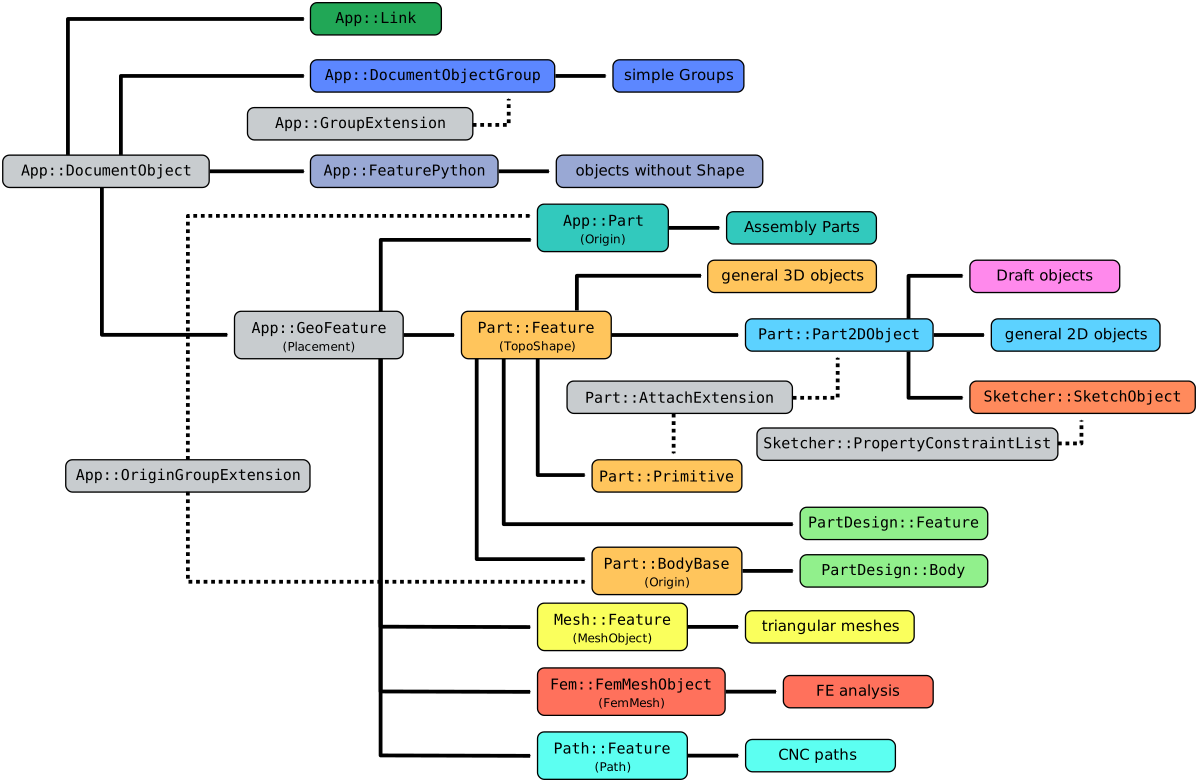
Simplified diagram of the relationships between the core objects in FreeCAD
Usage
The Part Feature is an internal object, so it cannot be created from the graphical interface, only from the Python Console as described in the Scripting section.
The Part::Feature is defined in the Part Workbench but can be used as the base class for scripted objects in all workbenches that produce 2D and 3D geometrical shapes. Essentially all objects produced in the Part Workbench are instances of a Part::Feature.
Part::Feature is also the parent class of the PartDesign Body, of the PartDesign Features, and of the Part Part2DObject, which is specialized for 2D (planar) shapes.
Workbenches can add more properties to this basic element to produce an object with complex behavior.
Properties
See Property for all property types that scripted objects can have.
The Part Feature (Part::Feature class) is derived from the basic App GeoFeature (App::GeoFeature class) and inherits all its properties. It also has several additional properties. Notably a DataShape property, which stores the Part TopoShape of the object. This is the geometry that is shown in the 3D View. Other properties that this object has are those related to the appearance of its TopoShape.
These are the properties available in the Property View. Hidden properties can be shown by using the Show hidden command in the context menu of the Property View.
Data
Base
- Data (Hidden)Proxy (
PythonObject): a custom class associated with this object. This only exists for the Python version. See Scripting. - Data (Hidden)Shape (
PartShape): a Part TopoShape associated with this object. - DataShape Material (
Material): the material of the object. - DataPlacement (
Placement): the position of the object. The placement is defined by aBasepoint (vector), and aRotation(axis and angle). See Placement.- Angle: the angle of rotation around the DataAxis. By default, it is
0°(zero degrees). - Axis: the unit vector that defines the axis of rotation for the placement. Each component is a floating point value between
0and1. If any value is above1, the vector is normalized so that the magnitude of the vector is1. By default, it is the positive Z-axis,(0, 0, 1). - Position: a vector with the 3D coordinates of the base point. By default, it is the origin
(0, 0, 0).
- Angle: the angle of rotation around the DataAxis. By default, it is
- Data (Hidden)_ Element Map Version (
String): TBD. introduced in 1.1 - DataLabel (
String): the user editable name of this object, it is an arbitrary UTF8 string. - Data (Hidden)Label2 (
String): a longer, user editable description of this object, it is an arbitrary UTF8 string that may include newlines. By default, it is an empty string"". - Data (Hidden)Expression Engine (
ExpressionEngine): a list of expressions. By default, it is empty[]. - Data (Hidden)Visibility (
Bool): whether to display the object or not.
View
Most objects in FreeCAD have what is called a "viewprovider", which is a class that defines the visual appearance of the object in the 3D View, and in the Tree View. The default viewprovider of Part Feature objects defines the following properties. Scripted objects that are derived from Part Feature will have access to these properties as well.
Base
- View (hidden)Proxy (
PythonObject): a custom viewprovider class associated with this object. This only exists for the Python version. See Scripting. - View (Hidden)Transform Origin (
Placement): stores the origin used by Std TransformManip. introduced in 1.1
Display Options
- ViewBounding Box (
Bool): if true the object will show the bounding box in the 3D View. - ViewDisplay Mode (
Enumeration):Flat Lines(regular visualization),Shaded(no edges),Wireframe(no faces),Points(only vertices). - ViewShow In Tree (
Bool): if true the object will appear in the Tree View; otherwise, the object will be hidden in the Tree View. Once an object in the tree is invisible, you can see it again by opening the context menu over the name of the document (right-click), and selecting Show items hidden in Tree View. Then the hidden item can be chosen and ViewShow In Tree can be switched back to
 true. - ViewShow Placement (
Bool): if true a coordinate system indicating the DataPlacement of the object is shown. introduced in 1.1 - ViewVisibility (
Bool): if true the object appears in the 3D View; otherwise it is invisible. By default this property can be toggled on and off by pressing the Space bar.
Object style
- ViewAngular Deflection (
Angle): it is a companion to ViewDeviation. It is another way to specify how finely to generate the mesh for rendering on screen or when exporting. The default value is28.5 degrees, or0.5 radians. This is the maximum value, the smaller the value the smoother the appearance will be, and the finer the mesh that will be exported. - ViewDeviation (
FloatConstraint): it is a companion to ViewAngular Deflection. It is another way to specify how finely to generate the mesh for rendering on screen or when exporting. The default value is0.5%. This is the maximum value, the smaller the value the smoother the appearance will be, and the finer the mesh that will be exported. - ViewDraw Style (
Enumeration):Solid(default),Dashed,Dotted,Dashdot; defines the style of the edges. - ViewLighting (
Enumeration):Two side(default),One side; the illumination comes from two sides or one side in the 3D View. - ViewLine Color (
Color): a tuple of four floating point RGBA values to define the color of the edges. - View (hidden)Line Color Array (
ColorList): it is a list of RGBA tuples defining colors, similar to ViewLine Color. - View (hidden)Line Material (
Material): an App Material associated with the edges in this object. By default it is empty. - ViewLine Width (
FloatConstraint): a float that determines the width in pixels of the edges.
- ViewPoint Color (
Color): similar to ViewLine Color, defines the color of the vertices. - View (hidden)Point Color Array (
ColorList): it is a list of RGBA tuples defining colors, similar to ViewPoint Color. - View (hidden)Point Material (
Material): an App Material associated with the vertices in this object. By default it is empty. - ViewPoint Size (
FloatConstraint): similar to ViewLine Width, defines the size of the vertices. - ViewShape Appearance (
MaterialList): a list of App Materials defining the appearance of the object. By default the list contains a single item which is then used for all faces of the object. Alternatively it can contain a separate App Material for each face. See Part ColorPerFace. Only the first App Material is shown in the Property View. Editing it will result in a list with a single item. An App Material has the following properties:- Diffuse Color: see here for an explanation of this and the next colors.
- Ambient Color
- Specular Color
- Emissive Color
- Shininess
- Transparency
- ViewTransparency (
Percent): an integer from0to100that determines the level of transparency of the faces. A value of100indicates completely invisible faces; the faces are invisible but they can still be picked as long as ViewSelectable istrue. Changing this property will also change the ViewShape Appearance list of the object. The resulting list will contain a single item.
Selection
- ViewOn Top When Selected (
Enumeration): it controls the way in which the selection occurs in the 3D View if the object has a Shape, and there are many objects partially covered by others. It defaults toDisabled, meaning that no special highlighting will occur;Enabledmeans that the object will appear on top of any other object when selected;Objectmeans that the object will appear on top only if the entire object is selected in the Tree View;Elementmeans that the object will appear on top only if a subelement (vertex, edge, face) is selected in the 3D View. - ViewSelectable (
Bool): if true the object can be picked with the pointer in the 3D View. Otherwise, the object can only be selected in the Tree View. - ViewSelection Style (
Enumeration): it controls the way the object is highlighted. If it isShape, the entire shape (vertices, edges, and faces) will be highlighted in the 3D View; if it isBoundBoxa bounding box will appear surrounding the object and will be highlighted.
Angular deflection and deviation
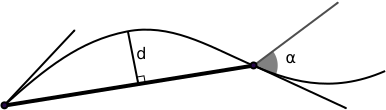
Angular Deflection and deviation parameters; d < linear deflection, α < angular deflection.
The deviation is a value in percentage that is related to the dimensions in millimeters of the bounding box of the object. The deviation in millimeters can be calculated as follows:
deviation_in_mm = (w + h + d)/3 * deviation/100
where w, h, d are the bounding box dimensions.
Scripting
See also: FreeCAD Scripting Basics and scripted objects.
A Part Feature is created with the addObject() method of the document.
import FreeCAD as App

doc = App.newDocument()
obj = App.ActiveDocument.addObject("Part::Feature", "Name")
obj.Label = "Custom label"
For Python subclassing, you should create a Part::FeaturePython object.
import FreeCAD as App

doc = App.newDocument()
obj = App.ActiveDocument.addObject("Part::FeaturePython", "Name")
obj.Label = "Custom label"
Name
See also: Object name for more information on the properties of the Name.
The addObject method has two basic string arguments.
- The first argument indicates the type of object, in this case,
"Part::FeaturePython". - The second argument is a string that defines the
Nameattribute. If it is not provided, it defaults to the same name as the class, that is,"Part__FeaturePython". TheNamecan only include simple alphanumeric characters, and the underscore,[_0-9a-zA-Z]. If other symbols are given, these will be converted to underscores; for example,"A+B:C*"is converted to"A_B_C_".
Label
If desired, the Label attribute can be changed to a more meaningful text.
- The
Labelcan accept any UTF8 string, including accents and spaces. Since the Tree View displays theLabel, it is a good practice to change theLabelto a more descriptive string. - By default the
Labelis unique, just like theName. However, this behavior can be changed in the preferences editor, Edit → Preferences → General → Document → Allow duplicate object labels in one document. This means that in general theLabelmay be repeated in the same document; when testing for a specific element the user should rely on theNamerather than on theLabel.
This page is retrieved from https://wiki.freecad.org/Part_Feature