Introduction

A Part Part2DObject, or formally a Part::Part2DObject, is a simple element with a topological shape that can be displayed in the 3D View.
The Part::Part2DObject is derived from the Part Feature, but is specialized for 2D geometry, given that its shape will lie on a plane. This plane is defined by its DataPlacement property (position, normal, and rotation). However, the plane can also be defined by supporting geometrical elements, such as the plane created by three arbitrary vertices, or a face of a solid body.
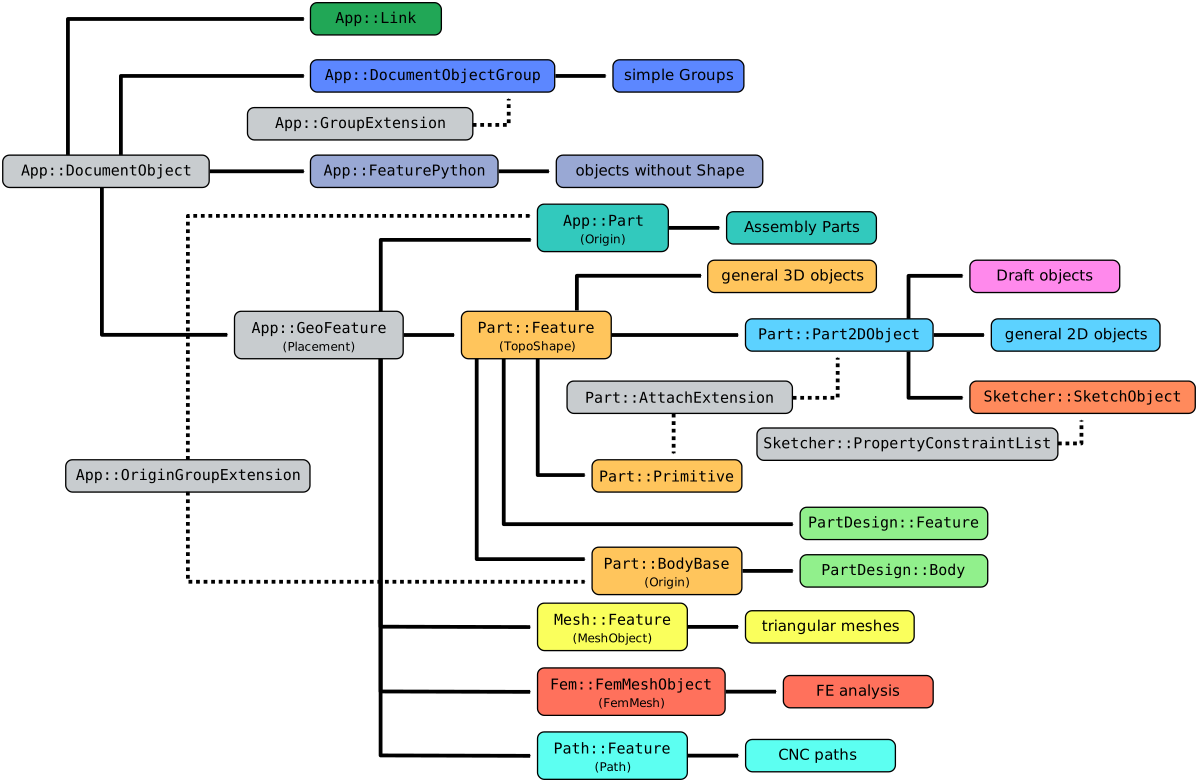
Simplified diagram of the relationships between the core objects in FreeCAD
Usage
The Part Part2DObject is an internal object, so it cannot be created from the graphical interface, only from the Python Console as described in the Scripting section.
The Part::Part2DObject is defined in the Part Workbench but can be used as the base class for scripted objects in all workbenches that produce 2D geometrical shapes. For example, it is the base object for sketches (Sketcher SketchObject), and for most objects created with the Draft Workbench.
Workbenches can add more properties to this basic element to produce an object with complex behavior.
Properties
See Property for all property types that scripted objects can have.
The Part Part2DObject (Part::Part2DObject class) is derived from the Part Feature (Part::Feature class) and inherits all its properties.
The Part Part2DObject also has the following additional properties in the Property View. Hidden properties can be shown by using the Show hidden command in the context menu of the Property View.
Data
Attachment
- Data (Hidden, ReadOnly)Attacher Type (
String): class name of the attach engine object driving the attachment. - DataAttacher Engine (
Enumeration): attach engine object driving the attachment. - DataAttachment Support (
LinkSubList): the other (sub)objects supporting this object. It defaults to an empty list[]. - DataMap Mode (
Enumeration): mode of attachment to the other (sub)objects. See Part EditAttachment. - DataMap Reversed (
Bool): if true the Z-direction will be reversed. For example, a sketch will be flipped upside down. Hidden if DataMap Mode isDeactivated. - DataMap Path Parameter (
Float): sets the point of curve to map this object to. It goes from0to1, which corresponds to thestartandend. It defaults to0. Hidden if not applicable. - DataAttachment Offset (
Placement): extra placement to apply in addition to attachment (in local coordinates). Hidden if DataMap Mode isDeactivated.
View
Display Options
- ViewShow Plane (
Bool): if true a plane indicating the XY-plane of the DataPlacement of the object is shown. introduced in 1.1
Scripting
See also: FreeCAD Scripting Basics and scripted objects.
See Part Feature for the general information on adding objects to the document.
A Part2DObject is created with the addObject() method of the document.
import FreeCAD as App

doc = App.newDocument()
obj = App.ActiveDocument.addObject("Part::Part2DObject", "Name")
obj.Label = "Custom label"
For Python subclassing you should create a Part::Part2DObjectPython object.
import FreeCAD as App

doc = App.newDocument()
obj = App.ActiveDocument.addObject("Part::Part2DObjectPython", "Name")
obj.Label = "Custom label"
This page is retrieved from https://wiki.freecad.org/Part_Part2DObject