Introduction

A Sketcher SketchObject, or formally a Sketcher::SketchObject, is the base element to create 2D objects with the Sketcher Workbench.
The Sketcher::SketchObject is derived from the Part Part2DObject, which means it is a Part Feature object specialized for 2D geometry. Like the Part2DObject, the SketchObject can be attached to planes and faces. In addition, the SketchObject can handle geometrical constraints.
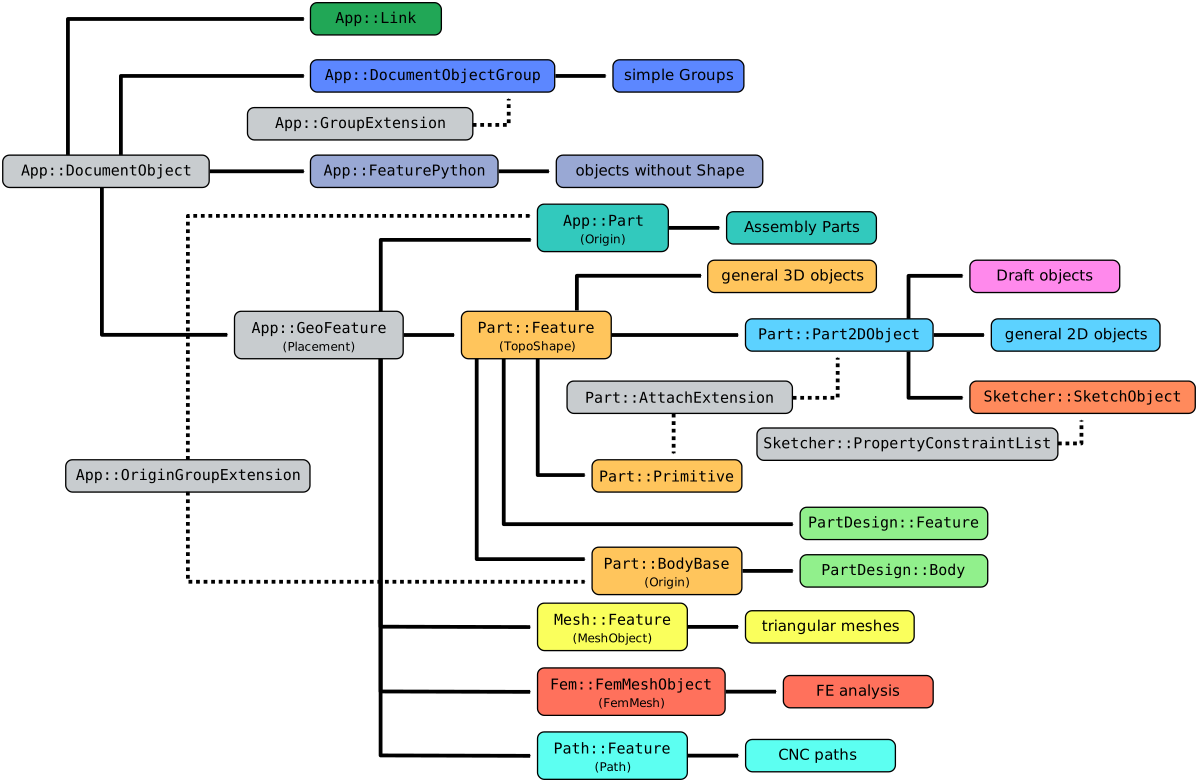
Simplified diagram of the relationships between the core objects in FreeCAD
Usage
See Sketcher NewSketch.
Properties
See Property for all property types that scripted objects can have.
The Sketcher SketchObject (Sketcher::SketchObject class) is derived from the Part Part2DObject (Part::Part2DObject class) and inherits all its properties.
The Sketcher SketchObject also has the following additional properties in the Property View. Hidden properties can be shown by using the Show hidden command in the context menu of the Property View.
Data
Base
- Data (Hidden)Internal Shape (
PartShape): TBD.
Internal Geometry
- DataMake Internals (
Bool): if true intersecting edges are split (does not seem to work).
Sketch
- Data (Hidden)Geometry (
GeometryList): a list of Part geometries that exist inside the sketch. - DataConstraints: named constraints, if they exist; otherwise it is an empty list
[]. - Data (ReadOnly)External Geometry (
LinkSubList): a list of Part geometries outside this Sketch that are used for reference. - Data (Hidden)External Types (
IntegerList): sketch external geometry type:0(projection),1(intersection) or2(both). introduced in 1.1 - Data (Hidden, ReadOnly)Fully Constrained (
Bool): if true the sketch is fully constrained. - Data (Hidden)Exports (
LinkListHidden): sketch export geometry. - Data (Hidden)External Geo (
GeometryList): sketch external geometry. - DataArc Fit Tolerance (
Precision): tolerance for fitting arcs of projected external geometry.
View
Auto Constraints
- ViewAutoconstraints (
Bool): if true constraints are automatically added when geometry is drawn. - ViewAvoid Redundant (
Bool): if true redundant auto-constraints are avoided.
Grid
- ViewGrid Auto (
Bool): if true the grid is resized based on the boundingbox of the geometry of the sketch. - ViewGrid Size (
Length): the size of the spacing of the local grid lines in the 3D View; it defaults to10 mm. - ViewShow Grid (
Bool): if true a grid local to the object will be displayed in the 3D View. This grid is independent of the Draft Grid.
Layers
- ViewVisual Layer List (
BadType):
Object Style
- ViewAuto Color (
Bool): if true the object will be colored based on user preferences, introduced in 1.1: the ViewLine Color, ViewPoint Color and ViewShape Appearance properties are then hidden in the Property View. Set tofalseto specify colors explicitly.
Visibility automation
- ViewEditing Workbench (
String): name of the workbench to activate when editing the sketch; it defaults toSketcherWorkbench. - ViewForce Ortho (
Bool): if true the camera will be forced to orthographic view mode when the sketch is opened. - ViewHide Dependent (
Bool): if true all objects that depend on the sketch are hidden when the sketch is opened. - ViewRestore Camera (
Bool): if true the camera position is saved before opening the sketch, and is restored after closing it. - ViewSection View (
Bool): if true only (parts of) objects behind the sketch plane are visible while the sketch is being edited. - ViewShow Links (
Bool): if true all objects used in links to external geometry are shown when the sketch is opened. - ViewShow Support (
Bool): if true all objects this sketch is attached to are shown when the sketch is opened. - View (Hidden)Tempo Vis (
PythonObject): a custom class associated with this object, that handles hiding and showing other objects when opening and closing the sketch.
Scripting
See also: FreeCAD Scripting Basics and scripted objects.
See Part Feature for the general information on adding objects to the document.
A SketchObject is created with the addObject() method of the document.
import FreeCAD as App

doc = App.newDocument()
obj = App.ActiveDocument.addObject("Sketcher::SketchObject", "Sketch")
obj.Label = "Custom label"
For Python subclassing you should create the Sketcher::SketchObjectPython object.
import FreeCAD as App

doc = App.newDocument()
obj = App.ActiveDocument.addObject("Sketcher::SketchObjectPython", "CustomSketch")
obj.Label = "Custom label"
This page is retrieved from https://wiki.freecad.org/Sketcher_SketchObject