Introduzione

Un Part Part2DObject, o formalmente un Part::Part2DObject, è un elemento semplice con una forma topologica che può essere visualizzato nella Vista 3D.
Part::Part2DObject è derivato dalla Part Feature, ma è specializzato nella geometria 2D, dato che la sua forma è posizionata su un piano. Il piano è definito dalla sua proprietà DatiPlacement (posizione, normale e rotazione). Tuttavia, il piano può anche essere definito supportando elementi geometrici, come il piano creato da tre vertici arbitrari o una faccia di un corpo solido.
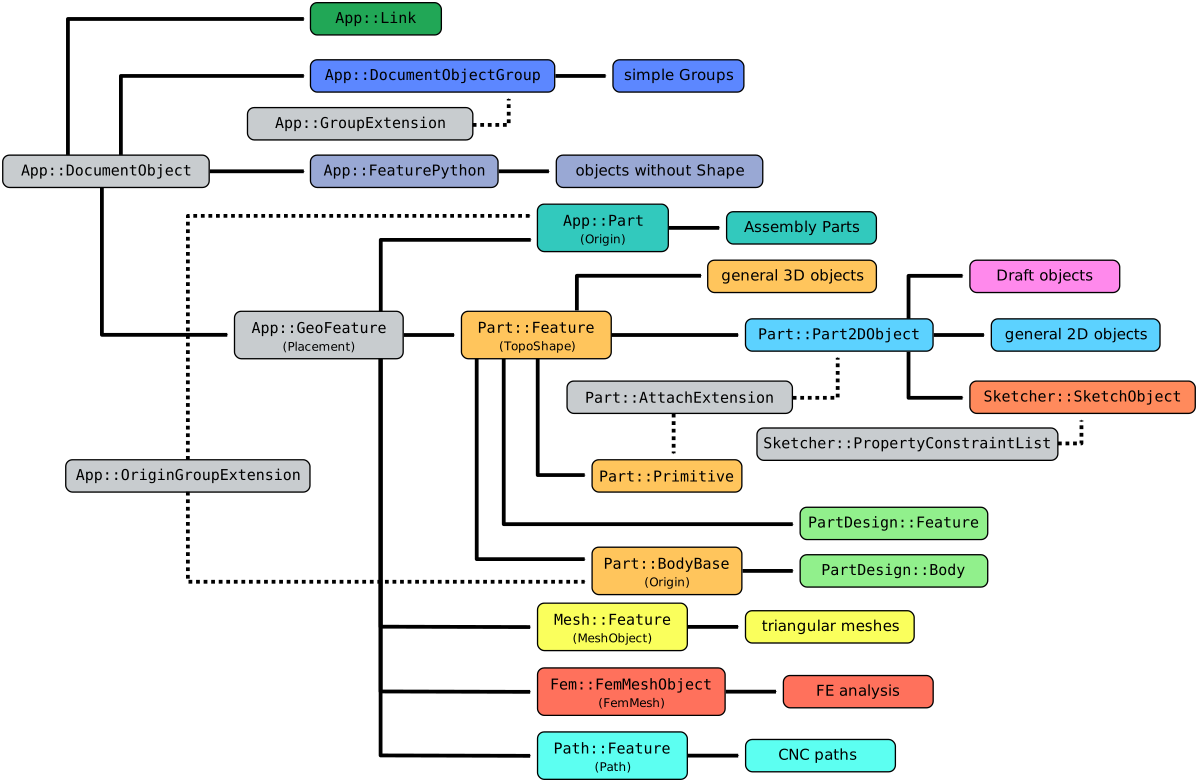
Diagramma semplificato delle relazioni tra gli oggetti principali in FreeCAD
Utilizzo
Part Part2DObject è un oggetto interno, quindi non può essere creato dall'interfaccia grafica, ma solo dalla console Python come descritto nel paragrafo Scripting.
Part::Part2DObject è definito nell'ambiente Part ma può essere usato come classe base per gli oggetti da script in tutti gli [[Workbenches/it|ambienti] ] che producono forme geometriche 2D. Ad esempio, è l'oggetto base per gli (Sketcher SketchObject) degli schizzi e per la maggior parte degli oggetti creati con Draft.
I workbench possono aggiungere diverse proprietà a questo elemento di base per produrre un oggetto con comportamento complesso.
Proprietà
Vedere Proprietà per tutti i tipi di proprietà che possono avere gli oggetti con script.
Il Part Part2DObject (classe Part::Part2DObject) è derivato da Part Feature (classe Part::Feature) e ne eredita tutte le proprietà.
Il Part Part2DObject ha anche le seguenti proprietà aggiuntive nell'editor delle proprietà. Le proprietà nascoste possono essere visualizzate utilizzando il comando Mostra nascoste nel menu contestuale dell'editor delle proprietà.
Dati
Attachment
- Dati (Hidden)Attacher Type (
String): nome della classe dell'oggetto motore di collegamento che guida l'allegato. Il valore predefinito èAttacher::AttachEnginePlane. - DatiSupport (
LinkSubList): è il piano o la faccia che supporta la geometria 2D. Il valore predefinito è un elenco vuoto[]. - DatiMap Mode (
Enumeration):Deactivatedper impostazione predefinita. Questa proprietà determina un piano che l'oggetto utilizzerà come riferimento per la geometria 2D. Cliccando sui puntini di sospensione ... (tre punti), a destra del campo di immissione si avvia il comando Part EditAttachment che consente di selezionare il piano di appoggio selezionando diversi elementi nella Vista 3D. Le diverse modalità sono:Deactivated,Translate origin,Object's XY,Object's XZ,Object's YZ,Plane face,Tangent to surface,Normal to edge,Frenet NB,Frenet TN,Frenet TB,Concentric,Revolution section,Plane by 3 points,Normal to 3 points,Folding,Inertia 2-3,Align O-N-X,Align O-N-Y,Align O-X-Y,Align O-X-N,Align O-Y-N,Align O-Y-X. - DatiMap Reversed (
Bool): il valore predefinito èfalse; se ètruela direzione Z verrà invertita. Ad esempio, uno schizzo verrà capovolto. Nascosto se DatiMap Mode èDeactivated. - Dati (Hidden)Map Path Parameter (
Float): imposta il punto della curva su cui mappare uno schizzo. Va da0a1, che corrisponde astarteend. Il valore predefinito è0. - DatiAttachment Offset (
Placement): la posizione dell'oggetto nella vista 3D, rispetto al posizionamento dell'oggetto allegato. Il posizionamento è definito da un puntoBase(vettore) e da unaRotazione(asse e angolo). Vedi Posizionamento. Nascosto se DatiMap Mode èDeactivated.
View
Display Options
- VistaShow Plane (
Bool): if true a plane indicating the XY-plane of the DatiPlacement of the object is shown. introduced in 1.1
Script
Vedere anche: Script di base per FreeCAD, e script di oggetti.
Vedere Part Feature per le informazioni generali sull'aggiunta di oggetti al documento..
Un Part2DObject viene creato con il metodo addObject() del documento.
import FreeCAD as App

doc = App.newDocument()
obj = App.ActiveDocument.addObject("Part::Part2DObject", "Name")
obj.Label = "Custom label"
Per la sottoclasse Python, è necessario creare un oggetto Part::Part2DObjectPython.
import FreeCAD as App

doc = App.newDocument()
obj = App.ActiveDocument.addObject("Part::Part2DObjectPython", "Name")
obj.Label = "Custom label"
Questa pagina è recuperata da https://wiki.freecad.org/Part_Part2DObject