Introduction

An App GeoFeature object, or formally an App::GeoFeature, is the base class of most objects that will display geometrical elements in the 3D View because it includes a DataPlacement property.
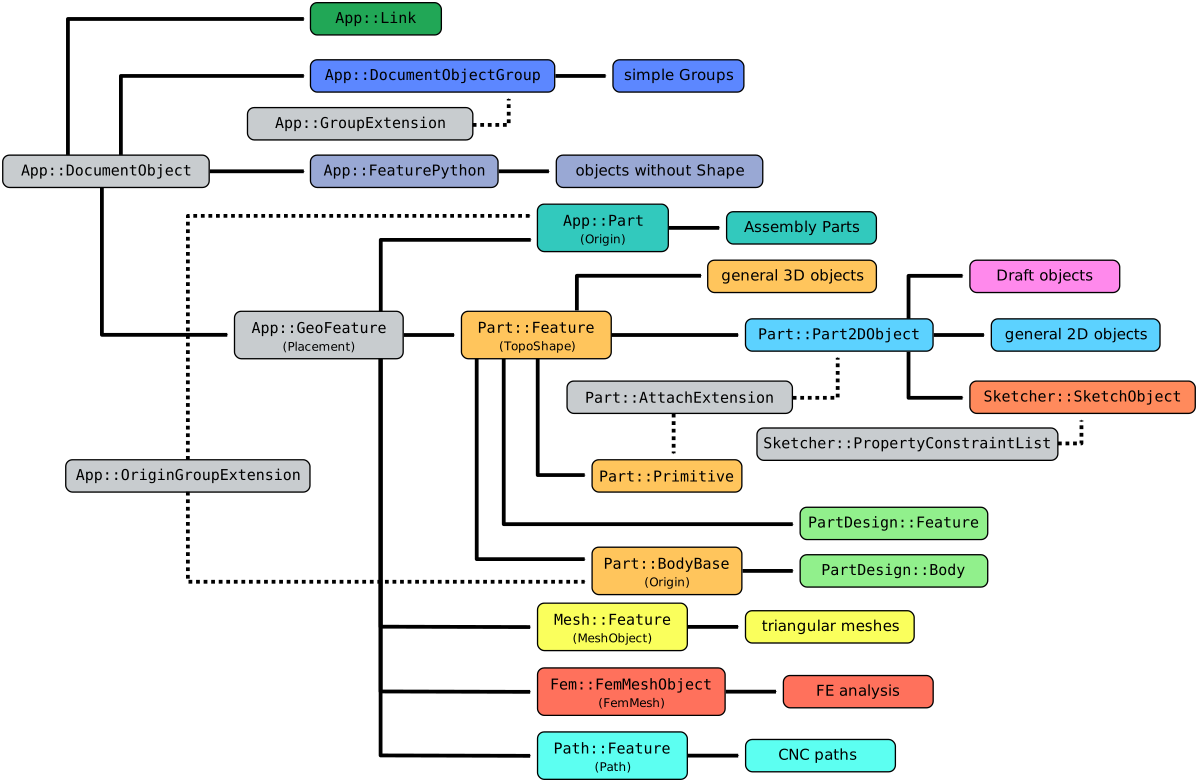
Simplified diagram of the relationships between the core objects in FreeCAD
Usage
The App GeoFeature is an internal object, so it cannot be created from the graphical interface. It is generally not meant to be used directly, rather it can be sub-classed to get a bare-bones object that only has a basic DataPlacement property to define its position in the 3D View.
Some of the most important derived objects are the following:
- The Part Feature class, the parent of most objects with 2D and 3D topological shapes.
- The Mesh Feature class, the parent of most objects made from meshes, not solids.
- The Fem FemMeshObject class, the parent of finite element meshes created with the FEM Workbench.
- The Path Feature and Path FeaturePython classes, the parents of objects created with the CAM Workbench for use in CNC machining.
- The App Part class, which defines Std Parts that can be used as containers of bodies to perform assemblies.
When creating this object in Python, instead of sub-classing App::GeoFeature, you should sub-class App::GeometryPython because the latter includes a default view provider, and Proxy attributes for the object itself, and its view provider. See Scripting.
Properties App GeoFeature
See Property for all property types that scripted objects can have.
The App GeoFeature (App::GeoFeature class) is derived from the basic App DocumentObject (App::DocumentObject class) and inherits all its properties. In addition it has a DataPlacement property, which controls its position in the 3D View.
Properties App GeometryPython
See Property for all property types that scripted objects can have.
The App GeometryPython (App::GeometryPython class) is derived from the basic App GeoFeature (App::GeoFeature class) and inherits all its properties. It also has several additional properties.
These are the properties available in the Property View. Hidden properties can be shown by using the Show hidden command in the context menu of the Property View.
See Part Feature for an explanation of the properties listed below.
Data
Base
- Data (Hidden)Proxy (
PythonObject) - DataPlacement (
Placement) - Data (Hidden)_ Element Map Version (
String) - DataLabel (
String) - Data (Hidden)Label2 (
String) - Data (Hidden)Expression Engine (
ExpressionEngine) - Data (Hidden)Visibility (
Bool)
View
Base
- View (Hidden)Proxy (
PythonObject) - View (Hidden)Transform Origin (
Placement)
Display Options
- ViewBounding Box (
Bool) - ViewDisplay Mode (
Enumeration) - ViewShow In Tree (
Bool) - ViewVisibility (
Bool)
Object Style
- ViewShape Appearance (
MaterialList) - ViewTransparency (
Percent)
Selection
- ViewOn Top When Selected (
Enumeration) - ViewSelectable (
Bool) - ViewSelection Style (
Enumeration)
Scripting
See also: FreeCAD Scripting Basics and scripted objects.
See Part Feature for the general information on adding objects to the document.
A GeoFeature is created with the addObject() method of the document. If you would like to create an object with a 2D or 3D topological shape, it may be better to create one of the sub-classes specialized for handling shapes, for example Part Feature or Part Part2DObject.
import FreeCAD as App

doc = App.newDocument()
obj = App.ActiveDocument.addObject("App::GeoFeature", "Name")
obj.Label = "Custom label"
For Python subclassing you should create the App::GeometryPython object.
import FreeCAD as App

doc = App.newDocument()
obj = App.ActiveDocument.addObject("App::GeometryPython", "Name")
obj.Label = "Custom label"
This page is retrieved from https://wiki.freecad.org/App_GeoFeature