


Introduction
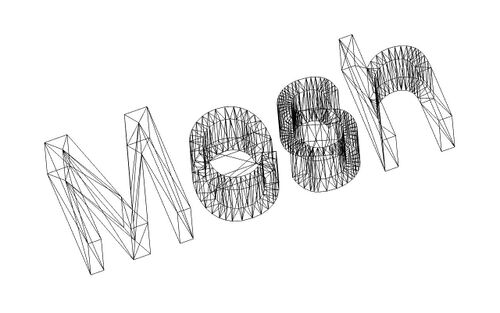
The Mesh Workbench handles triangle meshes. Meshes are a special type of 3D object, composed of triangular faces connected by their vertices and edges.
Many 3D applications, like Sketchup, Blender, Maya and 3D Studio Max, use meshes as their primary type of 3D object. Since meshes are very simple objects, containing only vertices (points), edges and triangular faces, they are very easy to create, modify, subdivide, stretch, and can easily be passed from one application to another without any loss of details. In addition, since meshes contain very simple data, 3D applications can usually manage very large quantities of them without using a lot of resources. For these reasons, meshes are often the 3D object type of choice for applications dealing with movies, animation, and image creation.
However, in the field of engineering meshes present a big limitation: they cannot accurately define curved surfaces. This is why FreeCAD relies on Brep instead. The Mesh Workbench offers some commands to directly manipulate meshes, but it is most often used to import 3D mesh data and convert it to a solid for use with the  Part Workbench or
  PartDesign Workbench.
Tools
All Mesh Workbench tools can be accessed from the Meshes menu. Almost all are also available in one of the Mesh toolbars.
 Import Mesh…: Imports a mesh object from a file.
 Export Mesh…: Exports a mesh object to a file.
 Mesh From Shape: Creates mesh objects from shape objects.
 Refinement: Remeshes a mesh object.
- Analyze
 Evaluate and Repair: Evaluates and repairs a mesh object.
 Face Info: Shows information about faces of mesh objects.
 Curvature Info: Shows the absolute curvature of curvature objects at selected points.
 Evaluate Solid: Checks if a mesh object is solid.
 Bounding Box Info: Shows the bounding box coordinates of a mesh object.
 Curvature Plot: Creates Mesh Curvature objects for mesh objects.
 Harmonize Normals: Harmonizes the normals of mesh objects.
 Flip Normals: Flips the normals of mesh objects.
 Fill Holes: Fills holes in mesh objects.
 Close Holes: Fills selected holes in mesh objects.
 Add Triangle: Adds faces along a boundary of an open mesh object.
 Remove Components: Removes faces from mesh objects.
 Remove Components Manually: Removes components by hand from mesh objects.
 Segmentation: Creates separate mesh segments for specified surface types of a mesh object.
 Segmentation From Best-Fit Surfaces: Creates separate mesh segments for specified surface types of a mesh object, and can identify their parameters.
 Smooth: Smooths mesh objects.
 Decimate: Reduces the number of faces in mesh objects.
 Scale: Scales mesh objects.
 Regular Solid: Creates a regular parametric solid mesh object.
- Boolean
 Union: Creates a mesh object that is the union of two mesh objects.
 Intersection: Creates a mesh object that is the intersection of two mesh objects.
 Difference: Creates a mesh object that is the difference of two mesh objects.
- Cutting
 Cut: Cuts whole faces from mesh objects.
 Trim: Trims faces and parts of faces from mesh objects.
 Trim With Plane: Trims faces and parts of faces on one side of a plane from a mesh object.
 Section From Plane: Creates a cross section across a mesh object.
 Cross-Sections: Creates multiple cross sections across mesh objects.
 Merge: Creates a mesh object by combining the meshes of two or more mesh objects.
 Split by Components: Splits a mesh object into its components.
 Unwrap Mesh: Creates a flat representation of a mesh object.
 Unwrap Face: Creates a flat representation of a face of a shape object.
Preferences
There are some export preferences related to Mesh Formats but these are not used by commands belonging to this workbench. They are used by the Std Export command.
Mesh Workbench preferences can be found in the following groups in the Preferences Editor:
 Display: On the Mesh View page several preferences can be set.
 OpenSCAD: The Mesh Union, Mesh Intersection and Mesh Difference commands require OpenSCAD and use the OpenSCAD executable preference to find its executable.
Notes
- More mesh tools are available in the
 OpenSCAD Workbench.
 - See Mesh Generation for detailed information on creating meshes using the GUI.
- See Mesh Scripting to manipulate and create meshes using Python.
- See also FreeCAD and Mesh Import
- See Asymptote to export meshes to the Asymptote format.
This page is retrieved from https://wiki.freecad.org/Mesh_Workbench