


Introduction
Introducere
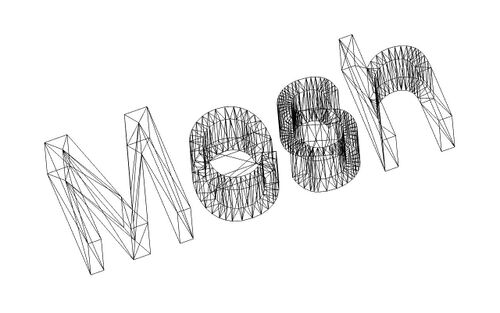
Atelierul Plase Mesh Workbench se ocupă de mesh triangle. Plasele/Mesh-urile sunt un tip special de obiect 3D, compuse din fațete triunghiulare legate de marginile lor și de colțurile lor (numite și vârfuri).
Multe aplicații 3D utilizează ochiurile de plasă ca tip principal de obiect 3D, cum ar fi sketchup, Blender , Maya sau 3D Studio Max, utilizează plase ca primă alegere de elecție. Deoarece plasele sunt obiecte foarte simple, conținând numai vârfuri (puncte), muchii și fațete (triunghiulare), ele sunt foarte ușor de creat, modificat, subdivizat, întins și ușor de trecut de la o aplicație la alta fără nici o pierdere. În plus, deoarece conțin date foarte simple, aplicațiile 3D pot gestiona, de obicei, cantități foarte mari din acestea fără nici o problemă. Din aceste motive, plasele sunt adesea tipul de obiect 3D preferat pentru aplicații care se ocupă cu filmele, animația și crearea imaginilor.
Cu toate acestea, în domeniul rețelelor de inginerie există o mare limitare: ele sunt doar realizate din suprafețe și nu au informații despre masă, deci nu se comportă ca solide. Aceasta înseamnă că toate operațiunile de bază pentru solide, cum ar fi adunarea sau scăderea, sunt dificil de realizat pe ochiuri de plasă. Mesh Workbench este util să importați date 3D în format de plase, să le analizați, să detectați erorile și, în final, să le convertiți într-un solid, pentru a fi utilizate cu Part Workbench.
Instrumente
Modulul de plase are în prezent o interfață foarte simplă, toate funcțiile sale fiind grupate în intrarea din meniul Mesh
 Import Mesh…: Imports a mesh object from a file.
 Export Mesh…: Exports a mesh object to a file.
 Mesh From Shape: Creates mesh objects from shape objects.
 Refinement: Remeshes a mesh object.
Analiza
- Analizează curbura, fațetele și verifică dacă o plasă poate fi convertită într-un solid
- Evaluate & Repair mesh...: Evaluează și repară plase
 Face Info: Dă informații despre fațete
- Curvature Info: Dă informații despre curbură
- Check solid mesh: Verifică dacă un solid poate fi convertit într-o plasă
- Boundings info...: Evaluează paralelipipedul de încadrare al unei plase
 Curvature Plot: Creates Mesh Curvature objects for mesh objects.
 Harmonize Normals: Harmonizes the normals of mesh objects.
 Flip Normals: Flips the normals of mesh objects.
 Fill Holes: Fills holes in mesh objects.
 Close Holes: Fills selected holes in mesh objects.
 Add Triangle: Adds faces along a boundary of an open mesh object.
 Remove Components: Removes faces from mesh objects.
 Remove Components Manually: Removes components by hand from mesh objects.
 Segmentation: Creates separate mesh segments for specified surface types of a mesh object.
 Segmentation From Best-Fit Surfaces: Creates separate mesh segments for specified surface types of a mesh object, and can identify their parameters.
 Smooth: Smooths mesh objects.
 Decimate: Reduces the number of faces in mesh objects.
 Scale: Scales mesh objects.
 Regular Solid: Creates a regular parametric solid mesh object.
Boolean
- Union: Realizează o uniune/fuziun e cu plase
- Intersection: Realizează o intersecție/common de plase
- Difference: Realizează o diferență/cut de plase
- Cutting
 Cut mesh: Cuts whole faces from mesh objects.
 Trim mesh: Trims faces and parts of faces from mesh objects.
 Trim mesh with a plane: Trims faces and parts of faces on one side of a plane from a mesh object.
 Create section from mesh and plane: Creates a cross section across a mesh object.
 Cross-sections...: Creates multiple cross sections across mesh objects. introduced in 0.19
 Merge: Creates a mesh object by combining the meshes of two or more mesh objects.
 Split by Components: Splits a mesh object into its components.
 Unwrap Mesh: Creates a flat representation of a mesh object.
 Unwrap Face: Creates a flat representation of a face of a shape object.
Preferences
There are some export preferences related to Mesh Formats but these are not used by commands belonging to this workbench. They are used by the Std Export command.
Mesh Workbench preferences can be found in the following groups in the Preferences Editor:
 Display: On the Mesh View page several preferences can be set.
 OpenSCAD: The Mesh Union, Mesh Intersection and Mesh Difference commands require OpenSCAD and use the OpenSCAD executable preference to find its executable.
Legături
Această pagină este preluată de la https://wiki.freecad.org/Mesh_Workbench