


|
|
| Umístění Menu |
|---|
| Draft -> Polygon |
| Pracovní stoly |
| Kreslení, Architektura |
| Výchozí zástupce |
| P G |
| Představen ve verzi |
| - |
| Viz také |
| Nikdo |

Description
Popis
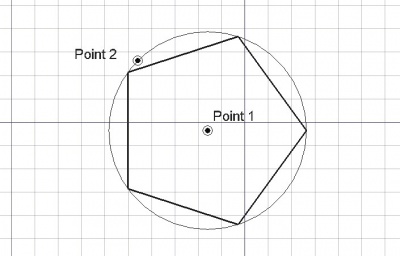
Nástroj Mnohoúhelník vytváří pravidelný mnohoúhelník zadáním 2 bodů, střed a druhý bod definující poloměr. Použije se tloušťka čáry a barva předem zadaná v záložce Nástrojů.
A Draft Polygon can be switched from inscribed to circumscribed by changing its ÚdajeDraw Mode property. The corners of a Draft Polygon can be filleted (rounded) or chamfered by changing its ÚdajeFillet Radius or ÚdajeChamfer Size respectively.
Usage
See also: Draft Tray, Draft Snap and Draft Constrain.
Použití
- Stiskněte tlačítko
 Mnohoúhelník nebo klávesy P a potom G
 - Klikněte na první bod ve 3D pohledu nebo zadejte jeho souřadnice pro určení středu
- V dialogovém okně voleb zadejte počet stran,
- Klikněte na další bod ve 3D pohledu nebo zadejte hodnotu definující poloměr mnohoúhelníku. Mnohoúhelník je také povrchem, i když se jeví jako drátový model.
Options
The single character keyboard shortcuts available in the task panel can be changed. See Draft Preferences. The shortcuts mentioned here are the default shortcuts.
Volby
- Pro zadání souřadnic ručně, jednoduše zadejte číslo a stiskněte ENTER mezi každou z komponent X, Y a Z.
- Stiskněte klávesu T nebo klikněte/odklikněte zaklikávací políčko Pokračovat. Je-li nastaven pokračovací mód, nástroj Mnohoúhelník bude po ukončení mnohoúhelníka restartován a připraven ke kreslení dalšího mnohoúhelníka bez nutnosti znovu jej spouštět klikáním na tlačítko Mnohoúhelník.
- Stiskněte při kreslení klávesu CTRL pro přichycení Vašeho bodu k nejbližšímu uchopovacímu místu, nezávisle na vzdálenosti od něho.
- Stiskněte při kreslení klávesu SHIFT pro nastavení vazby Vašeho dalšího bodu vodorovně nebo svisle v relaci k předchozímu bodu.
- Stisknutím klávesy I nebo tlačítka Filled zajistíte, že se mnohoúhelník tváří jako plocha (musí být uzavřená). Jednoduše se to nastavuje Pohled->Vlastnost Mnohoúhelník na "Otevřené čáry" nebo "Drátový model", toto také může být snadno změněno později.
- Stiskněte klávesu ESC nebo tlačítko Cancel pro ukončení aktuálního příkazu.
Notes
- A Draft Polygon can be edited with the Draft Edit command.
Preferences
See also: Preferences Editor and Draft Preferences.
- If the Edit → Preferences → Draft → General → Create Part primitives if possible option is checked, the command will create a Part RegularPolygon instead of a Draft Polygon.
Vlastnosti
- ÚdajePoloměr: Poloměr definiční kružnice
- ÚdajeKreslicí mód: Specifikuje jestli je mnohoúhelník vepsaný nebo opsaný definiční kruřnici
- ÚdajePočet stran: Počet stran mnohoúhelníka
- ÚdajePoloměr zaoblení: Specifikuje poloměr zaoblení v rozích mnohoúhelníka
See also: Property View.
A Draft Polygon object is derived from a Part Part2DObject and inherits all its properties. It also has the following additional properties:
Data
Draft
- ÚdajeArea (
Area): (read-only) specifies the area of the face of the polygon. The value will be0.0if ÚdajeMake Face iffalse. - ÚdajeChamfer Size (
Length): specifies the length of the chamfers at the corners of the polygon. - ÚdajeDraw Mode (
Enumeration): specifies if the polygon isinscribedin a circle orcircumscribedaround a circle. - ÚdajeFaces Number (
Integer): specifies the number of sides of the polygon. - ÚdajeFillet Radius (
Length): specifies the radius of the fillets at the corners of the polygon. - ÚdajeMake Face (
Bool): specifies if the polygon makes a face or not. If it istruea face is created, otherwise only the perimeter is considered part of the object. - ÚdajeRadius (
Length): specifies the radius of the circle that defines the polygon.
View
Draft
- PohledPattern (
Enumeration): specifies the Draft Pattern with which to fill the face of the polygon. This property only works if ÚdajeMake Face istrueand if PohledDisplay Mode isFlat Lines. - PohledPattern Size (
Float): specifies the size of the Draft Pattern.
Scripting
Skriptování
Nástroj Mnohoúhelník může být využit v makrech a z konzoly Pythonu použitím následující funkce:
To create a Draft Polygon use the make_polygon method (introduced in 0.19) of the Draft module. This method replaces the deprecated makePolygon method.
polygon = make_polygon(nfaces, radius=1, inscribed=True, placement=None, face=None, support=None)
- Vytvoří objekt mnohoúhelník se zadaným počtem stran a poloměrem.
- Je-li inscribed False, mnohoúhelník je opsán kolem kružnice s daným poloměrem. Jinak je vepsán dovnitř kružnice.
- Je-li face True, výsledný tvar je zobrazen jako povrch, jinak jako drátový model.
- Výstupem je nově vytvořený objekt.
Příklad:
import FreeCAD as App
import Draft

doc = App.newDocument()

polygon1 = Draft.make_polygon(4, radius=500)
polygon2 = Draft.make_polygon(5, radius=750)

zaxis = App.Vector(0, 0, 1)
p3 = App.Vector(1000, 1000, 0)
place3 = App.Placement(p3, App.Rotation(zaxis, 90))

Polygon3 = Draft.make_polygon(6, radius=1450, placement=place3)

doc.recompute()
Tato stránka je načtena z https://wiki.freecad.org/Draft_Polygon