


|
|
| Menyplacering |
|---|
| Draft → Offset |
| Arbetsbänkar |
| Skiss |
| Standard genväg |
| Ingen |
| Introducerad i version |
| - |
| Se även |
| Part 2D Offset |

Beskrivning
Detta verktyg gör en offset på det valda objektet. Om inget objekt är valt, så kommer du ombes att välja ett. Sedan ombes du om en punkt som ger avståndet för offseten från det markerade objektet.
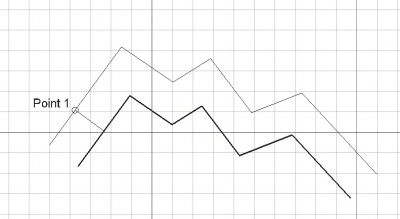
Offsetting a Draft Wire
Bruk
See also: Draft Snap and Draft Constrain.
- Markera punkter i ett tomt område i 3d vyn, eller på ett existerande objekt.
- Nedtryckning av CTRL kommer att snäppa din punkt till tillgängliga snäpp-punkter.
- Nedtryckning av SKIFT kommer att begränsa dig till det nuvarande segmentet, iställed för att markera det närmaste.
- Om du trycker på ESC så avbryts funktionen.
- C växlar kopieringsläget på/av. Med kopiering på, så kommer objekt(en) att kopieras istället för att flyttas.
- Nedtryckning av ALT kommer att skapa en kopia, även om kopieringsknappen är av.
- Om ALT är nedtryckt, så kan du göra multipla kopior ända tills ALT släpps.
Options
The single character keyboard shortcuts available in the task panel can be changed. See Draft Preferences. The shortcuts mentioned here are the default shortcuts.
- If the OCC-style offset checkbox is checked a special offset style is used: open Draft Wires are offset on both sides, and new edges are connected with rounded corners. This only works for planar objects with at least two edges. Note that with this style a new non-parametric object is created, and if copy mode is off the original object is deleted.
- Press C or click the Copy checkbox to toggle copy mode. If copy mode is on, the command will create an offset copy instead of offsetting the original object.
- Holding down Alt before picking points in the 3D View will also toggle copy mode. While Alt is held down multiple offset points can be picked. Release Alt to finish the command and see the created copies.
- Hold down Shift to keep the offset distance linked to the current segment.
- Press S to switch Draft snapping on or off.
- Press Esc or the Close button to abort the command.
Notes
- To create an offset version of a Draft BSpline its points are offset individually, and from the new points a new spline is calculated. This new spline is not parallel to the original spline. For an exact parallel offset of a Draft BSpline the Part Offset2D command should be used.
- The Draft Offset command cannot handle Draft BezCurves. Use the Part Offset2D command instead.
Scripting
See also: Autogenerated API documentation and FreeCAD Scripting Basics.
To offset objects use the offset method of the Draft module. The method can only handle Draft Wires, Draft Circles, Draft Rectangles, Draft Polygons and Draft BSplines.
offset_obj = offset(obj, delta, copy=False, bind=False, sym=False, occ=False)
objis the object to be offset.deltacontains the offset information:- For Draft Wires, Draft Rectangles and Draft Polygons it is an offset vector that must be perpendicular to the first segment of the object.
- For Draft Circles it is the new radius.
- For Draft BSplines it is a list of new points.
- If
copyisTruethe original object is kept and a new object is created. - If
bindisTruea face is created by connecting the shape of the original object and the shape of its offset. This only works for open Draft Wires. - If
symisTrue, andbindisTrueas well, the offset is made on both sides of the original object, the total width being the length of the given vector. This only works for open Draft Wires. - If
occisTrueOCC-style offsetting is used. See Options. IfoccisTruethebindandsymarguments are ignored. offset_objis returned with the original offset object, or with the new object. IfbindisTrueoroccisTrue, the new object is aPart::Featureobject.
Example:
import FreeCAD as App
import Draft

doc = App.newDocument()

p1 = App.Vector(0, 0, 0)
p2 = App.Vector(1500, 2000, 0)
p3 = App.Vector(4000, 0, 0)

wire = Draft.make_wire([p1, p2, p3])
doc.recompute()

vector = App.Vector(-200, 150, 0)
offset1 = Draft.offset(wire, vector, copy=True, bind=True, sym=True)
offset2 = Draft.offset(wire, 3*vector, copy=True)
offset3 = Draft.offset(wire, 6*vector, copy=True)
offset4 = Draft.offset(wire, 9*vector, copy=True)
offset5 = Draft.offset(wire, 1.5*vector, copy=True, occ=True)

doc.recompute()
Denna sida hämtas från https://wiki.freecad.org/Draft_Offset