


Description
Beskrivning
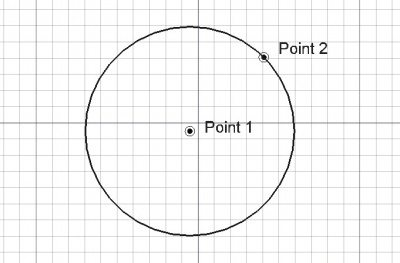
Detta verktyg ritar en cirkel genom att fråga efter två punkter, Centrum och radie, genom att välja tangenter, eller någon kombination av dessa.
A Draft Circle can be turned into an arc by setting its DataFirst Angle and DataLast Angle properties to different values.
Usage
See also: Draft Tray, Draft Snap and Draft Constrain.
- There are several ways to invoke the command:
- The Circle task panel opens. See Options for more information.
- Pick the first point, the center of the circle, in the 3D View, or type coordinates and press the
 Enter Point button.
 - Pick the second point in the 3D View, or enter a Radius.
Options
The single character keyboard shortcuts available in the task panel can be changed. See Draft Preferences. The shortcuts mentioned here are the default shortcuts.
Bruk
- Det primära bruket av cirkelverktyget är att markera två punkter, centrumet och en punkt på omkretsen, vilket definierar radien.
- Om man trycker ned ALT, så kan du välja en tangent istället för att markera en punkt. Du kan därför konstruera flera cirkeltyper genom att välja en, två eller tre tangenter.
- Välj en punkt i ett tomt område i 3d vyn, eller på ett existerande objekt.
- Nedtryckning av CTRL kommer att snäppa din punkt till tillgängliga snäpp-punkter.
- Nedtryckning av SKIFT begränsar din nya punkt i relation till föregående punkt.
- Skriv in siffror för att manuellt mata in en koordinat.
- Om du trycker på ESC så avbryts funktionen.
Notes
- A Draft Circle can be edited with the Draft Edit command.
Preferences
See also: Preferences Editor and Draft Preferences.
- If the Edit → Preferences → Draft → General → Create Part primitives if possible option is checked, the command will create a Part Circle instead of a Draft Circle.
Properties
See also: Property View.
A Draft Circle object is derived from a Part Part2DObject and inherits all its properties. It also has the following additional properties:
Data
Draft
- DataArea (
Area): (read-only) specifies the area of the face of the circle. The value will be0.0if DataMake Face iffalseor the face cannot be created. - DataFirst Angle (
Angle): specifies the start angle of the circle, normally0°. - DataLast Angle (
Angle): specifies the end angle of the circle, normally0°. - DataMake Face (
Bool): specifies if the circle makes a face or not. If it istruea face is created, otherwise only the perimeter is considered part of the object. This property only works if the DataFirst Angle and DataLast Angle have the same value. Note that0°and360°are not considered the same. - DataRadius (
Length): specifies the radius of the circle.
View
Draft
- VyPattern (
Enumeration): specifies the Draft Pattern with which to fill the face of the circle. This property only works if DataMake Face istrueand if VyDisplay Mode isFlat Lines. - VyPattern Size (
Float): specifies the size of the Draft Pattern.
Scripting
Skriptning
Den skapade cirkeln är ett Del föremå som innehåller en kant med endast ett hörn.
To create a Draft Circle use the make_circle method (introduced in 0.19) of the Draft module. This method replaces the deprecated makeCircle method.
circle = make_circle(radius, placement=None, face=None, startangle=None, endangle=None, support=None)
circle = make_circle(Part.Edge, placement=None, face=None, startangle=None, endangle=None, support=None)
- Creates a
circleobject with givenradiusin millimeters.radiuscan also be aPart.Edge, whoseCurveattribute must be aPart.Circle.
- If
placementisNonethe circle is created at the origin. - If
faceisTrue, the circle will make a face, that is, it will appear filled. - If
startangleandendangleare given in degrees, and have different values, they are used and the object appears as a Draft Arc.
Example:
import FreeCAD as App
import Draft

doc = App.newDocument()

circle1 = Draft.make_circle(200)

zaxis = App.Vector(0, 0, 1)
p2 = App.Vector(1000, 1000, 0)
place2 = App.Placement(p2, App.Rotation(zaxis, 0))
circle2 = Draft.make_circle(500, placement=place2)

p3 = App.Vector(-1000, -1000, 0)
place3 = App.Placement(p3, App.Rotation(zaxis, 0))
circle3 = Draft.make_circle(750, placement=place3)

doc.recompute()
Denna sida hämtas från https://wiki.freecad.org/Draft_Circle