


|
|
| Ubicación en el Menú |
|---|
| DiseñoPiezas -> Rotación |
| Entornos de trabajo |
| DiseñoPiezas |
| Atajo de teclado por defecto |
| Ninguno |
| Introducido en versión |
| - |
| Ver también |
| Ninguno |
Description
Descripción
La herramienta Rotación crea un sólido girando un boceto seleccionado o un objeto 2D sobre un eje dado.
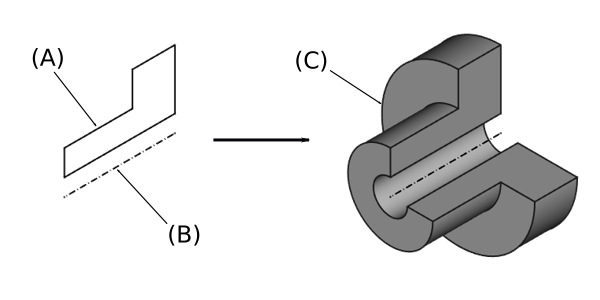
"Arriba: el bosquejo (A) gira 270 grados en sentido contrario a las agujas del reloj alrededor del eje (B); el sólido resultante (C) se muestra a la derecha.
Utilización
- Select a single sketch or one or more faces from the Body.
- There are several ways to invoke the tool:
- Press the
 Revolve button.
 - Select the Part Design → Additive Features → Revolve option from the menu.
- Press the
- Set the Revolution Parameters, see Options below.
- Press the OK button.
Options
Opciones
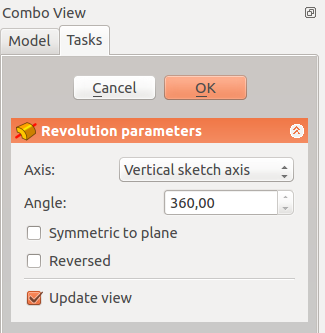
Al crear una revolución, el diálogo Parámetros de la revolución ofrece varios parámetros que especifican cómo debe girar el boceto.
Type
Type offers five different ways of specifying the angle of the revolution:
Angle
Enter a numeric value for the Angle of the revolution. With the option Symmetric to plane the revolution will extend half the given angle to either side of the sketch or face.
To last
The revolution will extend up to the last face of the support it encounters in its direction. If there is no support, an error message will appear.
To first
The revolution will extend up to the first face of the support it encounters in its direction. If there is no support, an error message will appear.
Up to face
The revolution will extend up to a face. Press the Face button and select a face or a datum plane from the Body.
Two Angles
This allows to enter a second angle in which the revolution should extend in the opposite direction. The directions can be switched by checking the Reversed option.
Axis
Specifies the axis of the revolution:
- Vertical sketch axis: selects the vertical sketch axis.
- Horizontal sketch axis: selects the horizontal sketch axis.
- Construction line: selects a construction line from the sketch used by the revolution. The dropdown list will contain an entry for each construction line. The first construction line will be labelled Construction line 1.
- Base (X/Y/Z)-axis: selects the X-, Y- or Z-axis of the Body's origin.
- Select reference…: allows the selection of a straight edge or a datum line from the Body.
Note that when changing the axis, the Reversed option may be (un)checked automatically.
Angle
Defines the angle of the revolution. This option is only available if Type is Angle or Two angles. Angles larger than 360° are not possible. Nor are negative values, use the Reversed option instead.
2nd angle
Defines the angle of the revolution in the opposite direction. This option is only available if Type is Two angles and Angle is smaller than 360°.
Symmetric to plane
Check this option to extend the revolution half the given angle to either side of the sketch or face. This option is only available if Type is Angle.
Reversed
Reverses the direction of the revolution.
Propiedades
Data
Part Design
- DatosRefine (
Bool)
Revolution
- DatosType (
Enumeration) - DatosBase (
Vector): (read-only) - DatosAxis (
Vector): (read-only) - DatosAngle (
Angle) - DatosUp To Face (
LinkSub) - DatosAngle2 (
Angle) - DatosReference Axis (
LinkSub)
Sketch Based
- DatosProfile (
LinkSub) - DatosMidplane (
Bool) - DatosReversed (
Bool) - DatosAllow Multi Face (
Bool)
Limitations
- 0.21 and below: A
 ShapeBinder cannot be used for the profile.
 - 0.21 and below: When using a
 SubShapeBinder for the profile, selecting the binder in the Tree View will fail, instead the binder's face has to be selected in the 3D View.
Esta página ha sido recuperada de https://wiki.freecad.org/PartDesign_Revolution