


|
|
| Menu location |
|---|
| Draft → Utilities → Create WP Proxy |
| Workbenches |
| Draft, Arch |
| Default shortcut |
| None |
| Introduced in version |
| - |
| See also |
| Draft SelectPlane |

Description
Descriere
Această comandă va plasa un obiect Proxy în document, plasat și aliniat la actualul Planul de lucru. Când se utilizează comanda Draft SelectPlane cu un astfel de obiect Proxy selectat sau prin dublu clic pe el în vizualizarea arborescentă, planul de lucru va fi poziționat și aliniat înapoi cu obiectul proxy. Poziția camerei și starea ascunsă/afișată a obiectelor sunt de asemenea stocate în obiectul Proxy și pot fi restabilite dacă proprietățile corespunzătoare sunt activate (vedeți mai jos).
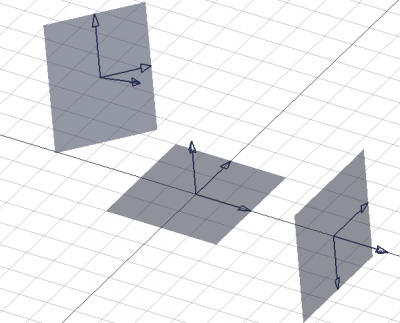
Three working plane proxies showing different orientations and offsets
Usage
Cum se folosește
- Asigurați-vă că Planul de lucru este setat așa cum doriți.
- Apăsați Draft -> Utilities ->
 Create WP Proxy
For a Draft WorkingPlaneProxy these additional options are available in the Tree View context menu:
 Save Camera Position: updates the VizualizareView Data property of the working plane proxy with the current 3D View camera settings.
- Save Visibility of Objects: updates the VizualizareVisibility Map property of the working plane proxy with the current visibility state of objects in the document.
Notes
- Working plane proxies can be moved and rotated like any other object. Use
 Draft Snap Center to snap to their DatePlacement point.
Proprietăți
See also: Property View.
A Draft WorkingPlaneProxy object is derived from an App FeaturePython object and inherits all its properties. It also has the following additional properties:
Data
Base
- Date Placement: stochează poziția acestui proxy și planul de lucru corespunzător
- Vizualizare Dimensiune afișare: mărimea obiectului Proxy din vizualizarea 3D
- Vizualizare Arrow Size: mărimea săgeților de pe cele 3 axe
- Vizualizare Restore View: Dacă este adevărat, poziția camerei va fi restabilită la activarea (prin dublu clic sau Draft SelectPlane) acest obiect
- Vizualizare Restore State: Dacă este adevărat, starea de vizibilitate a tuturor obiectelor din documentul curent va fi restabilită la activarea (prin dublu-clic sau Draft SelectPlane)
View
Base
- VizualizareLine Color (
Color): specifies the color of all elements of the working plane proxy. - VizualizareLine Width (
Float): specifies the line width of the axes and arrow symbols. - VizualizareRestore State (
Bool): specifies if the VizualizareVisibility Map is restored when the working plane is aligned with the working plane proxy. - VizualizareRestore View (
Bool): specifies if the VizualizareView Data is restored when the working plane is aligned with the working plane proxy. - VizualizareTransparency (
Percent): specifies the transparency of the face of the working plane proxy. - VizualizareView Data (
FloatList): specifies the camera position and settings. - Vizualizare (Hidden)Visibility Map (
Map): specifies the visibility state of objects.
Draft
- VizualizareArrow Size (
Length): specifies the size of the arrow symbols displayed at the tip of the three axes. - VizualizareDisplay Size (
Length): specifies the length and width of the working plane proxy.
Script-Programare
Obiectele proxy de lucru de lucru pot fi ușor create în script și macros:
See also: Autogenerated API documentation and FreeCAD Scripting Basics.
To create a Draft WorkingPlaneProxy use the make_workingplaneproxy method of the Draft module.
If the Draft Workbench is active the FreeCAD application object has a DraftWorkingPlane property which stores the current working plane. The Placement from the getPlacement method of the DraftWorkingPlane object can be used to create an aligned working plane proxy. The Placement of a working plane proxy in turn can be used to realign the working plane.
# This code only works if the Draft Workbench is active!

import FreeCAD as App
import FreeCADGui as Gui
import Draft

doc = App.newDocument()

workplane = App.DraftWorkingPlane
place = workplane.getPlacement()

proxy = Draft.make_workingplaneproxy(place)
proxy.ViewObject.DisplaySize = 3000
proxy.ViewObject.ArrowSize = 200

axis2 = App.Vector(1, 1, 1)
point2 = App.Vector(3000, 0, 0)
place2 = App.Placement(point2, App.Rotation(axis2, 90))

proxy2 = Draft.make_workingplaneproxy(place2)
proxy2.ViewObject.DisplaySize = 3000
proxy2.ViewObject.ArrowSize = 200

workplane.setFromPlacement(proxy2.Placement, rebase=True)
Gui.Snapper.setGrid()

doc.recompute()
Această pagină este preluată de la https://wiki.freecad.org/Draft_WorkingPlaneProxy