


|
|
| Menu location |
|---|
| Utilities → Working Plane Proxy Utils → Working Plane Proxy |
| Workbenches |
| Draft, BIM |
| Default shortcut |
| None |
| Introduced in version |
| - |
| See also |
| Draft SelectPlane |
Описание
The  Draft WorkingPlaneProxy command creates a working plane proxy to save the current Draft working plane. A working plane proxy can be used to quickly restore a working plane. The camera position and visibility of the objects in the 3D View are also saved in the working plane proxy and can, optionally, be restored as well.
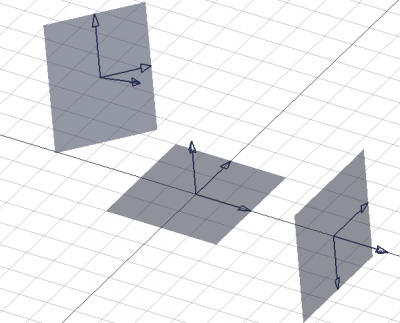
Three working plane proxies showing different orientations and offsets
Применение
- Optionally change the working plane.
- Optionally change the 3D View.
- Optionally change the visibility state of objects in the document.
- There are several ways to invoke the command:
- Draft: Press the Working Plane Proxy button.
- Draft: Select the Utilities → Working Plane Proxy option from the menu, or from the Tree View or 3D View context menu.
- BIM: Select the Utils → Working Plane Proxy option from the menu.
- Draft: Press the
- A working plane proxy is created.
- To align the working plane with a working plane proxy, double-click the working plane proxy in the Tree View or use it with the Draft SelectPlane command.
Контекстное меню
For a Draft WorkingPlaneProxy these additional options are available in the Tree View context menu:
 Save Camera Position: updates the ВидView Data property of the working plane proxy with the current 3D View camera settings.
- Save Visibility of Objects: updates the ВидVisibility Map property of the working plane proxy with the current visibility state of objects in the document.
Примечания
- Working plane proxies can be moved and rotated like any other object. Use
 Draft Snap Center to snap to their ДанныеPlacement point.
Properties
See also: Property View.
A Draft WorkingPlaneProxy object is derived from an App FeaturePython object and inherits all its properties. It also has the following additional properties:
Данные
Base
- ДанныеPlacement (
Placement): specifies the position of the working plane proxy in the 3D View. See Placement. - Данные (Hidden)Shape (
Shape): specifies the shape of the working plane proxy.
Вид
Base
- ВидLine Color (
Color): specifies the color of all elements of the working plane proxy. - ВидLine Width (
Float): specifies the line width of the axes and arrow symbols. - ВидRestore State (
Bool): specifies if the ВидVisibility Map is restored when the working plane is aligned with the working plane proxy. - ВидRestore View (
Bool): specifies if the ВидView Data is restored when the working plane is aligned with the working plane proxy. - ВидTransparency (
Percent): specifies the transparency of the face of the working plane proxy. - ВидView Data (
FloatList): specifies the camera position and settings. - Вид (Hidden)Visibility Map (
Map): specifies the visibility state of objects.
Draft
- ВидArrow Size (
Length): specifies the size of the arrow symbols displayed at the tip of the three axes. - ВидDisplay Size (
Length): specifies the length and width of the working plane proxy.
Scripting
See also: Autogenerated API documentation and FreeCAD Scripting Basics.
To create a Draft WorkingPlaneProxy use the make_workingplaneproxy method of the Draft module.
If the Draft Workbench is active the FreeCAD application object has a DraftWorkingPlane property which stores the current working plane. The Placement from the getPlacement method of the DraftWorkingPlane object can be used to create an aligned working plane proxy. The Placement of a working plane proxy in turn can be used to realign the working plane.
# This code only works if the Draft Workbench is active!

import FreeCAD as App
import FreeCADGui as Gui
import Draft

doc = App.newDocument()

workplane = App.DraftWorkingPlane
place = workplane.getPlacement()

proxy = Draft.make_workingplaneproxy(place)
proxy.ViewObject.DisplaySize = 3000
proxy.ViewObject.ArrowSize = 200

axis2 = App.Vector(1, 1, 1)
point2 = App.Vector(3000, 0, 0)
place2 = App.Placement(point2, App.Rotation(axis2, 90))

proxy2 = Draft.make_workingplaneproxy(place2)
proxy2.ViewObject.DisplaySize = 3000
proxy2.ViewObject.ArrowSize = 200

workplane.setFromPlacement(proxy2.Placement, rebase=True)
Gui.Snapper.setGrid()

doc.recompute()
Эта страница получена от https://wiki.freecad.org/Draft_WorkingPlaneProxy