


|
|
| Ubicación en el Menú |
|---|
| Borrador → Utilidades → Crear proxy del plano trabajo |
| Entornos de trabajo |
| Borrador, Arquitectura |
| Atajo de teclado por defecto |
| Ninguno |
| Introducido en versión |
| - |
| Ver también |
| Borrador SeleccionarPlano |
Descripción
Este comando colocará un objeto Proxy de Plano alineado con el actual Plano trabajo.
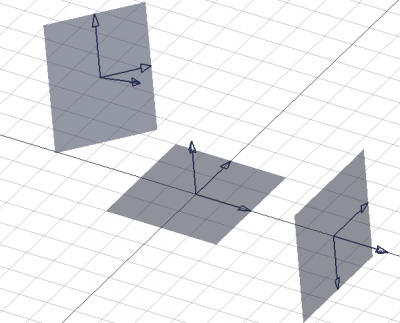
Tres proxies de planos de trabajo que muestran diferentes orientaciones y rellenos
Utilización
- Asegúrate de que el Plano trabajo está configurado como quieres.
- A continuación, vaya al menú Borrador → Utilidades →
 Crear proxy de plano trabajo.
For a Draft WorkingPlaneProxy these additional options are available in the Tree View context menu:
 Save Camera Position: updates the VistaView Data property of the working plane proxy with the current 3D View camera settings.
- Save Visibility of Objects: updates the VistaVisibility Map property of the working plane proxy with the current visibility state of objects in the document.
Notes
Notas
- El plano de trabajo almacenado en el objeto Proxy puede restaurarse haciendo doble clic en el objeto en la vista de árbol, o seleccionando el objeto Proxy y utilizando el Borrador SeleccionarPlano..
- La posición de la cámara se almacena en el objeto Proxy en el momento de su creación. Esta posición puede actualizarse en cualquier momento: haz zoom, panorámica y rotación de la vista como desees, luego haz clic con el botón derecho en el objeto Proxy en la vista de árbol y selecciona . Escribir posición de la cámara.
- El estado de visibilidad de todos los objetos también se almacena en el objeto Proxy en el momento de su creación. Este estado puede actualizarse en cualquier momento: establezca la propiedad VistaVisibility de los objetos a
trueofalsesegún desee, luego haga clic con el botón derecho en el objeto Proxy en la vista de árbol, y seleccione Escribir estado de los objetos. - Los proxies de plano pueden moverse y girarse como cualquier otro objeto para que definan el plano de trabajo deseado. Su apariencia visual también se puede cambiar en el Editor de propiedades.
Propiedades
See also: Property View.
A Draft WorkingPlaneProxy object is derived from an App FeaturePython object and inherits all its properties. It also has the following additional properties:
Data
Base
- DatosPlacement (
Placement): specifies the position of the working plane proxy in the 3D View. See Placement. - Datos (Hidden)Shape (
Shape): specifies the shape of the working plane proxy.
View
Base
- VistaLine Color (
Color): specifies the color of all elements of the working plane proxy. - VistaLine Width (
Float): specifies the line width of the axes and arrow symbols. - VistaRestore State (
Bool): specifies if the VistaVisibility Map is restored when the working plane is aligned with the working plane proxy. - VistaRestore View (
Bool): specifies if the VistaView Data is restored when the working plane is aligned with the working plane proxy. - VistaTransparency (
Percent): specifies the transparency of the face of the working plane proxy. - VistaView Data (
FloatList): specifies the camera position and settings. - Vista (Hidden)Visibility Map (
Map): specifies the visibility state of objects.
Draft
- VistaArrow Size (
Length): specifies the size of the arrow symbols displayed at the tip of the three axes. - VistaDisplay Size (
Length): specifies the length and width of the working plane proxy.
Guión
Ver también: Borrador API y FreeCAD Fundamentos de Guión.
Los objetos proxy del plano de trabajo se pueden utilizar en macros y desde la consola de Python utilizando la siguiente función:
If the Draft Workbench is active the FreeCAD application object has a DraftWorkingPlane property which stores the current working plane. The Placement from the getPlacement method of the DraftWorkingPlane object can be used to create an aligned working plane proxy. The Placement of a working plane proxy in turn can be used to realign the working plane.
# This code only works if the Draft Workbench is active!

import FreeCAD as App
import FreeCADGui as Gui
import Draft

doc = App.newDocument()

workplane = App.DraftWorkingPlane
place = workplane.getPlacement()

proxy = Draft.make_workingplaneproxy(place)
proxy.ViewObject.DisplaySize = 3000
proxy.ViewObject.ArrowSize = 200

axis2 = App.Vector(1, 1, 1)
point2 = App.Vector(3000, 0, 0)
place2 = App.Placement(point2, App.Rotation(axis2, 90))

proxy2 = Draft.make_workingplaneproxy(place2)
proxy2.ViewObject.DisplaySize = 3000
proxy2.ViewObject.ArrowSize = 200

workplane.setFromPlacement(proxy2.Placement, rebase=True)
Gui.Snapper.setGrid()

doc.recompute()
Esta página ha sido recuperada de https://wiki.freecad.org/Draft_WorkingPlaneProxy