


Descripción
El ”facebinder” un objeto muy simple construido a partir de caras seleccionadas de otros objetos. Es de tipo paramétrico, puede modificar el objeto original y las actualizaciones del objeto de faceta en consecuencia. Luego se puede usar, por ejemplo, para hacer una extrusión de una colección de caras de otros objetos. Un uso típico es en el diseño arquitectónico, para construir un objeto que cubre varias piezas de paredes. Puede mover y rotar el encuadernador después de su creación, todo permanecerá vinculado a las caras originales.
It can be used to create an extrusion from a collection of faces. This extrusion can for example represent a wall finish in architectural design.
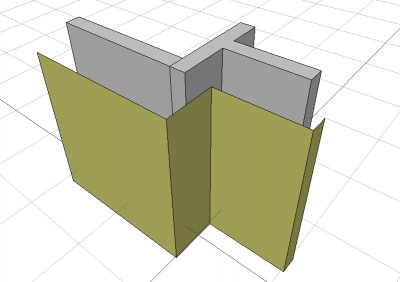
Facebinder created from the faces of walls
Utilización
- Select one or more faces.
- There are several ways to invoke the command:
- Press the
 Facebinder button.
 - Draft: Select the Drafting → Facebinder option from the menu.
- BIM: Select the 3D/BIM → Generic 3D tools → Facebinder option from the menu.
- Draft: Use the keyboard shortcut: F then F.
- Press the
Properties
See also: Property View.

On the left an extruded facebinder with closed corners (pink),
on the right an extruded facebinder with open corners (orange).
Closed corners are a V1.1 feature.
A Draft Facebinder object is derived from a Part Feature object and inherits all its properties. It also has the following additional properties:
Data
Draft
- DatosArea (
Area): (read-only) specifies the total area of the linked faces of the facebinder. - DatosExtrusion (
Distance): specifies the extrusion thickness of the facebinder. introduced in 1.1: If the facebinder has connected faces and DatosSew istrue, an attempt is made to close the corners of the extrusion. If this is not possible faces are extruded separately. - DatosFaces (
LinkSubList): specifies the linked faces of the facebinder. - DatosOffset (
Distance): specifies an offset distance to apply between the facebinder and the original faces, prior to extrusion. - DatosRemove Splitter (
Bool): Specifies whether to remove splitter lines that divide co-planar faces of the facebinder. - DatosSew (
Bool): Specifies whether to perform a topological sewing operation on the facebinder.
View
Draft
- VistaPattern (
Enumeration): specifies the Draft Pattern with which to fill the faces of the facebinder. This property only works if VistaDisplay Mode isFlat Lines. - VistaPattern Size (
Float): specifies the size of the Draft Pattern.
Scripting
See also: Autogenerated API documentation and FreeCAD Scripting Basics.
To create a Draft Facebinder use the make_facebinder method (introduced in 0.19) of the Draft module. This method replaces the deprecated makeFacebinder method.
facebinder = make_facebinder(selectionset)
- Creates a
facebinderobject from the givenselectionset, which is a list ofSelectionObjects as returned byFreeCADGui.Selection.getSelectionEx(). Only selected faces are taken into account.selectionsetcan also be aPropertyLinkSubList.
A PropertyLinkSubList is a list of tuples; each tuple contains as first element an object, and as second element a list (or tuple) of strings; these strings indicate the names of the sub-elements (faces) of that object.
PropertyLinkSubList = [tuple1, tuple2, tuple3, ...]
PropertyLinkSubList = [(object1, list1), (object2, list2), (object3, list3), ...]
PropertyLinkSubList = [(object1, ['Face1', 'Face4', 'Face6']), ...]
PropertyLinkSubList = [(object1, ('Face1', 'Face4', 'Face6')), ...]
The thickness of the Facebinder can be added by overwriting its Extrusion attribute; the value is entered in millimeters.
The placement of the Facebinder can be changed by overwriting its Placement attribute, or by individually overwriting its Placement.Base and Placement.Rotation attributes.
Example:
import FreeCAD as App
import FreeCADGui as Gui
import Draft

doc = App.newDocument()

# Insert a solid box
box = doc.addObject("Part::Box", "Box")
box.Length = 2300
box.Width = 800
box.Height = 1000

# selection = Gui.Selection.getSelectionEx()
selection = [(box, ("Face1", "Face6"))]
facebinder = Draft.make_facebinder(selection)
facebinder.Extrusion = 50

doc.recompute()

facebinder.Placement.Base = App.Vector(1000, -1000, 100)
facebinder.ViewObject.ShapeColor = (0.99, 0.99, 0.4)

doc.recompute()
Esta página ha sido recuperada de https://wiki.freecad.org/Draft_Facebinder