


Descriere
Facebinderul este un obiect foarte simplu, construit din fațetele selectate ale altor obiecte. Este parametric, puteți modifica obiectul original și actualizările obiectului facebinder în consecință. Acesta poate fi apoi folosit, de exemplu, pentru a face o extrudare dintr-o colecție de fațete de la alte obiecte. O utilizare tipică este în designul arhitectural, pentru a construi un obiect care acoperă mai multe bucăți de pereți. Puteți mișca și roti în jurul fațetei după crearea ei, totul va rămâne legat de fațetele originale.
It can be used to create an extrusion from a collection of faces. This extrusion can for example represent a wall finish in architectural design.
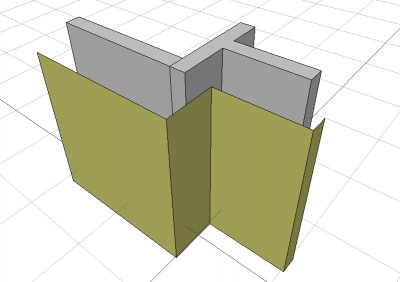
Facebinder created from the faces of walls
Cum se folosește
- Selectați fețetele pe obiecte (utilizați CTRL pentru a selecta mai multe fețe)
- Apăsați butonul
 Facebinder, sau apăsați tatele F, F
Properties
See also: Property View.

On the left an extruded facebinder with closed corners (pink),
on the right an extruded facebinder with open corners (orange).
Closed corners are a V1.1 feature.
A Draft Facebinder object is derived from a Part Feature object and inherits all its properties. It also has the following additional properties:
Data
Draft
- DateArea (
Area): (read-only) specifies the total area of the linked faces of the facebinder. - DateExtrusion (
Distance): specifies the extrusion thickness of the facebinder. introduced in 1.1: If the facebinder has connected faces and DateSew istrue, an attempt is made to close the corners of the extrusion. If this is not possible faces are extruded separately. - DateFaces (
LinkSubList): specifies the linked faces of the facebinder. - DateOffset (
Distance): specifies an offset distance to apply between the facebinder and the original faces, prior to extrusion. - DateRemove Splitter (
Bool): Specifies whether to remove splitter lines that divide co-planar faces of the facebinder. - DateSew (
Bool): Specifies whether to perform a topological sewing operation on the facebinder.
View
Draft
- VizualizarePattern (
Enumeration): specifies the Draft Pattern with which to fill the faces of the facebinder. This property only works if VizualizareDisplay Mode isFlat Lines. - VizualizarePattern Size (
Float): specifies the size of the Draft Pattern.
Scripting
Scrip-Programare
Instrumentul Facebinder poate fi folosit în scripturile python și macros utilizând următoarea funcție:
facebinder = make_facebinder(selectionset)
- Creează un obiect facebinder din setul de selecție dat, care este o listă de obiecte de selecție, cum ar fi returnate de metoda FreeCADGui.Selection.getSelectionEx ().
- Sunt luate în considerare doar fețele selectate
- Returnează obiectul nou creat
PropertyLinkSubList = [tuple1, tuple2, tuple3, ...]
PropertyLinkSubList = [(object1, list1), (object2, list2), (object3, list3), ...]
PropertyLinkSubList = [(object1, ['Face1', 'Face4', 'Face6']), ...]
PropertyLinkSubList = [(object1, ('Face1', 'Face4', 'Face6')), ...]
The thickness of the Facebinder can be added by overwriting its Extrusion attribute; the value is entered in millimeters.
The placement of the Facebinder can be changed by overwriting its Placement attribute, or by individually overwriting its Placement.Base and Placement.Rotation attributes.
Exempluː
import FreeCAD as App
import FreeCADGui as Gui
import Draft

doc = App.newDocument()

# Insert a solid box
box = doc.addObject("Part::Box", "Box")
box.Length = 2300
box.Width = 800
box.Height = 1000

# selection = Gui.Selection.getSelectionEx()
selection = [(box, ("Face1", "Face6"))]
facebinder = Draft.make_facebinder(selection)
facebinder.Extrusion = 50

doc.recompute()

facebinder.Placement.Base = App.Vector(1000, -1000, 100)
facebinder.ViewObject.ShapeColor = (0.99, 0.99, 0.4)

doc.recompute()
Această pagină este preluată de la https://wiki.freecad.org/Draft_Facebinder