 Tutorial Tutorial
|
| Topic |
|---|
| Robot Workbench |
| Level |
| Intermediate |
| Time to complete |
| Authors |
| FreeCAD version |
| Example files |
| See also |
| None |
Overview
Acest tutorial explică modul de utilizare a FreeCAD și a Atelierului de simulare a robotului pentru a simula mișcările robotului serial cu 6 axe. Tutorialul se concentreaza pe crearea fișierului vrml utilizat ca vizualizare. Baza fișierului vrml este un model FreeCAD. Versiunea FreeCAD folosită este 0.11.4252ppa1 pe Ubuntu 32bit.
Deschideți un fișier sau creați unul cu FreeCAD
Tutorialul se bazează pe fișierul STEP al unui Stäubli TX40 (TX40-HB.stp). Puteți descărca fișierul de la Stäubli. Cu toate acestea, deși încă nu trebuie se verifică acest lucru, metoda ar trebui să se aplice și unui model freeCAD complet realizat. După deschiderea fișierului, trebuie să obțineți acest lucru:
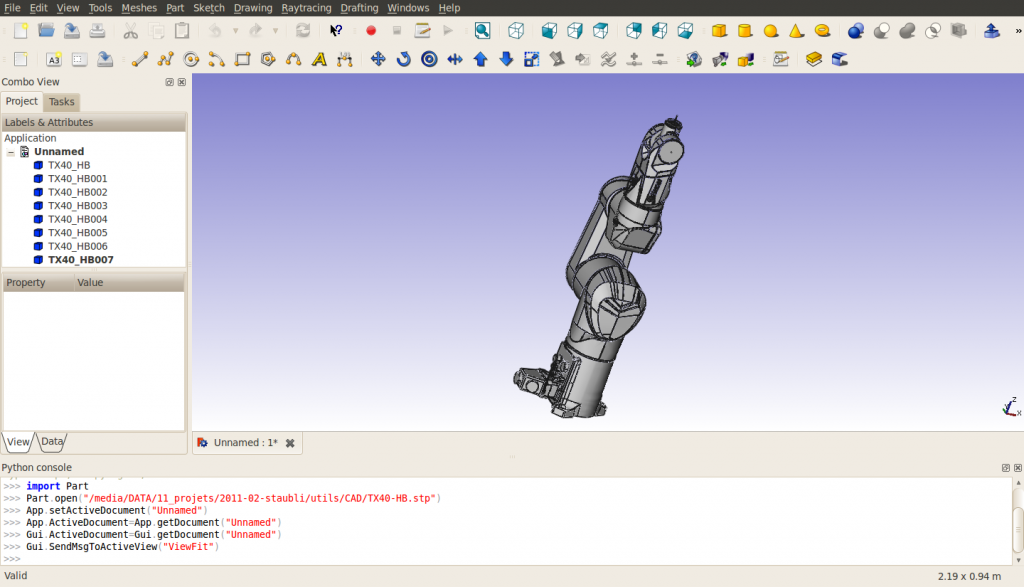
Observați că importăm, robotul este alcătuit din 8 forme, direct pe rădăcina arborelui de documente. Structura fișierului vrml exportat se poate schimba dacă se utilizează grupuri. Formele sunt comandate de la bază la instrument. Ultima formă conține axele de rotație ale tuturor axelor robotului. Corelația dintre numele formei - numele piesei este dat de (din martie 2011) FreeCAD nu importă numele incluse în fișierele STEP:
| FreeCAD name | STEP name |
|---|---|
| TX40_HB | HORIZONTAL BASE CABLE OUTLET |
| TX40_HB001 | SHOULDER |
| TX40_HB002 | ARM |
| TX40_HB003 | ELBOW |
| TX40_HB004 | FOREARM |
| TX40_HB005 | WRIST |
| TX40_HB006 | TOOL FLANGE |
| TX40_HB007 | ? |
Pentru acest import, schimbați "Display Mode" pentru fiecare formă, exceptând TX40_HB007, de la "Flat Lines" la "Shaded" pentru exportul vrml pentru a arăta bine. Am schimbat de asemenea culoarile la [245, 196, 0] și [204, 204, 204] pentru a corespunde mai bine cu galbenul Stäubli's. Ascunde TX40_HB007 deoarece conține axele tuturorl articulațiilor și nu poate fi luat de o parte.
Măsurați caracteristicile geometrice
În vederea construirii tabelului Denavit-Hartenberg (see Robot 6-Axis) și pregătiți fișierul vrml, trebuie să obțineți caracteristicile robotului. Deocamdată, instrumentul de măsurare FreeCAD nu este gata, puteți utiliza axele incluse în TX40_HB007 (coordonatele sunt indicate în partea stângă jos atunci când indicați un obiect cu mouse-ul) sau trebuie să utilizați consola Python pentru a obține unele informații despre geometrie. Rețineți că tabelul DH este necesar numai dacă trebuie să utilizați cinematica inversă, adică să obțineți coordonatele carteziene sau să dirijați robotul cu coordonate carteziene. Tabelul DH-table pentru acest robot este următorul (mm, deg and deg/s):
| i | d | θ | r | α | θmin | θmax | Axis velocity |
|---|---|---|---|---|---|---|---|
| 1 | 320 | q1 | 0 | -90 | -180 | 180 | 555 |
| 2 | 35 | q2 - 90 | 225 | 0 | -125 | 125 | 475 |
| 3 | 0 | q3 + 90 | 0 | 90 | -138 | 138 | 585 |
| 4 | 225 | q4 | 0 | -90 | -270 | 270 | 1035 |
| 5 | 0 | q5 | 0 | 90 | -120 | 133.5 | 1135 |
| 6 | 65 | q6 | 0 | 0 | -270 | 270 | 1575 |
Atunci fișierul csv file este :
a  , alpha, d  , theta, rotDir, maxAngle, minAngle, AxisVelocity
0  ,   -90, 320,     0,      1,      180,     -180, 555
225,     0,  35,   -90,      1,      125,     -125, 475
0  ,    90,   0,    90,      1,      138,     -138, 585
0  ,   -90, 225,     0,      1,      270,     -270, 1035
0  ,    90,   0,     0,      1,    133.5,     -120, 1135
0  ,     0,  65,     0,      1,      270,     -270, 1575
Export la vrml
Exportați documentul într-un fișier vrml. Structura fișierului vrml este următoarea:
#VRML V2.0 utf8


Group {
  children
    Group {
      children [
        Group {
        …

        },

        Group {
        …

        },

        Group {
        …

        },

        Group {
        …

        },

        Group {
        …

        },

        Group {
        …

        },

        Group {
        …

        },

        Group {
        …

        } ]

    }

}
Puteți observa că avem 8 grupuri independente care corespund celor 8 forme.
Pregătirea fișierului vrml
Toate formele din fișierul vrml sunt exprimate în cadrul de bază, independente una de celălaltă. Pentru Atelierul Robot Simulation Workbench, trebuie să creăm o structură în care o mișcare a unei forme induce o mișcare a tuturor formelor situate ulterior în structură. Plasarea formelor va fi relativă la forma precedentă, așa că trebuie să includem câteva translații din sistemul de referință absolut la cel relativ. Translațiile descrise în următoarea imagine:
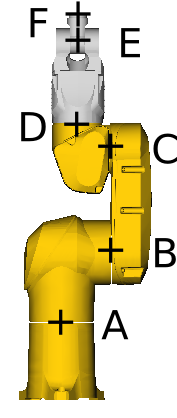
With
- A=(0, 0, 168)
- B=(0, 107.8, 320)
- C=(0, 104.15, 545)
- D=(0, 35, 601)
- E=(0, 35, 770)
- F=(0, 35, 835).
Să luăm un exemplu în 4 axe întere ELBOW și FOREARM, situat la D=(xd, yd, zd). Ancora pentru axa FreeCAD este
"DEF FREECAD_AXIS4 Transform { rotation 0 1 0 0 children ["
Aceasta corespunde unei rotații în jurul axei y. În modelul CAD, rotația este în jurul axei z. Astfel, avem nevoie de o rotație în jurul axei x a <math> \ pi </ math> înaintea definiției axei FreeCAD și a <math> - \ pi </ math> după aceasta. De asemenea, este necesară o translație (-xd, -yd, -zd) chiar înainte ca grupul care corespunde definiției FOREARM să o exprime în cadrul de referință relativ centrat(D) Asata înseamnă că o translație (xd,yd,zd)trebuie să fie introduse înainte de prima rotație. La final, fișierul vrml de la definiția ELBOW la definiția FOREARM arată astfel:
      # ELBOW
      Group {
        … here comes the unmodified definition of ELBOW

      },

      Transform {
        translation 0 35 601
        rotation 1 0 0 1.5707963
        children
          DEF FREECAD_AXIS4 Transform { rotation 0 1 0 0 children
            Transform {
              rotation 1 0 0 -1.5707963
              children
                Transform {
                  translation 0 -35 -601
                  children [
      # FOREARM
      Group {
        ... here comes the unmodified definition of FOREARM

      },
La sfârșitul documentului, trebuie introduse parantezele de închidere corespunzătoare: ]}}}},
Pentru fiecare din cele 6 axe. În cele din urmă, documentul arată astfel (nu știu dacă poate fi conectat fișierul aici din cauza drepturilor de autor):
#VRML V2.0 utf8


Group {
  children
  Group {
    children [
      # HORIZONTAL BASE CABLE OUTLET
      Group {
          ... here comes the unmodified definition of HORIZONTAL BASE CABLE OUTLET

      },

      Transform {
        translation 0 0 168
        rotation 1 0 0 1.5707963
        children
          DEF FREECAD_AXIS1 Transform { rotation 0 1 0 0 children
            Transform {
              rotation 1 0 0 -1.5707963
              children
                Transform {
                  translation 0 0 -168
                  children [
      # SHOULDER
      Group {
          ... here comes the unmodified definition of SHOULDER

      },

      Transform {
        translation 0 107.8 320
        #rotation 0 0 1 0
        children
          DEF FREECAD_AXIS2 Transform { rotation 0 1 0 0 children
            Transform {
              #rotation 0 0 1 0
              children
                Transform {
                  translation 0 -107.8 -320
                  children [
      # ARM
      Group {
          ... here comes the unmodified definition of ARM

      },

      Transform {
        translation 0 104.15 545
        #rotation 0 0 1 0
        children
          DEF FREECAD_AXIS3 Transform { rotation 0 1 0 0 children
            Transform {
              #rotation 0 0 1 0
              children
                Transform {
                  translation 0 -104.15 -545
                  children [
      # ELBOW
      Group {
          ... here comes the unmodified definition of ELBOW

      },

      Transform {
        translation 0 35 601
        rotation 1 0 0 1.5707963
        children
          DEF FREECAD_AXIS4 Transform { rotation 0 1 0 0 children
            Transform {
              rotation 1 0 0 -1.5707963
              children
                Transform {
                  translation 0 -35 -601
                  children [
      # FOREARM
      Group {
          ... here comes the unmodified definition of FOREARM

      },

      Transform {
        translation 0 35 770
        #rotation 0 0 1 0
        children
          DEF FREECAD_AXIS5 Transform { rotation 0 1 0 0 children
            Transform {
              #rotation 0 0 1 0
              children
                Transform {
                  translation 0 -35 -770
                  children [
      # WRIST
      Group {
          ... here comes the unmodified definition of WRIST

      },

      Transform {
        translation 0 35 835
        rotation 1 0 0 1.5707963
        children
          DEF FREECAD_AXIS6 Transform { rotation 0 1 0 0 children
            Transform {
              rotation 1 0 0 -1.5707963
              children
                Transform {
                  translation 0 -35 -835
                  children [
      # TOOL FLANGE
      Group {
          ... here comes the unmodified definition of TOOL FRAME

      },

      Group {
          ... here comes the unmodified definition of TX40_HB007

      } # "]" was deleted from this line
    ]}}}},
    ]}}}},
    ]}}}},
    ]}}}},
    ]}}}},
    ]}}}},
    ] # this is the "]" deleted from the line above
  }
}
Iată un patch pentru a obține fișierul vrml potrivit pentru simularea robotului:
7a8
>         # HORIZONTAL BASE CABLE OUTLET
95968a95970,95981
>         Transform {
>           translation 0 0 168
>           rotation 1 0 0 1.5707963
>           children
>             DEF FREECAD_AXIS1 Transform { rotation 0 1 0 0 children
>               Transform {
>                 rotation 1 0 0 -1.5707963
>                 children
>                   Transform {
>                     translation 0 0 -168
>                     children [
>         # SHOULDER
128428a128442,128453
>         Transform {
>           translation 0 107.8 320
>           #rotation 0 0 1 0
>           children
>             DEF FREECAD_AXIS2 Transform { rotation 0 1 0 0 children
>               Transform {
>                 #rotation 0 0 1 0
>                 children
>                   Transform {
>                     translation 0 -107.8 -320
>                     children [
>         # ARM
206503a206529,206540
>         Transform {
>           translation 0 104.15 545
>           #rotation 0 0 1 0
>           children
>             DEF FREECAD_AXIS3 Transform { rotation 0 1 0 0 children
>               Transform {
>                 #rotation 0 0 1 0
>                 children
>                   Transform {
>                     translation 0 -104.15 -545
>                     children [
>         # ELBOW
267111a267149,267160
>         Transform {
>           translation 0 35 601
>           rotation 1 0 0 1.5707963
>           children
>             DEF FREECAD_AXIS4 Transform { rotation 0 1 0 0 children
>               Transform {
>                 rotation 1 0 0 -1.5707963
>                 children
>                   Transform {
>                     translation 0 -35 -601
>                     children [
>         # FOREARM
417854a417904,417915
>         Transform {
>           translation 0 35 770
>           #rotation 0 0 1 0
>           children
>             DEF FREECAD_AXIS5 Transform { rotation 0 1 0 0 children
>               Transform {
>                 #rotation 0 0 1 0
>                 children
>                   Transform {
>                     translation 0 -35 -770
>                     children [
>         # WRIST
422053a422115,422126
>         Transform {
>           translation 0 35 835
>           rotation 1 0 0 1.5707963
>           children
>             DEF FREECAD_AXIS6 Transform { rotation 0 1 0 0 children
>               Transform {
>                 rotation 1 0 0 -1.5707963
>                 children
>                   Transform {
>                     translation 0 -35 -835
>                     children [
>         # TOOL FLANGE
435627c435700,435707
<         } ]
---
>         }
>       ]}}}},
>       ]}}}},
>       ]}}}},
>       ]}}}},
>       ]}}}},
>       ]}}}},
>       ]
Această pagină este preluată de la https://wiki.freecad.org/VRML_Preparation_for_Robot_Simulation