Creating a SketchObject using Python
We create a SketchObject like this:
import FreeCAD as App
import Part
import Sketcher

doc = App.newDocument()

sketch = doc.addObject("Sketcher::SketchObject", "Sketch")
sketch.addGeometry(Part.LineSegment(App.Vector(1.2, 1.8, 0),
                                    App.Vector(5.2, 5.3, 0)), False)
sketch.addGeometry(Part.LineSegment(App.Vector(6.5, 1.5, 0),
                                    App.Vector(10.2, 5.0, 0)), False)
sketch.addGeometry(Part.LineSegment(App.Vector(12.2, 1.0, 0),
                                    App.Vector(15.4, 5.0, 0)), False)

doc.recompute()
It also adds three lines in the newly created Sketch.
Creación de una restricción con Python
A geometric constraint 


 and
and  can be created from macros and from the Python console by using the following command:
sketch.addConstraint(Sketcher.Constraint(ConstraintType, EdgeOrPartOfEdge…))
A dimensional constraint 


 and the special
  refraction constraint can be created from macros and from the Python console by using the following command:
sketch.addConstraint(Sketcher.Constraint(DimensionalConstraintType, EdgeOrPartOfEdge…, App.Units.Quantity("float_value unit")))
e.g.
sketch.addConstraint(Sketcher.Constraint(DimensionalConstraintType, EdgeOrPartOfEdge…, App.Units.Quantity("123.0 mm")))
The first argument ConstraintType is described below in Constraint types.
A constraint can take up to six arguments which are edges or indicate which sub-part of an edge is used by the constraint. See the documentation of individual constraints for details on what combinations of edges and sub-parts of edges can be passed as arguments. The main issue with this function is to identify correctly the line number and the vertex number of the lines you want to process. The sections below describe how to identify the numbering of a line, and how to Identify the numbering of the sub-parts of a line.
Tipos de restricciones
For geometric constraints, the first argument is one of the following. See the corresponding feature page for the possible combinations of arguments allowed for each constraint.
| Code | Icon | Feature |
|---|---|---|
"Coincident" |
|
Coincident Constraint |
"PointOnObject" |
|
Point-On-Object Constraint |
"Vertical" |
|
Vertical Constraint |
"Horizontal" |
|
Horizontal Constraint |
"Parallel" |
|
Parallel Constraint |
"Perpendicular" |
|
Perpendicular Constraint |
"Tangent" |
|
Tangent/Collinear Constraint |
"Equal" |
|
Equal Constraint |
"Symmetric" |
|
Symmetric Constraint |
"Block" |
|
Block Constraint |
For dimensional constraints, the first argument is one of the following. See the corresponding feature page for the possible combinations of arguments allowed for each constraint.
| Code | Icon | Feature |
|---|---|---|
"DistanceX" |
|
Horizontal Dimension |
"DistanceY" |
|
Vertical Dimension |
"Distance" |
|
Distance Dimension |
"Radius" |
|
Radius Dimension |
"Diameter" |
|
Diameter Dimension |
"Angle" |
|
Angle Dimension |
"AngleViaPoint" |
|
Angle Dimension |
The refraction constraint behave like dimensional constraints for the purposes of scripting. Again, see the corresponding feature page for the possible combinations of arguments allowed for each constraint.
| Code | Icon | Feature |
|---|---|---|
"SnellsLaw" |
|
Refraction Constraint |
The lock position constraint is a GUI command which creates a horizontal dimension and a vertical dimension constraint, it is not a constraint of its own.
Identificación de la numeración de una línea
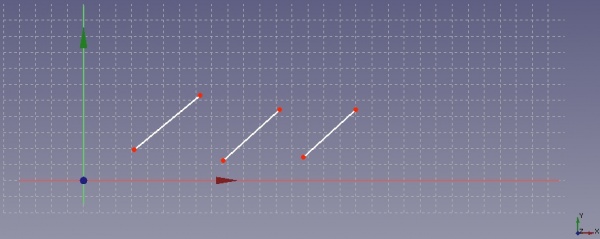
I have drawn three lines as shown in the following figure.
By moving the cursor of the mouse above the line you can see the line number at the bottom left of the FreeCAD windows, see next figure.
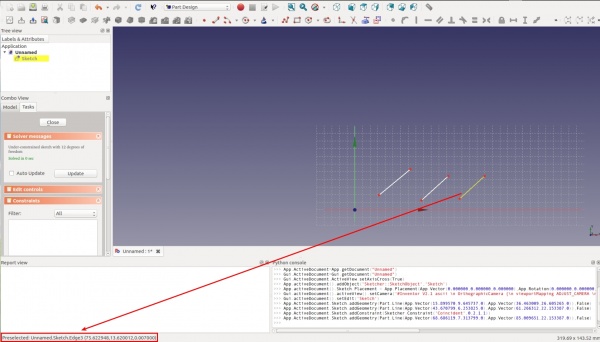
Unfortunately the numbering displayed on the FreeCAD windows start from 1 whereas the numbering of the line used to script start from 0: this means that you have to subtract one each time you want to refer to a line.
Positive numbers indicate sketch edges (straight lines, circles, conics, B-splines, and so on). The following values can be used to denote elements that are not sketch edges:
-1denotes the horizontal x axis-2denotes the vertical y axis-ndenotes the external geometry element numbern-3(e.g. the external geometry element with index 0 in the flattened listsketch.ExternalGeometrywould be denoted by -3, the following element in the flattened list would be -4 and so on).
Identifying the numbering of the sub-parts of a line
When qualifying which part of a line is affected by a constraint, the following values can be used:
0to indicate that the constraint affects the entire edge.1to indicate that the constraint affects the start point of the edge (a full circle has no starting point).2to indicate that the constraint affects the endpoint of the edge.3to indicate that the constraint affects the center point of the edge. Can only be used for circles, circular arcs, ellipses and elliptical arcs.nto indicate that the constraint affects the n-th pole of a B-spline.
The vertices indicated by 1 and 2 are numbered according to their order of creation. To find out the order of their creation (If you have a lot of lines, you cannot remember which vertex you have created first), you just have to move the cursor of your mouse above the two vertices of one line, see following figure.
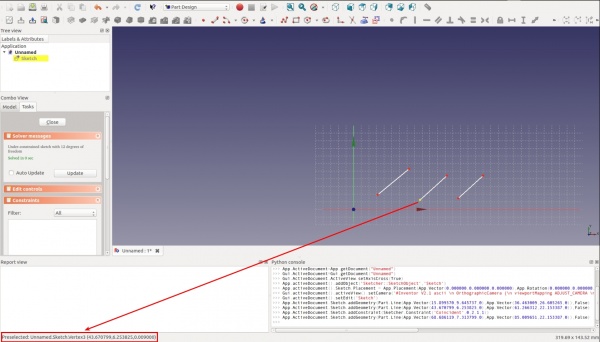
If you read e.g. 4 and 5, it means that the vertex with the lower number (4 in this example) will be referenced by using the number 1 (first in the script command and the vertex with the higher number (5 in this example) will be referenced by using the number 2 in the script command.
Ejemplo
Let us take the previous example of the three lines. The subsequent figure indicates the numbering of each line and their vertices according to the convention for scripting.
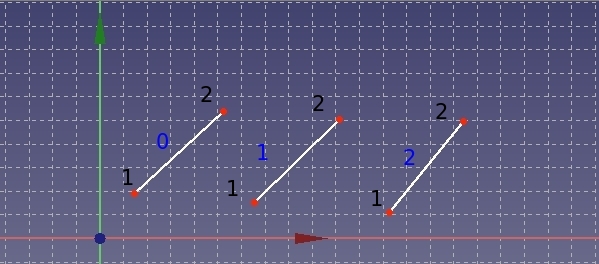
blue text: numbering of line, black text: numbering of vertices
The command sketch.addConstraint(Sketcher.Constraint("Coincident", 1, 2, 2, 1)) yields following result:
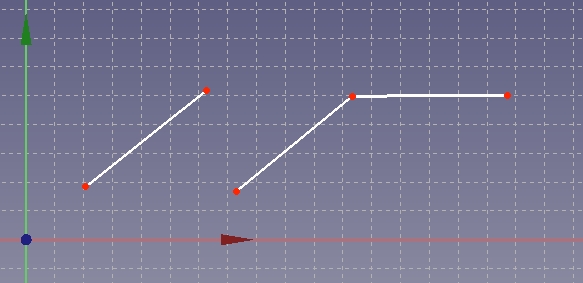
The full code to draw the three lines and add a Coincident constraint on two points from two lines is like this:
import FreeCAD as App
import Part
import Sketcher

doc = App.newDocument()

sketch = doc.addObject("Sketcher::SketchObject", "Sketch")
sketch.addGeometry(Part.LineSegment(App.Vector(1.2, 1.8, 0),
                                    App.Vector(5.2, 5.3, 0)), False)
sketch.addGeometry(Part.LineSegment(App.Vector(6.5, 1.5, 0),
                                    App.Vector(10.2, 5.0, 0)), False)
sketch.addGeometry(Part.LineSegment(App.Vector(12.2, 1.0, 0),
                                    App.Vector(15.4, 5.0, 0)), False)
sketch.addConstraint(Sketcher.Constraint("Coincident", 1, 2, 2, 1))

doc.recompute()
Esta página ha sido recuperada de https://wiki.freecad.org/Sketcher_scripting