


|
|
| Ubicación en el Menú |
|---|
| Sketch → Restricciones de croquis → Restricción de refracción (Ley de Snell) |
| Entornos de trabajo |
| Sketcher |
| Atajo de teclado por defecto |
| Ninguno |
| Introducido en versión |
| - |
| Ver también |
| Ninguno |

Description
The  Sketcher ConstrainSnellsLaw tool constrains two lines to follow the law of refraction of light as it penetrates through an interface where two materials with different refraction indices meet. See Snell's law.
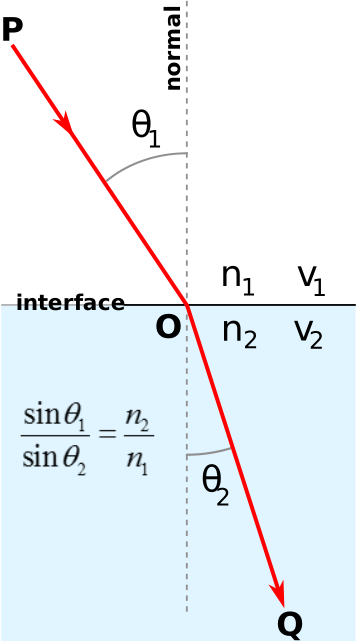
Snell's Law
Usage
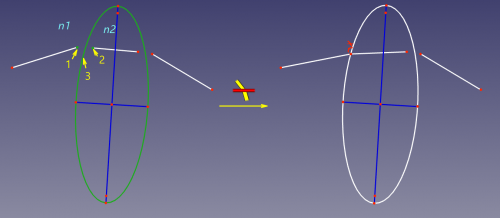
The sequence of clicks is indicated by yellow arrows with numbers, n1 and n2 show where the indices of refraction are
- Prepare two lines to represent a beam of light, and an edge to act as an interface. The lines should be on different sides of the interface. The interface can be a line, an arc, a circle or a conic.
- Select an endpoint of the first line, an endpoint of the second line, and the interface edge. Note the selection order of the endpoints.
- There are several ways to invoke the tool:
- Select the Sketch → Constraints → Refraction Constraint option from the menu.
- Use the keyboard shortcut: K then W.
- Select the Sketch → Constraints →
- The Refractive Index Ratio dialog opens.
- Enter the Ratio n2/n1. Where n2 is for the medium where the second selected line resides, and n1 is for the first line's medium.
- A refraction constraint is added. If required the endpoints are made coincident and constrained onto the interface. These additional constraints are called helper constraints.
Notes
- The actual Snell's law constraint enforces the plain law equation n1*sin(theta1) = n2*sin(theta2). It needs the line ends to be made coincident and on the interface by other constraints, otherwise the behavior is undefined. The necessary helper constraints are added automatically based on the current coordinates of the elements.
- In Python the helper constraints must be added manually (see Scripting).
- These helper constraints can be temporarily deleted and the endpoints dragged apart, which can be useful in case one wants to construct a reflected ray or birefringence rays.
- Unlike the reality, refraction indices are associated with rays of light, but not according to the sides of the boundary. This is useful to emulate birefringence, construct paths of different wavelengths due to refraction, and easily construct angle of onset of total internal reflection.
- Both rays can be on the same side of the interface, satisfying the constraint equation. This is physical nonsense, unless the ratio n2/n1 is 1.0, in which case the constraint emulates a reflection.
- Arcs of circle and ellipse are also accepted as rays. But this is also physical nonsense.
Scripting
The constraints can be created from macros and from the Python console by using the following function:
Sketch.addConstraint(Sketcher.Constraint('SnellsLaw',line1,pointpos1,line2,pointpos2,interface,n2byn1))
where:
Sketchis a sketch objectline1andpointpos1are two integers identifying the endpoint of the line in medium with refractive index of n1.line1is the line's index in the sketch (the value, returned by Sketch.addGeometry), andpointpos1should be 1 for start point and 2 for end point.line2andpointpos2are the indexes specifying the endpoint of the second line (in medium n2)interfaceis the index specifying the line indicating the position of the interface between medium n1 and medium n2n2byn1is a floating-point number equal to the ratio of refractive indices n2/n1
The Sketcher scripting page explains the values which can be used for line1, pointpos1, line2, pointpos2 and interface and contains further examples on how to create constraints from Python scripts.
Example:
import Sketcher
import Part
import FreeCAD

StartPoint = 1
EndPoint = 2

f = App.activeDocument().addObject("Sketcher::SketchObject","Sketch")

# add geometry to the sketch
icir = f.addGeometry(Part.Circle(App.Vector(-547.612366,227.479736,0),App.Vector(0,0,1),68.161979))
iline1 = f.addGeometry(Part.LineSegment(App.Vector(-667.331726,244.127090,0),App.Vector(-604.284241,269.275238,0)))
iline2 = f.addGeometry(Part.LineSegment(App.Vector(-604.284241,269.275238,0),App.Vector(-490.940491,256.878265,0)))
# add constraints
# helper constraints:
f.addConstraint(Sketcher.Constraint('Coincident',iline1,EndPoint,iline2,StartPoint))
f.addConstraint(Sketcher.Constraint('PointOnObject',iline1,EndPoint,icir))
# the Snell's law:
f.addConstraint(Sketcher.Constraint('SnellsLaw',iline1,EndPoint,iline2,StartPoint,icir,1.47))

App.ActiveDocument.recompute()
Esta página ha sido recuperada de https://wiki.freecad.org/Sketcher_ConstrainSnellsLaw