


|
|
| Ubicación en el Menú |
|---|
| Croquis → Geometrías de Croquizador → Crear arco por el centro |
| Entornos de trabajo |
| Croquizador |
| Atajo de teclado por defecto |
| Ninguno |
| Introducido en versión |
| - |
| Ver también |
| Croquizador Círculo |

Descripción
Esta herramienta dibuja arcos indicando tres puntos: el centro, el ángulo inicial a lo largo del radio, y el radio final.
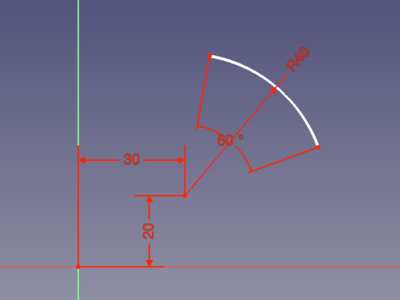
Arc created in Center mode with automatically applied constraints defined by entering all On-View-Parameters
Utilización
See also: Drawing aids.
Pos-OVP = Positional On-View-Parameters. introduced in 1.0
Dim-OVP = Dimensional On-View-Parameters. introduced in 1.0
- Seleccionar puntos en un área vacía de la vista 3D, o sobre un objeto existente (las restricciones automáticas debe estar activado en la Vista de Tareas).
- Presionando Esc o pulsando el botón derecho del ratón se cancela la función.
Notes
- An arc has 5 degrees of freedom (DoF). Constraining its end points and its center to other existing and static points with coincident constraints would need 3×2=6 DoF. To avoid over-constraining, 2 points of the arc can be coincident to these existing points, but the last constraint needs to consume only one DoF. It can be a horizontal or vertical constraint for example. If both end points have coincident constraints, applying a radius dimension or equal constraint to define the radius of the arc can also work.
Esta página ha sido recuperada de https://wiki.freecad.org/Sketcher_CreateArc