


|
|
| Menu location |
|---|
| Part → Primitives → Sphere |
| Workbenches |
| Part |
| Default shortcut |
| None |
| Introduced in version |
| - |
| See also |
| Part Primitives |
Description
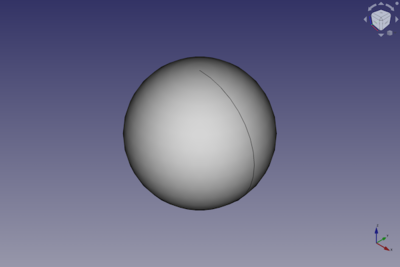
The  Part Sphere command creates a parametric sphere solid. It is the result of revolving a circular arc profile around an axis. In the coordinate system defined by its DataPlacement property, the center of the sphere is positioned at the origin, and its axis of revolution is the Z-axis.
A Part Sphere can be truncated at the top and/or bottom by changing its DataAngle1 and/or DataAngle2 properties. It can be turned into a segment of a sphere by changing its DataAngle3 property.
Usage
- There are several ways to invoke the command:
- Press the Sphere button.
- Select the Part → Primitives → Sphere option from the menu.
- Press the
- The Sphere object is created.
- Optionally change the dimensions and DataPlacement of the sphere by doing one of the following:
- Double-click the object in the Tree View:
- The Geometric Primitives task panel opens.
- Change one or more properties.
- The object is dynamically updated in the 3D View.
- Press the OK button to close the task panel.
- Change the properties in the Property View.
- Change the DataPlacement with the
 Std TransformManip command.
- Double-click the object in the Tree View:
Example
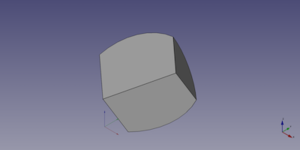
A Part Sphere object created with the scripting example below is shown here.
Notes
- A Part Sphere can also be created with the
 Part Primitives command. With that command you can specify the dimensions and placement at creation time.
Properties
See also: Property View.
A Part Sphere object is derived from a Part Feature object and inherits all its properties. It also has the following additional properties:
Data
Attachment
The object has the same attachment properties as a Part Part2DObject.
Sphere
- DataRadius (
Length): The radius of the sphere. The default is5mm. - DataAngle1 (
Angle): The start angle of the circular arc profile of the sphere. Valid range:-90° <= value <= 90°. May not be equal to DataAngle2. The default is-90°. - DataAngle2 (
Angle): The end angle of the circular arc profile of the sphere. Valid range:-90° <= value <= 90°. May not be equal to DataAngle1. The default is90°. If the total angle of the arc profile is smaller than180°the sphere will be truncated and have a flat face at the top and/or bottom. - DataAngle3 (
Angle): The total angle of revolution of the sphere. Valid range:0° < value <= 360°. The default is360°. If it is smaller than360°the resulting solid will be a segment of a sphere.
Scripting
See also: Autogenerated API documentation, Part scripting and FreeCAD Scripting Basics.
A Part Sphere can be created with the addObject() method of the document:
sphere = FreeCAD.ActiveDocument.addObject("Part::Sphere", "mySphere")
- Where
"mySphere"is the name for the object. - The function returns the newly created object.
Example:
import FreeCAD as App

doc = App.activeDocument()

sphere = doc.addObject("Part::Sphere", "mySphere")
sphere.Radius = 20
sphere.Angle1 = -30
sphere.Angle2 = 45
sphere.Angle3 = 90
sphere.Placement = App.Placement(App.Vector(3, 9, 11), App.Rotation(75, 60, 30))

doc.recompute()
This page is retrieved from https://wiki.freecad.org/Part_Sphere