|
|
| Descrizione |
|---|
| Questa macro marca con un punto rosso (modificabile) il centro della faccia (massa) e stampa le sue coordinate. Versione macro: 0.2 Ultima modifica: 2018-10-07 Download: ToolBar Icon Autore: Mario52 |
| Autore |
| Mario52 |
| Download |
| ToolBar Icon |
| Link |
| Raccolta di macro Come installare le macro Personalizzare la toolbar |
| Versione macro |
| 0.2 |
| Data ultima modifica |
| 2018-10-07 |
| Versioni di FreeCAD |
| None |
| Scorciatoia |
| Nessuna |
| Vedere anche |
| Nessuno |

Descrizione
Questa macro marca con un punto rosso (modificabile) il centro della faccia (massa) e stampa le sue coordinate
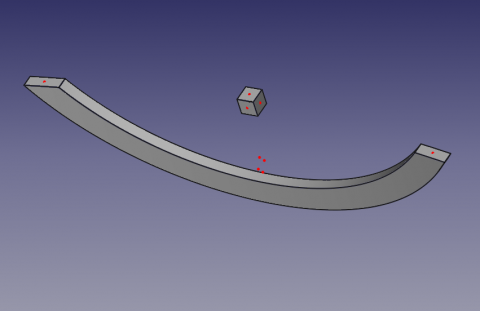
Centro della faccia
Utilizzo
Selezionare una faccia ed avviare la macro. Sulla faccia appare un punto di colore rosso (il colore può essere modificato).
Per cambiare il colore del punto modificare le righe 36, 37, 38
red = 1.0 # 1 = 255
green = 0.0 #
blue = 0.0 #
Il centro della superficie della faccia (massa) e le sue coordinate XYZ vengono visualizzati nella vista report.
Icone
Scaricare le immagini e copiarle nel repertorio delle macro.
Cliccare sull'immagine con il tasto destro del mouse e salvarla nella nuova posizione selezionando "Salva oggetto con nome ..."

Script
Macro_CenterFace.FCMacro
# -*- coding: utf-8 -*-

#OS: Windows Vista     #OS: Windows 10
#Platform: 32-bit      #Word size of OS: 64-bit
#Version: 0.14.3389    #Word size of FreeCAD: 64-bit
#Python version: 2.6.2 #Version: 0.17.13528 (Git)
#Qt version: 4.5.2     #Build type: Release
#Coin version: 3.1.0   #Branch: releases/FreeCAD-0-17
#SoQt version: 1.4.1   #Hash: 5c3f7bf8ec51e2c7187789f7edba71a7aa82a88b
#OCC version: 6.5.1    #Python version: 2.7.14
                       #Qt version: 4.8.7
                       #Coin version: 4.0.0a
                       #OCC version: 7.2.0

# 29/04/2014, 07/10/2018
__title__   = "Macro_CenterFace"
__author__  = "Mario52"
__url__     = "https://freecad.org/index-fr.html"
__Wiki__    = "https://wiki.freecad.org/Macro_CenterFace"
__version__ = "00.02"
__date__    = "07/10/2018"
__Comment__ = "select a face launch and list the center coordinate XYZ of face"

import FreeCAD, FreeCADGui, Draft, Part

def objectRealPlacement3D(obj):    # search the real Placement
    try:
        objectPlacement      = obj.Shape.Placement
        objectPlacementBase  = FreeCAD.Vector(objectPlacement.Base)

        ####
        objectWorkCenter     = objectPlacementBase
        ####

        if hasattr(obj, "getGlobalPlacement"):
            globalPlacement       = obj.getGlobalPlacement()
            globalPlacementBase   = FreeCAD.Vector(globalPlacement.Base)
            ####
            objectRealPlacement3D = globalPlacementBase.sub(objectWorkCenter)#mode=0 adapte pour BBox + Centerpoints
            ####
        else:
            objectRealPlacement3D = objectWorkCenter

        return objectRealPlacement3D
    except Exception:
        return FreeCAD.Vector(0.0, 0.0, 0.0)


try:
    sel = FreeCADGui.Selection.getSelection()       # get the selection
    sh = sel[0]                                     # seletion of the first element

    App.Console.PrintMessage( "__Begin__________"+"\n")
    import unicodedata
    nameLabel  = unicodedata.normalize('NFKD', sh.Label).encode('ascii','ignore')
    App.Console.PrintMessage("Label : "+ str(nameLabel)+"\n")        # extract the Label
    App.Console.PrintMessage("Name  : "+ str(sel[0].Name) +"\n")     # extract the Name
except:
    App.Console.PrintError( "Select a face"+"\n")

try:
    SubElement = FreeCADGui.Selection.getSelectionEx()# "getSelectionEx" Used for selecting subobjects
    element_ = SubElement[0].SubElementNames[0]       # seletion of the first element

    #print element_
    #print sh.Faces
    # LineColor
    red   = 1.0  # 1 = 255
    green = 0.0  #
    blue  = 0.0  #

    for i in range(len(sh.Shape.Faces)):                    # list and extract the data

        oripl_X = sh.Shape.Faces[i].CenterOfMass.x
        oripl_Y = sh.Shape.Faces[i].CenterOfMass.y
        oripl_Z = sh.Shape.Faces[i].CenterOfMass.z
        placementOrigine = objectRealPlacement3D( sh )
        oripl_X += placementOrigine[0]
        oripl_Y += placementOrigine[1]
        oripl_Z += placementOrigine[2]

        App.Console.PrintMessage( "Center Face "+str(i)+"    : "+str(sh.Shape.Faces[i].CenterOfMass)+"\n") # Vector center mass to face
        App.Console.PrintMessage( "GlobalPlacement  : "+str(placementOrigine)+"\n") # Vector center mass to face
        Draft.makePoint(oripl_X, oripl_Y, oripl_Z) # create a point
        FreeCADGui.activeDocument().activeObject().PointColor = (red, green, blue)

        App.Console.PrintMessage( "       Surface   : "+str(sel[0].Shape.Faces[i-1].Area)+"\n")
        fco = 0
        for f0 in sel[0].Shape.Faces[i].Vertexes:      # Vertexes faces
            fco += 1
            App.Console.PrintMessage("       Vertexe X"+str(fco)+": "+str(f0.Point.x)+" Y"+str(fco)+": "+str(f0.Point.y)+" Z"+str(fco)+": "+str(f0.Point.z)+"\n")

except:
    App.Console.PrintError( "Select a face *"+"\n")
App.Console.PrintMessage( "__End____________"+"\n")
Versione
ver 0.2 07/10/2018 : aggiornamento verso FC 017 "getGlobalPlacement"
ver 0.1 29/04/2014
Questa pagina è recuperata da https://wiki.freecad.org/Macro_CenterFace