|
|
| Description |
|---|
| Cette macro crée un point rouge (éditable) au centre de la face (centre de gravité) sélectionnée et affiche ses coordonnées dans la vue rapport. Version macro : 0.2 Date dernière modification : 2018-10-07 Téléchargement : Icône de la barre d'outils Auteur: Mario52 |
| Auteur |
| Mario52 |
| Téléchargement |
| Icône de la barre d'outils |
| Liens |
| Page des macros Comment installer une macro Comment créer une barre d'outils |
| Version Macro |
| 0.2 |
| Dernière modification |
| 2018-10-07 |
| Version(s) FreeCAD |
| None |
| Raccourci clavier |
| None |
| Voir aussi |
| None |

Description
Cette macro crée un point rouge (éditable) au centre de la face (centre de gravité) sélectionnée et affiche ses coordonnées dans la vue rapport.
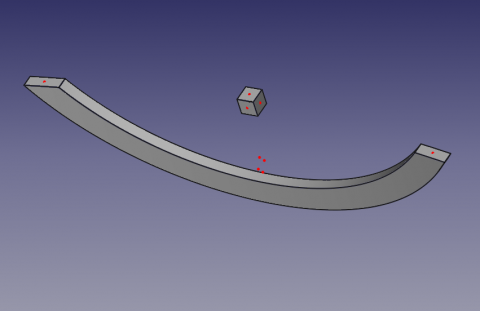
CenterFace
Utilisation
Sélectionnez une face et lancez la macro. Un point sur la face est coloré en rouge (peut être modifié).
Pour changer la couleur du point, modifiez les lignes 36, 37, 38
red = 1.0 # 1 = 255
green = 0.0 #
blue = 0.0 #
Le centre de la face et les coordonnées XYZ de ce centre seront affichés dans la vue rapport ainsi que la surface de la face et ses coordonnées.
Icône
Téléchargez l'icône pour votre barre d'outils et copiez la dans votre répertoire de macros.
Cliquez sur l'image, dans la nouvelle fenêtre faites clic droit de la souris et cliquez "Enregistrez l'image sous..."

Macro
Macro_CenterFace.FCMacro
# -*- coding: utf-8 -*-

#OS: Windows Vista     #OS: Windows 10
#Platform: 32-bit      #Word size of OS: 64-bit
#Version: 0.14.3389    #Word size of FreeCAD: 64-bit
#Python version: 2.6.2 #Version: 0.17.13528 (Git)
#Qt version: 4.5.2     #Build type: Release
#Coin version: 3.1.0   #Branch: releases/FreeCAD-0-17
#SoQt version: 1.4.1   #Hash: 5c3f7bf8ec51e2c7187789f7edba71a7aa82a88b
#OCC version: 6.5.1    #Python version: 2.7.14
                       #Qt version: 4.8.7
                       #Coin version: 4.0.0a
                       #OCC version: 7.2.0

# 29/04/2014, 07/10/2018
__title__   = "Macro_CenterFace"
__author__  = "Mario52"
__url__     = "https://freecad.org/index-fr.html"
__Wiki__    = "https://wiki.freecad.org/Macro_CenterFace"
__version__ = "00.02"
__date__    = "07/10/2018"
__Comment__ = "select a face launch and list the center coordinate XYZ of face"

import FreeCAD, FreeCADGui, Draft, Part

def objectRealPlacement3D(obj):    # search the real Placement
    try:
        objectPlacement      = obj.Shape.Placement
        objectPlacementBase  = FreeCAD.Vector(objectPlacement.Base)

        ####
        objectWorkCenter     = objectPlacementBase
        ####

        if hasattr(obj, "getGlobalPlacement"):
            globalPlacement       = obj.getGlobalPlacement()
            globalPlacementBase   = FreeCAD.Vector(globalPlacement.Base)
            ####
            objectRealPlacement3D = globalPlacementBase.sub(objectWorkCenter)#mode=0 adapte pour BBox + Centerpoints
            ####
        else:
            objectRealPlacement3D = objectWorkCenter

        return objectRealPlacement3D
    except Exception:
        return FreeCAD.Vector(0.0, 0.0, 0.0)


try:
    sel = FreeCADGui.Selection.getSelection()       # get the selection
    sh = sel[0]                                     # seletion of the first element

    App.Console.PrintMessage( "__Begin__________"+"\n")
    import unicodedata
    nameLabel  = unicodedata.normalize('NFKD', sh.Label).encode('ascii','ignore')
    App.Console.PrintMessage("Label : "+ str(nameLabel)+"\n")        # extract the Label
    App.Console.PrintMessage("Name  : "+ str(sel[0].Name) +"\n")     # extract the Name
except:
    App.Console.PrintError( "Select a face"+"\n")

try:
    SubElement = FreeCADGui.Selection.getSelectionEx()# "getSelectionEx" Used for selecting subobjects
    element_ = SubElement[0].SubElementNames[0]       # seletion of the first element

    #print element_
    #print sh.Faces
    # LineColor
    red   = 1.0  # 1 = 255
    green = 0.0  #
    blue  = 0.0  #

    for i in range(len(sh.Shape.Faces)):                    # list and extract the data

        oripl_X = sh.Shape.Faces[i].CenterOfMass.x
        oripl_Y = sh.Shape.Faces[i].CenterOfMass.y
        oripl_Z = sh.Shape.Faces[i].CenterOfMass.z
        placementOrigine = objectRealPlacement3D( sh )
        oripl_X += placementOrigine[0]
        oripl_Y += placementOrigine[1]
        oripl_Z += placementOrigine[2]

        App.Console.PrintMessage( "Center Face "+str(i)+"    : "+str(sh.Shape.Faces[i].CenterOfMass)+"\n") # Vector center mass to face
        App.Console.PrintMessage( "GlobalPlacement  : "+str(placementOrigine)+"\n") # Vector center mass to face
        Draft.makePoint(oripl_X, oripl_Y, oripl_Z) # create a point
        FreeCADGui.activeDocument().activeObject().PointColor = (red, green, blue)

        App.Console.PrintMessage( "       Surface   : "+str(sel[0].Shape.Faces[i-1].Area)+"\n")
        fco = 0
        for f0 in sel[0].Shape.Faces[i].Vertexes:      # Vertexes faces
            fco += 1
            App.Console.PrintMessage("       Vertexe X"+str(fco)+": "+str(f0.Point.x)+" Y"+str(fco)+": "+str(f0.Point.y)+" Z"+str(fco)+": "+str(f0.Point.z)+"\n")

except:
    App.Console.PrintError( "Select a face *"+"\n")
App.Console.PrintMessage( "__End____________"+"\n")
Version
ver 0.2 07/10/2018 : mise à jour pour FC 017 "getGlobalPlacement"
ver 0.1 29/04/2014
Cette page est extraite de https://wiki.freecad.org/Macro_CenterFace