|
|
| Description |
|---|
| This macro red trace (editable) the center face (mass) with 1 point and print the coordinates. Macro version: 0.2 Last modified: 2018-10-07 Download: ToolBar Icon Author: Mario52 |
| Author |
| Mario52 |
| Download |
| ToolBar Icon |
| Links |
| Macros recipes How to install macros How to customize toolbars |
| Macro Version |
| 0.2 |
| Date last modified |
| 2018-10-07 |
| FreeCAD Version(s) |
| None |
| Default shortcut |
| None |
| See also |
| None |

Description
This macro red trace (editable) the center face (mass) with 1 point and print the coordinates.
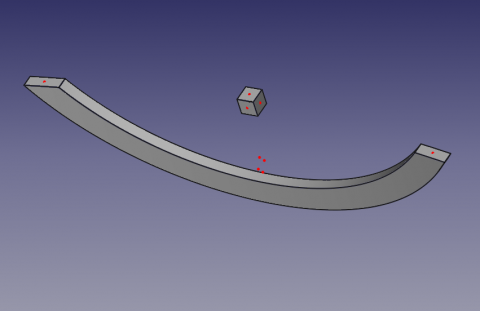
CenterFace
Usage
Select one face and launch the macro. 1 point to face are coloured red (can be changed).
To change the color of the dot change the lines 36, 37, 38
red = 1.0 # 1 = 255
green = 0.0 #
blue = 0.0 #
The center of the face (mass) surface and the XYZ coordinates of the face are displayed in the report view.
Icon
Download the file image and copy in your macro repertory.
Click the image, in the new window position the mouse over the image, click the right mouse and do "Save target as ..."

Script
Macro_CenterFace.FCMacro
# -*- coding: utf-8 -*-

#OS: Windows Vista     #OS: Windows 10
#Platform: 32-bit      #Word size of OS: 64-bit
#Version: 0.14.3389    #Word size of FreeCAD: 64-bit
#Python version: 2.6.2 #Version: 0.17.13528 (Git)
#Qt version: 4.5.2     #Build type: Release
#Coin version: 3.1.0   #Branch: releases/FreeCAD-0-17
#SoQt version: 1.4.1   #Hash: 5c3f7bf8ec51e2c7187789f7edba71a7aa82a88b
#OCC version: 6.5.1    #Python version: 2.7.14
                       #Qt version: 4.8.7
                       #Coin version: 4.0.0a
                       #OCC version: 7.2.0

# 29/04/2014, 07/10/2018
__title__   = "Macro_CenterFace"
__author__  = "Mario52"
__url__     = "https://freecad.org/index-fr.html"
__Wiki__    = "https://wiki.freecad.org/Macro_CenterFace"
__version__ = "00.02"
__date__    = "07/10/2018"
__Comment__ = "select a face launch and list the center coordinate XYZ of face"

import FreeCAD, FreeCADGui, Draft, Part

def objectRealPlacement3D(obj):    # search the real Placement
    try:
        objectPlacement      = obj.Shape.Placement
        objectPlacementBase  = FreeCAD.Vector(objectPlacement.Base)

        ####
        objectWorkCenter     = objectPlacementBase
        ####

        if hasattr(obj, "getGlobalPlacement"):
            globalPlacement       = obj.getGlobalPlacement()
            globalPlacementBase   = FreeCAD.Vector(globalPlacement.Base)
            ####
            objectRealPlacement3D = globalPlacementBase.sub(objectWorkCenter)#mode=0 adapte pour BBox + Centerpoints
            ####
        else:
            objectRealPlacement3D = objectWorkCenter

        return objectRealPlacement3D
    except Exception:
        return FreeCAD.Vector(0.0, 0.0, 0.0)


try:
    sel = FreeCADGui.Selection.getSelection()       # get the selection
    sh = sel[0]                                     # seletion of the first element

    App.Console.PrintMessage( "__Begin__________"+"\n")
    import unicodedata
    nameLabel  = unicodedata.normalize('NFKD', sh.Label).encode('ascii','ignore')
    App.Console.PrintMessage("Label : "+ str(nameLabel)+"\n")        # extract the Label
    App.Console.PrintMessage("Name  : "+ str(sel[0].Name) +"\n")     # extract the Name
except:
    App.Console.PrintError( "Select a face"+"\n")

try:
    SubElement = FreeCADGui.Selection.getSelectionEx()# "getSelectionEx" Used for selecting subobjects
    element_ = SubElement[0].SubElementNames[0]       # seletion of the first element

    #print element_
    #print sh.Faces
    # LineColor
    red   = 1.0  # 1 = 255
    green = 0.0  #
    blue  = 0.0  #

    for i in range(len(sh.Shape.Faces)):                    # list and extract the data

        oripl_X = sh.Shape.Faces[i].CenterOfMass.x
        oripl_Y = sh.Shape.Faces[i].CenterOfMass.y
        oripl_Z = sh.Shape.Faces[i].CenterOfMass.z
        placementOrigine = objectRealPlacement3D( sh )
        oripl_X += placementOrigine[0]
        oripl_Y += placementOrigine[1]
        oripl_Z += placementOrigine[2]

        App.Console.PrintMessage( "Center Face "+str(i)+"    : "+str(sh.Shape.Faces[i].CenterOfMass)+"\n") # Vector center mass to face
        App.Console.PrintMessage( "GlobalPlacement  : "+str(placementOrigine)+"\n") # Vector center mass to face
        Draft.makePoint(oripl_X, oripl_Y, oripl_Z) # create a point
        FreeCADGui.activeDocument().activeObject().PointColor = (red, green, blue)

        App.Console.PrintMessage( "       Surface   : "+str(sel[0].Shape.Faces[i-1].Area)+"\n")
        fco = 0
        for f0 in sel[0].Shape.Faces[i].Vertexes:      # Vertexes faces
            fco += 1
            App.Console.PrintMessage("       Vertexe X"+str(fco)+": "+str(f0.Point.x)+" Y"+str(fco)+": "+str(f0.Point.y)+" Z"+str(fco)+": "+str(f0.Point.z)+"\n")

except:
    App.Console.PrintError( "Select a face *"+"\n")
App.Console.PrintMessage( "__End____________"+"\n")
Version
ver 0.2 07/10/2018 : upgrade for FC 017 "getGlobalPlacement"
ver 0.1 29/04/2014
This page is retrieved from https://wiki.freecad.org/Macro_CenterFace