|
|
| Popis |
|---|
| This macro red trace (editable) the center face (mass) with 1 point and print the coordinates. Version macro : 0.1 Date last modification : 2014-04-29 Autor: Mario52 |
| Autor |
| Mario52 |
| Download |
| None |
| Odkazy |
| Makro recepty| Jak nainstalovat makra Jak přizpůsobit panely nástrojů |
| Verze |
| 0.1 |
| Datum poslední úpravy |
| 2014-04-29 |
| Verze FreeCAD |
| None |
| Výchozí zástupce |
| None |
| Viz též |
| None |

Description
Popis
Toto makro červené stopy (lze upravovat) středovou plochu (hmotnost) s 1 bodem a vytisknout souřadnice.
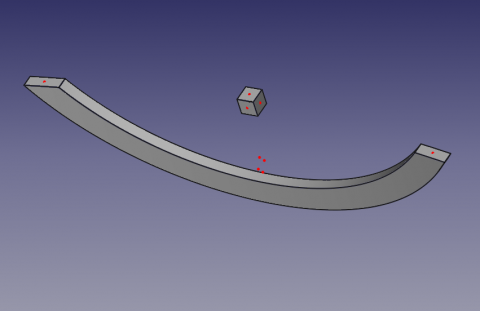
CenterFace
Usage
Použijte
Vyberte jednu tvář a spusťte makro. 1 bod na obličej je barevně červený (lze jej změnit).
Chcete-li změnit barvu bodu, změňte řádky 36, 37, 38
red = 1.0 # 1 = 255
green = 0.0 #
blue = 0.0 #
Střed plochy obličeje (hmotnost) a souřadnice XYZ obličeje jsou zobrazeny v zobrazení sestavy.
Icon
Icone
Stáhněte obrázek obrázku a zkopírujte do repertoáru maker.
Klikněte na obrázek, v novém okně umístěte myš nad obrázek, klikněte pravým tlačítkem myši a proveďte "Uložit cíl jako ..."

Skript
Macro_CenterFace.FCMacro
# -*- coding: utf-8 -*-

#OS: Windows Vista     #OS: Windows 10
#Platform: 32-bit      #Word size of OS: 64-bit
#Version: 0.14.3389    #Word size of FreeCAD: 64-bit
#Python version: 2.6.2 #Version: 0.17.13528 (Git)
#Qt version: 4.5.2     #Build type: Release
#Coin version: 3.1.0   #Branch: releases/FreeCAD-0-17
#SoQt version: 1.4.1   #Hash: 5c3f7bf8ec51e2c7187789f7edba71a7aa82a88b
#OCC version: 6.5.1    #Python version: 2.7.14
                       #Qt version: 4.8.7
                       #Coin version: 4.0.0a
                       #OCC version: 7.2.0

# 29/04/2014, 07/10/2018
__title__   = "Macro_CenterFace"
__author__  = "Mario52"
__url__     = "https://freecad.org/index-fr.html"
__Wiki__    = "https://wiki.freecad.org/Macro_CenterFace"
__version__ = "00.02"
__date__    = "07/10/2018"
__Comment__ = "select a face launch and list the center coordinate XYZ of face"

import FreeCAD, FreeCADGui, Draft, Part

def objectRealPlacement3D(obj):    # search the real Placement
    try:
        objectPlacement      = obj.Shape.Placement
        objectPlacementBase  = FreeCAD.Vector(objectPlacement.Base)

        ####
        objectWorkCenter     = objectPlacementBase
        ####

        if hasattr(obj, "getGlobalPlacement"):
            globalPlacement       = obj.getGlobalPlacement()
            globalPlacementBase   = FreeCAD.Vector(globalPlacement.Base)
            ####
            objectRealPlacement3D = globalPlacementBase.sub(objectWorkCenter)#mode=0 adapte pour BBox + Centerpoints
            ####
        else:
            objectRealPlacement3D = objectWorkCenter

        return objectRealPlacement3D
    except Exception:
        return FreeCAD.Vector(0.0, 0.0, 0.0)


try:
    sel = FreeCADGui.Selection.getSelection()       # get the selection
    sh = sel[0]                                     # seletion of the first element

    App.Console.PrintMessage( "__Begin__________"+"\n")
    import unicodedata
    nameLabel  = unicodedata.normalize('NFKD', sh.Label).encode('ascii','ignore')
    App.Console.PrintMessage("Label : "+ str(nameLabel)+"\n")        # extract the Label
    App.Console.PrintMessage("Name  : "+ str(sel[0].Name) +"\n")     # extract the Name
except:
    App.Console.PrintError( "Select a face"+"\n")

try:
    SubElement = FreeCADGui.Selection.getSelectionEx()# "getSelectionEx" Used for selecting subobjects
    element_ = SubElement[0].SubElementNames[0]       # seletion of the first element

    #print element_
    #print sh.Faces
    # LineColor
    red   = 1.0  # 1 = 255
    green = 0.0  #
    blue  = 0.0  #

    for i in range(len(sh.Shape.Faces)):                    # list and extract the data

        oripl_X = sh.Shape.Faces[i].CenterOfMass.x
        oripl_Y = sh.Shape.Faces[i].CenterOfMass.y
        oripl_Z = sh.Shape.Faces[i].CenterOfMass.z
        placementOrigine = objectRealPlacement3D( sh )
        oripl_X += placementOrigine[0]
        oripl_Y += placementOrigine[1]
        oripl_Z += placementOrigine[2]

        App.Console.PrintMessage( "Center Face "+str(i)+"    : "+str(sh.Shape.Faces[i].CenterOfMass)+"\n") # Vector center mass to face
        App.Console.PrintMessage( "GlobalPlacement  : "+str(placementOrigine)+"\n") # Vector center mass to face
        Draft.makePoint(oripl_X, oripl_Y, oripl_Z) # create a point
        FreeCADGui.activeDocument().activeObject().PointColor = (red, green, blue)

        App.Console.PrintMessage( "       Surface   : "+str(sel[0].Shape.Faces[i-1].Area)+"\n")
        fco = 0
        for f0 in sel[0].Shape.Faces[i].Vertexes:      # Vertexes faces
            fco += 1
            App.Console.PrintMessage("       Vertexe X"+str(fco)+": "+str(f0.Point.x)+" Y"+str(fco)+": "+str(f0.Point.y)+" Z"+str(fco)+": "+str(f0.Point.z)+"\n")

except:
    App.Console.PrintError( "Select a face *"+"\n")
App.Console.PrintMessage( "__End____________"+"\n")
Verze
ver 0.2 07/10/2018 : upgrade for FC 017 "getGlobalPlacement"
ver 0.1 29/04/2014
Tato stránka je načtena z https://wiki.freecad.org/Macro_CenterFace