|
|
| Beschreibung |
|---|
| Dieses Makro kennzeichnet Flächenschwerpunkte mit roten Punkten und gibt die Koordinaten aus. (Die Farbe kann eingestellt werden) Versionsmakro : 0.2 Datum der letzten Änderung : 2018-10-07 Herunterladen : Werkzeugleisten-Symbol Autor: Mario52 |
| Autor |
| Mario52 |
| Herunterladen |
| Werkzeugleisten-Symbol |
| Links |
| Makros Rezepte Wie man Makros installiert Symbolleisten anpassen |
| Macro-Version |
| 0.2 |
| Datum der letzten Änderung |
| 2018-10-07 |
| FreeCAD-Version(s) |
| None |
| Standardverknüpfung |
| None |
| Siehe auch |
| None |

Beschreibung
Dieses Makro kennzeichnet Flächenschwerpunkte mit roten Punkten und gibt die Koordinaten aus. (Die Farbe kann eingestellt werden)
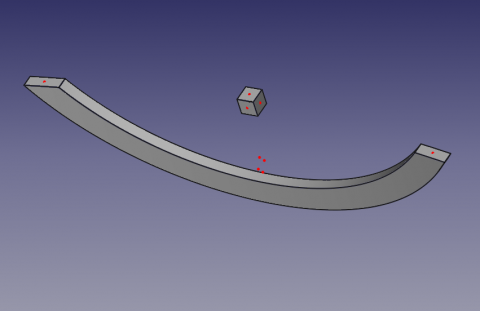
Flächenschwerpunkte
Anwendung
Eine Fläche auswählen, dann das Makro starten. Auf jede Fläche wird ein roter Punkt gesetzt (Farbe kann geändert werden).
Um die Farbe der Punkte anzupassen, werden die Zeilen 36, 37, 38 geändert.
red = 1.0 # 1 = 255
green = 0.0 #
blue = 0.0 #
Die Flächenschwerpunkte und die X-, Y-, und Z-Koordinaten der Fläche werden im Ausgabefenster angezeigt.
Symbol
Das Dateisymbol herunterladen und in das eigene Makro-Verzeichnis kopieren.
Auf das Bild klicken, im neuen Fenster die Maus über dem Bild positionieren, mit der rechten Maustaste klicken und "Ziel speichern unter ..." wählen.

Skript
Macro_CenterFace.FCMacro
# -*- coding: utf-8 -*-

#OS: Windows Vista     #OS: Windows 10
#Platform: 32-bit      #Word size of OS: 64-bit
#Version: 0.14.3389    #Word size of FreeCAD: 64-bit
#Python version: 2.6.2 #Version: 0.17.13528 (Git)
#Qt version: 4.5.2     #Build type: Release
#Coin version: 3.1.0   #Branch: releases/FreeCAD-0-17
#SoQt version: 1.4.1   #Hash: 5c3f7bf8ec51e2c7187789f7edba71a7aa82a88b
#OCC version: 6.5.1    #Python version: 2.7.14
                       #Qt version: 4.8.7
                       #Coin version: 4.0.0a
                       #OCC version: 7.2.0

# 29/04/2014, 07/10/2018
__title__   = "Macro_CenterFace"
__author__  = "Mario52"
__url__     = "https://freecad.org/index-fr.html"
__Wiki__    = "https://wiki.freecad.org/Macro_CenterFace"
__version__ = "00.02"
__date__    = "07/10/2018"
__Comment__ = "select a face launch and list the center coordinate XYZ of face"

import FreeCAD, FreeCADGui, Draft, Part

def objectRealPlacement3D(obj):    # search the real Placement
    try:
        objectPlacement      = obj.Shape.Placement
        objectPlacementBase  = FreeCAD.Vector(objectPlacement.Base)

        ####
        objectWorkCenter     = objectPlacementBase
        ####

        if hasattr(obj, "getGlobalPlacement"):
            globalPlacement       = obj.getGlobalPlacement()
            globalPlacementBase   = FreeCAD.Vector(globalPlacement.Base)
            ####
            objectRealPlacement3D = globalPlacementBase.sub(objectWorkCenter)#mode=0 adapte pour BBox + Centerpoints
            ####
        else:
            objectRealPlacement3D = objectWorkCenter

        return objectRealPlacement3D
    except Exception:
        return FreeCAD.Vector(0.0, 0.0, 0.0)


try:
    sel = FreeCADGui.Selection.getSelection()       # get the selection
    sh = sel[0]                                     # seletion of the first element

    App.Console.PrintMessage( "__Begin__________"+"\n")
    import unicodedata
    nameLabel  = unicodedata.normalize('NFKD', sh.Label).encode('ascii','ignore')
    App.Console.PrintMessage("Label : "+ str(nameLabel)+"\n")        # extract the Label
    App.Console.PrintMessage("Name  : "+ str(sel[0].Name) +"\n")     # extract the Name
except:
    App.Console.PrintError( "Select a face"+"\n")

try:
    SubElement = FreeCADGui.Selection.getSelectionEx()# "getSelectionEx" Used for selecting subobjects
    element_ = SubElement[0].SubElementNames[0]       # seletion of the first element

    #print element_
    #print sh.Faces
    # LineColor
    red   = 1.0  # 1 = 255
    green = 0.0  #
    blue  = 0.0  #

    for i in range(len(sh.Shape.Faces)):                    # list and extract the data

        oripl_X = sh.Shape.Faces[i].CenterOfMass.x
        oripl_Y = sh.Shape.Faces[i].CenterOfMass.y
        oripl_Z = sh.Shape.Faces[i].CenterOfMass.z
        placementOrigine = objectRealPlacement3D( sh )
        oripl_X += placementOrigine[0]
        oripl_Y += placementOrigine[1]
        oripl_Z += placementOrigine[2]

        App.Console.PrintMessage( "Center Face "+str(i)+"    : "+str(sh.Shape.Faces[i].CenterOfMass)+"\n") # Vector center mass to face
        App.Console.PrintMessage( "GlobalPlacement  : "+str(placementOrigine)+"\n") # Vector center mass to face
        Draft.makePoint(oripl_X, oripl_Y, oripl_Z) # create a point
        FreeCADGui.activeDocument().activeObject().PointColor = (red, green, blue)

        App.Console.PrintMessage( "       Surface   : "+str(sel[0].Shape.Faces[i-1].Area)+"\n")
        fco = 0
        for f0 in sel[0].Shape.Faces[i].Vertexes:      # Vertexes faces
            fco += 1
            App.Console.PrintMessage("       Vertexe X"+str(fco)+": "+str(f0.Point.x)+" Y"+str(fco)+": "+str(f0.Point.y)+" Z"+str(fco)+": "+str(f0.Point.z)+"\n")

except:
    App.Console.PrintError( "Select a face *"+"\n")
App.Console.PrintMessage( "__End____________"+"\n")
Version
ver 0.2 07/10/2018 : upgrade for FC 017 "getGlobalPlacement"
ver 0.1 29/04/2014
Diese Seite wird abgerufen von https://wiki.freecad.org/Macro_CenterFace