


简介
FEM 工作台为 FreeCAD 提供了现代化有限元分析(FEA)工作流,即将用于创建分析的所有工具集成到了单个图形用户界面(GUI)中。

工作流程
创建有限元分析的流程如下:
- 预处理:配置要仿真的问题
- 创建几何模型:使用 FreeCAD 创建或从其它应用导入几何模型
- 创建仿真
- 为几何模型添加约束(例如载荷和固定支撑)
- 为几何模型的部件设定材质
- 为几何模型创建或从其它应用导入有限元网格
- 求解:在 FreeCAD 中运行外部求解器
- 后处理:在 FreeCAD 中将仿真结果可视化,或是导出结果以在其它应用中进行后处理
FEM 工作台在 Linux,Windows 和 Mac OSX 上都可用。由于工作台使用了外部求解器,因此具体的手动配置工作多少取决于你所使用的系统平台。关于配置外部工具的步骤请参考 FEM 安装文档。
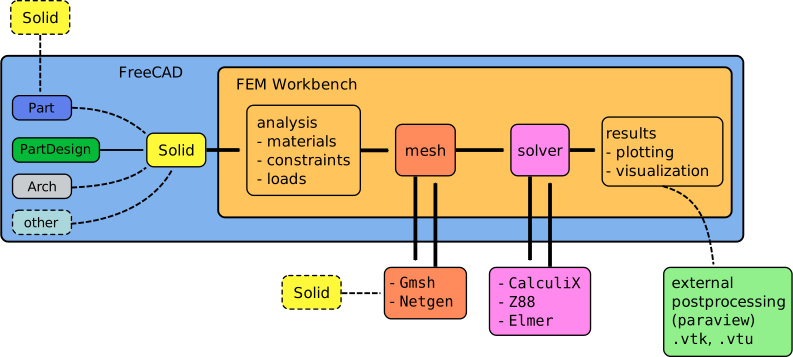
FEM 工作台的流程;工作台会调用两个外部程序,分别用于为固体对象生成网格和为有限元问题求解
菜单:模型
 仿真容器:为机械仿真创建一个新容器
材质
 固体材质:从数据库中选择固体材质
 流体材质:从数据库中选择流体材质
 非线性机械材质:添加非线性机械材质模型
 Reinforced Material (Concrete): Lets you select reinforced materials consisting of a matrix and a reinforcement from the database.
 材质编辑器:打开材质编辑器以编辑材质
Element Geometry
 Beam Cross Section: Used to define cross sections for beam elements.
 Beam Rotation: Used to rotate cross sections of beam elements.
 Shell Plate Thickness: Used to define shell element thickness.
 Fluid Section for 1D Flow: Used to create fluid section element for pneumatic and hydraulic networks.
电磁边界条件
 静电势边界条件:用于定义静电势。
 电流密度边界条件:用于定义电流密度。introduced in 0.21
 磁化强度边界条件用于定义磁化强度。introduced in 0.21
 电荷密度:用于定义电荷密度载荷。introduced in 1.1
Fluid Boundary Conditions
 Initial Flow Velocity Condition: Used to define an initial flow velocity for a body (volume).
 Initial Pressure Condition: Used to define an initial pressure for a body (volume). introduced in 0.21
 Flow Velocity Boundary Condition: Used to define a flow velocity as a boundary condition at an edge (2D) or face (3D).
Geometrical Analysis Features
 Plane Multi-Point Constraint: Used to define a constraint for keeping the nodes on a planar surface on the same plane.
 Section Print Feature: Used to print the predefined facial output variables (forces and moments) to the data file.
 Local Coordinate System: Used to define a local coordinate system for a face.
Mechanical Boundary Conditions and Loads
 Fixed Boundary Condition: Used to define a fixed boundary condition on point/edge/face(s).
 Rigid Body Constraint: Used to apply the CalculiX's rigid body constraint that constrains the motion of the nodes of a selected geometrical entity to the motion of a reference point positioned by the user. introduced in 1.0
 Displacement Boundary Condition: Used to define a displacement boundary condition on point/edge/face(s).
 Contact Constraint: Used to define a contact constraint between two faces.
 Tie Constraint: Used to define a tie constraint ("bonded contact") between two faces, or, introduced in 1.0, cyclic symmetry.
 Spring Boundary Condition: Used to define a spring boundary condition. introduced in 0.20
 Force Load: Used to define a force in [N] applied uniformly to the selected geometric entity in the defined direction.
 Pressure Load: Used to define a pressure load.
 Centrifugal Load: Used to define a centrifugal force body load. introduced in 0.20
 Gravity Load: Used to define a gravity acceleration acting on a model.
Thermal Boundary Conditions and Loads
 Initial Temperature: Used to define the initial temperature of a body.
 Heat Flux Load: Used to define a heat flux load on a face(s).
 Temperature Boundary Condition: Used to define a temperature boundary condition on a point/edge/face(s).
 Body Heat Source: Used to define an internally generated body heat.
Overwrite Constants
 Constant Vacuum Permittivity: Used to overwrite the permittivity of vacuum with a custom value.
菜单:网格
 由 Netgen 根据形状生成 FEM 网格:使用 Netgen 从模型生成有限元网格。
 由 Gmsh 根据形状生成 FEM 网格:使用 Gmsh 从模型生成有限元网格。
 FEM 网格边界层:创建各向异性网格,用于对边界附近进行精确计算。
 Mesh Refinement: Creates a localized area(s) to mesh which highly optimizes analysis time.
 Mesh Group: Groups and labels elements of a mesh (vertex, edge, surface) together, useful for exporting the mesh to external solvers.
 Erase Elements: Hides elements selected by a polygon from the mesh. introduced in 1.0
 将 FEM 网格转换为一般网格:将选定 FEM 网格的三维元素的平面或所有二维元素转换为曲面网格。
菜单:求解
 CalculiX 求解器:为仿真创建一个新求解器
 Elmer 求解器:为 Elmer 求解器创建求解器控制器。
 Mystran 求解器:为 MYSTRAN 求解器创建求解器控制器。introduced in 0.20
 Z88 求解器:为 Z88 求解器创建求解器控制器。
机械方程
 Elasticity Equation: Equation for the Solver Elmer to perform linear mechanical analyses.
 Deformation Equation: Equation for the Solver Elmer to perform nonlinear mechanical analyses (deformations). introduced in 0.21
Electromagnetic Equations
 Electrostatic Equation: Equation for the Solver Elmer to perform electrostatic analyses.
 Electricforce Equation: Equation for the Solver Elmer to calculate the electric force on surfaces.
 Magnetodynamic Equation: Equation for the Solver Elmer to calculate magnetodynamics. introduced in 0.21
 Magnetodynamic 2D Equation: Equation for the Solver Elmer to calculate magnetodynamics in 2D. introduced in 0.21
 Static Current Equation: Equation for the Solver Elmer to calculate static current conduction. introduced in 1.1
 Flow Equation: Equation for the Solver Elmer to perform flow analyses.
 Flux Equation: Equation for the Solver Elmer to perform flux analyses.
 Heat Equation: Equation for the Solver Elmer to perform heat transfer analyses.
 Solver Job Control: Opens the menu to adjust and start the selected solver.
 Run Solver: Runs the selected solver of the active analysis.
Menu: Results
 Purge Results: Deletes the results of the active analysis.
 Show Result: Used to display the result of an analysis. This dialog is not available for the Solver Elmer as this solver visualizes using the Post pipeline from result object only.
 Apply Changes to Pipeline: Toggles if changes to pipelines and filters are applied immediately.
 Post Pipeline From Result: Used to add a new graphical representation of FEM analysis results (color scale and more display options).
 Pipeline Branch: Used to branch the results pipeline. introduced in 1.1
 Warp Filter: Used to visualize the scaled deformed shape of the model.
 Scalar Clip Filter: Used to clip a field with a specified scalar value.
 Function Cut Filter: Used to display the results on a plane, a sphere, a cylinder, or a box cutting through the model.
 Region Clip Filter: Used to clip a field with a plane, a sphere, a cylinder, or a box cutting through the model.
 Contours Filter: Used to display iso-lines (for analyses in 2D) or iso-contours. introduced in 0.21
 Glyph Filter: Used to create glyph (symbol) plots. introduced in 1.1
 Line Clip Filter: Used to plot the values of a field along a specified line.
 Stress Linearization Plot: Creates a stress linearization plot.
 Data at Point Clip Filter: Used to display value of a selected field at a given point.
 Calculator Filter: Used to create custom fields by evaluating expressions operating on the existing fields. introduced in 1.1
Filter Functions
 Plane: Cuts the result mesh with a plane.
 Sphere: Cuts the result mesh with a sphere.
 Cylinder: Cuts the result mesh with a cylinder. introduced in 0.21
 Box: Cuts the result mesh with a box. introduced in 0.21
Data Visualizations
 Create Lineplot: Creates a lineplot for a selected pipeline/filter. introduced in 1.1
 Create Histogram: Creates a histogram for a selected pipeline/filter. introduced in 1.1
 Create Table: Creates a table for a selected pipeline/filter. introduced in 1.1
Menu: Utilities
 Clipping Plane on Face: Adds a clipping plane for the whole model view.
 Remove All Clipping Planes: Removes all existing clipping planes.
 FEM Examples: Open the GUI to access FEM examples.
Context Menu
 Clear FEM Mesh: Deletes the mesh file from the FreeCAD file. Useful to make a FreeCAD file lighter.
 Clear Mesh Groups: Deletes the mesh groups without removing the mesh itself, to reduce the file size when exporting meshes. introduced in 1.2
 Display Mesh Info: Displays basic statistics of existing mesh - number of nodes and elements of each type.
Obsolete tools
 Fluid boundary condition: Used to define a fluid boundary condition. Did not have a solver. Not available in 1.0 and above.
 Constraint bearing: Used to define a bearing constraint. Did not have a solver. Not available in 1.0 and above.
 Constraint gear: Used to define a gear constraint. Did not have a solver. Not available in 1.0 and above.
 Constraint pulley: Used to define a pulley constraint. Did not have a solver. Not available in 1.0 and above.
 Solver CalculiX (new framework): Same as the original framework Solver CalculiX with extra checks. Tool was unfinished. Not available in 1.0 and above.
 Nodes set: Creates/defines a node set from FEM mesh. Tool was unfinished and couldn't be used. Not available in 1.0 and above.
Preferences
 Preferences: Preferences available in FEM Tools.
Information
The following pages explain different topics of the FEM Workbench.
FEM Install: a detailed description on how to set up the external programs used in the workbench.
FEM Geometry Preparation and Meshing: tips regarding geometry preparation for FEM and meshing.
FEM Mesh: details about meshes in the FEM Workbench.
FEM Solver: further information on the different solvers available in the workbench, and those that could be used in the future.
FEM CalculiX: further information on CalculiX, the default solver used in the workbench for structural analysis.
FEM Concrete: interesting information on the topic of simulating concrete structures.
Tutorials
Tutorial 1: FEM CalculiX Cantilever 3D; basic simply supported beam analysis.
Tutorial 2: FEM Tutorial; simple tension analysis of a structure.
Tutorial 3: FEM Tutorial Python; set up the cantilever example entirely through scripting in Python, including the mesh.
Tutorial 4: FEM Shear of a Composite Block; see the deformation of a block that is comprised of two materials.
Tutorial 5: Transient FEM analysis
Tutorial 6: Post-Processing of FEM Results with Paraview
Tutorial 7: FEM Example Capacitance Two Balls; Elmer's GUI tutorial 6 "Electrostatics Capacitance Two Balls" using FEM Examples.
Coupled thermal mechanical analysis tutorials by openSIM
Video tutorial 1: FEM video for beginner (including YouTube link)
Video tutorial 2: FEM video for beginner (including YouTube link)
Many video tutorials: anisim Open Source Engineering Software (in German)
Extending the FEM Workbench
The FEM Workbench is under constant development. An objective of the project is to find ways to easily interact with various FEM solvers, so that the end user can streamline the process of creating, meshing, simulating, and optimizing an engineering design problem, all within FreeCAD.
The following information is aimed at power users and developers who want to extend the FEM Workbench in different ways. Familiarity with C++ and Python is expected, and also some knowledge of the "document object" system used in FreeCAD is necessary; this information is available in the Power users hub and the Developer hub. Please notice that since FreeCAD is under active development, some articles may be too old, and thus obsolete. The most up to date information is discussed in the FreeCAD forums, in the Development section. For FEM discussions, advice or assistance in extending the workbench, the reader should refer to the FEM subforum.
The following articles explain how the workbench can be extended, for example, by adding new types of boundary conditions (constraints), or equations.
- Extend FEM Module
- Onboarding FEM Devs attempts to orient new devs on how to contribute to the FEM Workbench.
- Add FEM Constraint Tutorial
- Add FEM Equation Tutorial
A developer's guide has been written to help power users in understanding the complex FreeCAD codebase and the interactions between the core elements and the individual workbenches. The book is hosted at github so multiple users can contribute to it and keep it updated.
- Early preview of ebook: Module developer' guide to FreeCAD source forum thread.
- FreeCAD Mod Dev Guide github repository.
Extending the FEM Workbench documentation
- More information regarding extending or missing FEM documentation can be found in the forum: FEM documentation missing on the Wiki