


Introducere
FEM Workbench oferă un flux modern de analiză prin metoda elementelor finite (MEF) pentru FreeCAD. În principal, acest lucru înseamnă că toate instrumentele pentru a face o analiză prin Metoda Elementului Finit sunt combinate într-o singură interfață grafică(GUI).

Plan de lucru
Pașii pentru a face AEF în Atelierul AEF din FreeCAD GUI sunt:
- Preprocesare, setting up the analysis problem.
- Modelarea geometriei, în care FreeCAD este deja un software aproape dezvoltat: creating the geometry with FreeCAD, or importing it from a different application.
- Creați o analiză:
- Creați o Plasă AEF din modelul geometric.
- Adăugați la modelul de analiză constrângeri, cum ar fi sarcini și corecții de asistență.
- Adăugați un material la modelul de analiză
- Rezolvarea: Rezolvați sistemul de ecuații din cadrul GUI-ului FreeCAD.
- Postprocesare: Vezi rezultatele din FreeCAD GUI.
Începând cu versiunea 0.15 a FreeCAD, Atelierul AEF poate fi folosit pe platforme Windows, Mac OSX și Linux. Deoarece Atelierul AEF folosește software extern, cantitatea de intervenție manuală până când Atelierul AEF este gata de utilizare va depinde de sistemul de operare pe care îl utilizați. Verificați FEM Install page for instructions on setting up the external tools.
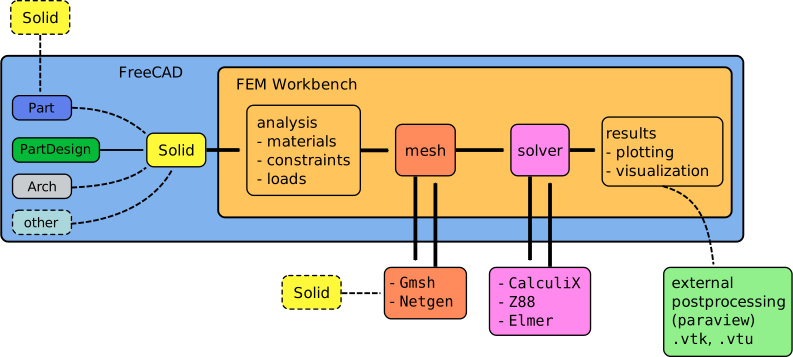
Workflow of the FEM Workbench; the workbench calls two external programs to perform meshing of a solid object, and perform the actual solution of the finite element problem
Meniu: Model
 Analysis container: Creează un nou container pentru analiza mecanică. Dacă un solid este selectat în vederea arborescentă înainte de a face click pe el dialogul plasei de discretizare va fi deschis alături
Materiale
 FEM material for solid: Vă permite să selectați un material din baza de date.
 Material for fluid: Lets you select a material from the database.
 Nonlinear mechanical material: Vă permite să selectați un material din baza de date..
 Reinforced Material (Concrete): Lets you select reinforced materials consisting of a matrix and a reinforcement from the database.
 Material editor:: Lets you open the material editor to edit materials
Element Geometry


Electromagnetic Boundary Conditions

 Current Density Boundary Condition: Used to define a current density. introduced in 0.21
 Magnetization Boundary Condition: Used to define a magnetization. introduced in 0.21
 Electric Charge Density: Used to define electric charge density load. introduced in 1.1
Fluid constraints

 Initial Pressure Condition: Used to define an initial pressure for a body (volume). introduced in 0.21

Geometrical Analysis Features
 Constraint plane rotation: Vă permite să definiți o constrângere de rotație a planului pe o fațetă plană
 Section Print Feature: Used to print the predefined facial output variables (forces and moments) to the data file.

Constrângeri Mecanice
 Constraint fixed:Se utilizează pentru a defini o constrângere fixă pe punct/margine/fațetă (e)..
 Rigid Body Constraint: Used to apply the CalculiX's rigid body constraint that constrains the motion of the nodes of a selected geometrical entity to the motion of a reference point positioned by the user. introduced in 1.0
 Constraint displacement: Used to define a displacement constraint on point/edge/face(s).
 Constraint contact: Utilizat pentru a defini contactul de constrângere între două fațete.
 Tie Constraint: Used to define a tie constraint ("bonded contact") between two faces, or, introduced in 1.0, cyclic symmetry.
 Spring Boundary Condition: Used to define a spring boundary condition. introduced in 0.20
 Constraint force: Utilizat pentru a defini o forță exprimată în [N] aplicată unifrom pe fațetă selectată într-o direcție definibilă.
 Constraint pressure: Utilizat pentru a defini constrângere de presiune.
 Centrifugal Load: Used to define a centrifugal force body load. introduced in 0.20
 Constraint self weight: Utilizat pentru a defini accelerația gravitațională care acționează asupra modelului.
Constrângeri termice
 Constraint initial temperature: Utilizat pentru a defini temperatura inițială a corpului.
 Constraint heatflux: Utilizat pentru a defini fluxul de căldură constrâns pe o fațetă(e).
 Constraint temperature: Utilizat pentru a defini constrângerea de temperatură pe un punct/muchie/fațetă(e).
Overwrite Constants
 Constant Vacuum Permittivity: Used to overwrite the permittivity of vacuum with a custom value.
Meniu plase/Mesh


 Erase Elements: Hides elements selected by a polygon from the mesh. introduced in 1.0
 FEM mesh to mesh: Convert the surface of a FEM mesh to a mesh.
Meniu Rezolvitori
 Solver Calculix CCX tools: Creează un nou rezolvitor pentru această analiză. În cele mai multe cazuri rezolvitorul este creat împreună cu analiza.

 Solver Mystran: Creates the solver controller for the MYSTRAN solver. introduced in 0.20
Mechanical Equations

 Deformation Equation: Equation for the
  Solver Elmer to perform nonlinear mechanical analyses (deformations). introduced in 0.21
Electromagnetic Equations

 Electricforce Equation: Equation for the Solver Elmer to calculate the electric force on surfaces.
 Magnetodynamic Equation: Equation for the Solver Elmer to calculate magnetodynamics. introduced in 0.21
 Magnetodynamic 2D Equation: Equation for the Solver Elmer to calculate magnetodynamics in 2D. introduced in 0.21
 Static Current Equation: Equation for the Solver Elmer to calculate static current conduction. introduced in 1.1


 Solver job control: Deschide meniul pentru a ajusta și porni rezolvitorul selectat.
 Solver run calculation: Rulează rezolvitorul selectat al analizei active.
Meniu Rezultate
 Results purge: Șterge rezultatul analizei active.
 Result show: Utilizează afișarea rezultatelor analizei


 Pipeline Branch: Used to branch the results pipeline. introduced in 1.1


 Contours Filter: Used to display iso-lines (for analyses in 2D) or iso-contours. introduced in 0.21
 Glyph Filter: Used to create glyph (symbol) plots. introduced in 1.1


 Calculator Filter: Used to create custom fields by evaluating expressions operating on the existing fields. introduced in 1.1
Filter Functions
 Plane: Cuts the result mesh with a plane.
 Sphere: Cuts the result mesh with a sphere.
 Cylinder: Cuts the result mesh with a cylinder. introduced in 0.21
 Box: Cuts the result mesh with a box. introduced in 0.21
Data Visualizations
 Create Lineplot: Creates a lineplot for a selected pipeline/filter. introduced in 1.1
 Create Histogram: Creates a histogram for a selected pipeline/filter. introduced in 1.1
 Create Table: Creates a table for a selected pipeline/filter. introduced in 1.1
Meniu: Utilități


 FEM Examples: Open the GUI to access FEM examples.
Meniu de Context

 Clear Mesh Groups: Deletes the mesh groups without removing the mesh itself, to reduce the file size when exporting meshes. introduced in 1.2
 Display FEM mesh info: Displays basic statistics of existing mesh - number of nodes and elements of each type.
Obsolete tools

 Constraint bearing: Utilizat pentru a defini o constrângere de rulment.
 Constraint gear: Utilizat pentru a defini o constrângere de angrenaj de roți dințate.
 Constraint pulley: Utilizat pentru a defini o constrângere de tip fulie.
 Nodes set: Creates/defines a node set from FEM mesh.
Preferințe
!!FUZZY!!*  Preferences...: Preferințe disponibile în Instrumentele MEF.
Links
FEM Install pentru o detaliată descriere a modului cum lucrează Modului MEF.
The following pages explain different topics of the FEM Workbench.
FEM Install: a detailed description on how to set up the external programs used in the workbench.
FEM Geometry Preparation and Meshing: tips regarding geometry preparation for FEM and meshing.
FEM Mesh pentru informații suplimentere privind AEF asupra Plaselor în Modulul MEF din FreeCAD
FEM Solver for further Informations about FEM Solvers in FEM Module,
FEM CalculiX Pentru informații suplimentare despre Calculix, cel mai folosit ți bine dezvoltat rezolvitor în Modulul MEF
FEM Concrete for informations about analysis's of concrete structures.
Tutorials
Tutoriale
Tutorial 1 FEM CalculiX Cantilever 3D
Tutorial 2 FEM Tutorial
Tutorial 3 FEM Tutorial Python
Tutorial 4 FEM Shear of a Composite Block
Tutorial 5: Transient FEM analysis
Tutorial 6: Post-Processing of FEM Results with Paraview
Tutorial 7: FEM Example Capacitance Two Balls; Elmer's GUI tutorial 6 "Electrostatics Capacitance Two Balls" using FEM Examples.
Cuprins tutoriale de analiză termică la piese mecanice PDF's
Video Tutorial 1 Forum post with you tube link
Video Tutorial 2 Forum post with you tube link
Further video Tutorials Forum post with you tube link
Extending the FEM Workbench
The FEM Workbench is under constant development. An objective of the project is to find ways to easily interact with various FEM solvers, so that the end user can streamline the process of creating, meshing, simulating, and optimizing an engineering design problem, all within FreeCAD.
The following information is aimed at power users and developers who want to extend the FEM Workbench in different ways. Familiarity with C++ and Python is expected, and also some knowledge of the "document object" system used in FreeCAD is necessary; this information is available in the Power users hub and the Developer hub. Please notice that since FreeCAD is under active development, some articles may be too old, and thus obsolete. The most up to date information is discussed in the FreeCAD forums, in the Development section. For FEM discussions, advice or assistance in extending the workbench, the reader should refer to the FEM subforum.
A developer's guide has been written to help power users in understanding the complex FreeCAD codebase and the interactions between the core elements and the individual workbenches. The book is hosted at github so multiple users can contribute to it and keep it updated.
- Early preview of ebook: Module developer' guide to FreeCAD source forum thread.
- FreeCAD Mod Dev Guide github repository.
Extending the FEM Workbench documentation
- More information regarding extending or missing FEM documentation can be found in the forum: FEM documentation missing on the Wiki
Această pagină este preluată de la https://wiki.freecad.org/FEM_Workbench