


|
|
| Menu location |
|---|
| Gear → Involute Gear |
| Workbenches |
| FCGear |
| Default shortcut |
| None |
| Introduced in version |
| v0.16 |
| See also |
| FCGear CycloideGear |
Descripción
The  FCGear InvoluteGear command creates an involute gear wheel with spur gearing by default that can also be transformed into a helical gearing or a double helical gearing.
Debido a la favorable relación de engrane y su fabricación relativamente sencilla, el dentado de espiral es la forma de diente más común en la construcción de máquinas. Las ruedas dentadas se encuentran allí donde se desea transferir movimiento y fuerza de una pieza a otra. Se pueden encontrar, por ejemplo, en máquinas, coches, relojes o electrodomésticos. A menudo, el movimiento se transmite directamente de una rueda dentada a otra, pero a veces también a través de una cadena. Además, se puede cambiar el sentido de giro. También es posible cambiar un movimiento radial a uno lineal mediante un cremallera involuta.
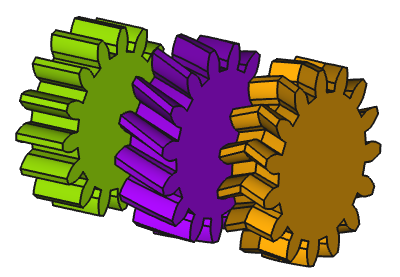
De izquierda a derecha: engranaje recto, engranaje helicoidal, engranaje helicoidal doble
Uso
- Cambie a
 entorno de trabajo FCGear.
 - Hay varias formas de invocar el comando:
- Presione el botón engranaje evolvente en la barra de herramientas.
- Seleccione la opción Gear → Engranaje evolvente del menú.
- Presione el botón
- Cambie el parámetro de engranaje a las condiciones requeridas (ver Propiedades).
Propiedades
See also: Property View.
Un objeto FCGear InvoluteGear se deriva de un objeto Part Feature y hereda todas sus propiedades. También tiene las siguientes propiedades adicionales:
Datos
accuracy
- Datosnumpoints (
Integer): Default is20. Change of the involute profile. Changing the value can lead to unexpected results. - Datossimple (
Bool): Default isfalse,truegenerates a simplified display (without teeth and only a cylinder in pitch diameter).
base
- Datosgear (
PythonObject): Python gear object. - Datosheight (
Length): Default is5 mm. Value of the gear width. - Datosmodule (
Length): Default is1 mm. Module is the ratio of the reference diameter of the gear divided by the number of teeth (see Notes). - Datosnum_teeth (
Integer): Default is15. Number of teeth (see Notes).
computed
- Datosaddendum_diameter (
Length): Default is17 mm. Outside diameter, measured at the addendum (the tip of the teeth). - Datosangular_backlash (
Angle): (read-only) The angle by which this gear can turn without moving the mating gear. - Datospitch_diameter (
Length): Default is15 mm. The pitch diameter. - Datosroot_diameter (
Length): (read-only) The root diameter, measured at the foot of the teeth. - Datostransverse_pitch (
Length): Default is3.14 mm. The transverse pitch. - Datostraverse_module (
Length): Default is1 mm. The traverse module of the generated gear.
fillets
- Datoshead_fillet (
Float): Default is0 mm. A fillet for the tooth-head. - Datosroot_fillet (
Float): Default is0 mm. A fillet for the tooth-root. - Datosundercut (
Bool): Default isfalse,truechanges the profile of the tooth root (see Notes).
helical
- Datosdouble_helix (
Bool): Default isfalse,truecreates a double helix gear (see Notes). - Datoshelix_angle (
Angle): Default is0°. With the helix angle β a helical gear is created – positive value → rotation direction right, negative value → rotation direction left (see Notes). - Datosproperties_from_tool (
Bool): Default isfalse. Iftrueand Datoshelix_angle is not zero, gear parameters are recomputed internally for the rotated gear.
hole
- DatosAxle_hole (
Bool): Default isfalse.trueenables a central hole for an axle. - DatosAxle_holesize (
Length): Default is10 mm. Diameter of the hole for an axle. - Datosoffset_hole (
Bool): Default isfalse,trueenables an offset hole. - Datosoffset_holeoffset (
Length): Default is10 mm. The offset of the offset hole. - Datosoffset_holesize (
Length): Default is10 mm. The diameter of the offset hole.
involute
tolerance
- Datosbacklash (
Length): Default is0. Backlash, also called lash or play, is the distance between the teeth at a gear pair. - Datosclearance (
Float): Default is0.25(see Notes). - Datoshead (
Float): Default is0. This value is used to change the tooth height. - Datosreversed_backlash (
Bool):truebacklash decrease orfalse(default) backlash increase see Notes).
version
- Datosversion (
String):
Notas
- Datoshelix_angle (beta, ): Changing the helix angle does not change the pitch diameter, or more precise the transverse pitch diameter () since the Datosmodule property represents the transverse module () unless the Datosproperties_from_tool property is
true. In that case it represents the normal module (), and all properties depending on the transverse module in the computed group will be divided by cos and thus enlarged.- Spur gear: , and
- Helical gear: , and
- However, a helix angle of less than 10° has hardly any advantages over straight teeth.
- Datosclearance (): At a gear pair, clearance is the distance between the tooth tip of the first gear and the tooth root of the second gear.
- Datosdouble_helix: Activates double helical gearing if the Datoshelix_angle property is larger than 0 ().
- Datosmodule (): Using ISO (International Organization for Standardization) guidelines, Module size is designated as the unit representing gear tooth-sizes.
- The module multiplied by the number of teeth () defines the pitch circle diameter ():
- The module multiplied by Pi () defines the pitch (), the arc distance on the pitch circle between corresponding points of adjacent teeth:
- Datosshift: Profile shift is not merely used to prevent undercut. It can be used to adjust center distance between two gears. If a positive correction is applied, such as to prevent undercut in a pinion, the tooth thickness at top is thinner.
- Datosnum_teeth (number of teeth, ): If the number of teeth is changed, the pitch diameter () also changes.
- Datosundercut: Undercut is used when the number of teeth of a gear is too small. Otherwise the mating gear will cut into the tooth root. The undercut not only weakens the tooth with a wasp-like waist, but also removes some of the useful involute adjacent to the base circle.
- Datospressure_angle (): 20° is a standard value here. The pressure angle is defined as the angle between the line-of-action (common tangent to the base circles) and a perpendicular to the line-of-centers. Thus, for standard gears, 14.5° pressure angle gears have base circles much nearer to the roots of teeth than 20° gears. It is for this reason that 14.5° gears encounter greater undercutting problems than 20° gears. Important: the pressure angle changes with a profile shift. Only change the parameter, if sufficient knowledge of the gear geometry is available.
- Datosreversed_backlash: If there are several gears, pay attention to which gear the parameter is set for.
Limitaciones
A 2D tooth profile, obtained by setting the Datosheight to zero, cannot be used with features requiring a 2D shape. For example PartDesign Pad and PartDesign AdditiveHelix features do not accept such a profile as base. For technical details, please refer to the related issue on GitHub.
Fórmulas útiles
Standard Spur Gears
Aquí "standard" se refiere a aquellos engranajes rectos sin coeficiente de cambio de perfil ().
| Symbol | Term | Formula | FCGear Parameter |
|---|---|---|---|
| Module | - | ||
| Number of Teeth | - | ||
| Pressure Angle | Typically, | ||
| Reference Diameter or Pitch Diameter | |||
| Addendum Coefficient | Typically, | ||
| Dedendum Coefficient | Typically, | ||
| Addendum | - | ||
| Dedendum | - | ||
| Tooth Height or Tooth Depth | Typically, |
- | |
| Profile Shift Coefficient | For standard gears, |
| Symbol | Term | Formula |
|---|---|---|
| Tip Diameter | Typically, | |
| Root Diameter | Typically, |
| Symbol | Term | Formula |
|---|---|---|
| Tip Diameter | Typically, | |
| Root Diameter | Typically, |
| Symbol | Term | Formula |
|---|---|---|
| Center Distance | ||
| Tip and Root Clearance | |
Standard Helical Gears
As above with no profile shifting but the helix angle () is taken into account.
| Symbol | Term | Formula |
|---|---|---|
| Transverse Module | ||
| Normal Module | ||
| Transverse Pitch | ||
| Normal Pitch | ||
| Pitch Diameter |
- Addendum and dedendum are also controlled by the normal module.
- It depends on the Datosproperties_from_tool property if the Datosmodule property is used as normal module or transverse module.
Programación
Utilice el poder de Python para automatizar el modelado de sus engranajes:
import FreeCAD as App
import FreeCADGui as Gui
import freecad.gears.commands
gear = freecad.gears.commands.CreateInvoluteGear.create()
gear.num_teeth = 20
gear.helix_angle = 20
gear.height = 10
gear.double_helix = True
App.ActiveDocument.recompute()
Gui.SendMsgToActiveView("ViewFit")
Esta página ha sido recuperada de https://wiki.freecad.org/FCGear_InvoluteGear