


|
|
| Menu location |
|---|
| Gear → Cycloid Gear |
| Workbenches |
| Gear |
| Default shortcut |
| None |
| Introduced in version |
| v0.16 |
| See also |
| FCGear InvoluteGear |
Description
The  FCGear CycloidGear command creates a cycloidal gear wheel with spur gearing by default that can also be transformed into a helical gearing or a double helical gearing.
Cycloidal gears are very sensitive to an inaccurate adjustment of the centre distance, which then leads to a change in the transmission ratio. For these reasons, cycloidal gears are hardly found in mechanical engineering but are only used in special cases such as in the watch industry, for roots type blowers or for the drive of gear racks.
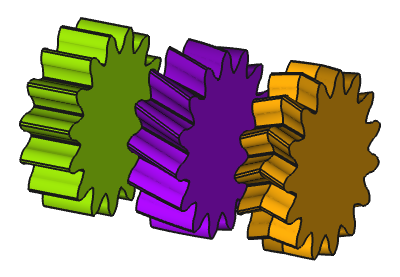
From left to right: Spur gearing, helical gearing, double helical gearing
Usage
- Switch to the
 Gear Workbench.
 - There are several ways to invoke the command:
- Press the Cycloid Gear button in the toolbar.
- Select the Gear → Cycloid Gear option from the menu.
- Press the
- Change the gear parameter to the required conditions (see Properties).
Properties
See also: Property View.
An FCGear CycloidGear object is derived from a Part Feature object and inherits all its properties. It also has the following additional properties:
Data
accuracy
- Datanumpoints (
Integer): Default is15. Change of the involute profile. Changing the value can lead to unexpected results.
base
- Datagear (
PythonObject): Python gear object. - Dataheight (
Length): Default is5 mm. Value of the gear width. - Datamodule (
Length): Default is1 mm. Module is the ratio of the reference diameter of the gear divided by the number of teeth (see Notes). - Datanum_teeth (
Integer): Default is15. Number of teeth.
computed
- Dataangular_backlash (
Angle): (read-only) - Datapitch_diameter (
Length): (read-only) Working pitch diameter.
cycloid
- Datainner_diameter (
Float): (read-only) Diameter of the rolling circle of hypocycloid, normalized by the Datamodule (see Notes). - Dataouter_diameter (
Float): Default is7.5. Diameter of the rolling circle of epicycloid, normalized by the Datamodule (see Notes).
fillets
- Datahead_fillet (
Float): Default is0 mm. - Dataroot_fillet (
Float): Default is0 mm.
helical
- Datadouble_helix (
Bool): Default isfalse,truecreates a double helix gear (see Notes). - Datahelix_angle (
Angle): Default is0°. With the helix angle β a helical gear is created – positive value → rotation direction right, negative value → rotation direction left.
tolerance
- Databacklash (
Length): Default is0. Backlash, also called lash or play, is the distance between the teeth at a gear pair.
- Dataclearance (
Float): Default is0.25(see Notes). - Datahead (
Float): Default is0. Additional length of the tip of the teeth, normalized by the Datamodule.
version
- Dataversion (
String):
Notes
- Cycloidal gears must always be specially matched to each other and can generally not be exchanged at will: In a gear pair, the value of inner_diameter on one gear must equal the outer_diameter on the other, and vice versa. See also the information in Properties cycloid parameter view below.
- Dataclearance (): At a gear pair, clearance is the distance between the tooth tip of the first gear and the tooth root of the second gear.
- Datadouble_helix: Activates double helical gearing if the Datahelix_angle property is larger than 0 ().
- Datamodule (): Using ISO (International Organization for Standardization) guidelines, Module size is designated as the unit representing gear tooth-sizes.
- The module multiplied by the number of teeth () defines the pitch circle diameter ():
- The module multiplied by Pi () defines the pitch (), the arc distance on the pitch circle between corresponding points of adjacent teeth:
Special cases
Straight line as hypocycloid
To obtain a straight line, directly towards the center, as hypocycloid, use the following expression for the Datainner_diameter: teeth / 2. Such a tooth form is often found in historical clockworks and thus called "clock toothing". A larger Dataclearance makes the effect even more visible.
Full hypocycloid/epicycloid as tooth
To obtain a gear made of complete hypocycloid and epicycloid curves use the following expressions:
- Datainner_diameter:
0.5 - Dataouter_diameter:
inner_diameter - Dataclearance:
-1 + inner_diameter - 1e-06 - Datahead:
-1 + outer_diameter - 1e-06
The reference diameter is d = m * z, with m being the Datamodule and z being the Datanum_teeth. For a complete hypocycloid, the rolling diameter has to be d_i = d / (z*2) = m*z / (z*2). And if we now normalize this by the module, we get d_in = m*z / (z*2) / m = 1 / 2.
Now the cycloids' rolling circle diameters have to match the gear's addedum/dedendum. The addendum, i.e. the tooth length above the reference circle, is 1 + Datahead. The dedendum, i.e. the tooth length below the reference circle, is 1 + Dataclearance. Both are normalized by the module, thus we need a head/clearance value of 1 - d_in. The additional explicit tolerance value (1e-6 in the expressions above) is required to overcome coincidence issues.
Such "gears" allow the the number of teeth to be as low as two and are used as rotary vanes in pumps or compressors (cf. Roots-type Supercharger).
Infinitely large epicycloid
If the radius of the epicycloid's rolling circle becomes infinitely large, it becomes a rolling straight line. Such a degenerated epicycloid is called involute. Gears with such a tooth form are handled by the involute gear command. It is by far the most common tooth form Today.
Useful formulas
See Gear InvoluteGear.
Properties cycloid parameter view

Scripting
Use the power of Python to automate your gear modeling:
import FreeCAD as App
import FreeCADGui as Gui
import freecad.gears.commands
gear = freecad.gears.commands.CreateCycloidGear.create()
gear.num_teeth = 20
gear.helix_angle = 20
gear.height = 10
gear.double_helix = True
App.ActiveDocument.recompute()
Gui.SendMsgToActiveView("ViewFit")
This page is retrieved from https://wiki.freecad.org/FCGear_CycloidGear