


|
|
| Menyplacering |
|---|
| Draft → Scale |
| Arbetsbänkar |
| Draft, Arch |
| Standard genväg |
| S C |
| Introducerad i version |
| - |
| Se även |
| Draft Clone |

Beskrivning
Detta verktyg skalar valda objekt runt en baspunkt. Om inga objekt är markerade, så kommer du ombes att välja ett.
The command can be used on 2D objects created with the Draft Workbench or Sketcher Workbench, but also on many 3D objects such as those created with the Part Workbench, PartDesign Workbench or BIM Workbench.
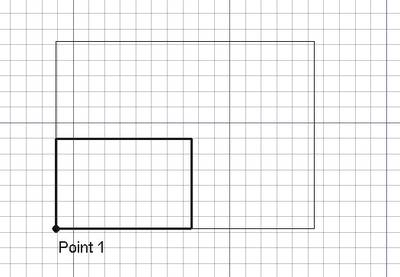
Scaling an object around a base point
Bruk
See also: Draft Snap and Draft Constrain.
- Optionally select one or more objects, or one or more subelements of Draft Lines or Draft Wires.
- There are several ways to invoke the command:
- If you have not yet selected an object: select an object in the 3D View.
- The Scale task panel opens. See Options for more information.
- If subelements have been selected: check the Modify subelements checkbox to switch on subelement mode.
- Pick the base point in the 3D View, or type coordinates and press the
 Enter Point button.
 - Enter the X, Y and Z scale factors.
- Press Enter or the OK button to finish the command.
Options
First task panel
The single character keyboard shortcuts available in the task panel can be changed. See Draft Preferences. The shortcuts mentioned here are the default shortcuts.
- To manually enter the coordinates for the base point enter the X, Y and Z component, and press Enter after each. Or you can press the Enter Point button when you have the desired values. It is advisable to move the pointer out of the 3D View before entering coordinates.
- Press G or click the Global checkbox to toggle global mode. If global mode is on, coordinates are relative to the global coordinate system, else they are relative to the working plane coordinate system.
- Press S to switch Draft snapping on or off.
- Press the Close button to abort the command.
Second task panel
- Markera en punkt i ett tomt område i 3d vyn, eller på ett existerande objekt för baspunkten, sedan en annan punkt för skalfaktorn
- x, y och z komponenterna av den andra punkten definierar skalfaktorn. Till exempel, (1,1,1) gör ingenting, (2,2,2) kommer att skala 2x i alla riktningar, (-1,1,1) kommer att spegla i x riktningen.
- Nedtryckning av CTRL kommer att snäppa din punkt till tillgängliga snäpp-punkter.
- Nedtryckning av SKIFT kommer att koppla ihop x och y värdena, så att förhållandet inte ändras
- Om du trycker på ESC så avbryts funktionen.
- Skriv in siffror för att manuellt mata in en koordinat.
- C växlar kopieringsläget på/av. Med kopiering på, så kommer objekt(en) att kopieras istället för att flyttas.
- Nedtryckning av ALT kommer att skapa en kopia, även om kopieringsknappen är av.
- Om ALT är nedtryckt, så kan du göra multipla kopior ända tills ALT släpps.
Notes
- The command can also scale Image Planes, but not in clone mode.
Preferences
See also: Preferences Editor and Draft Preferences.
- To reselect the base objects after copying objects: Edit → Preferences → Draft → General → Select base objects after copying.
Scripting
See also: Autogenerated API documentation and FreeCAD Scripting Basics.
To scale objects use the scale method of the Draft module.
scaled_list = scale(objectslist, scale=Vector(1,1,1), center=Vector(0,0,0), copy=False)
objectslistcontains the objects to be scaled. It is either a single object or a list of objects.scaleis the vector that specifies by the X, Y and Z scale factors.centeris the center point of the scaling operation.- If
copyisTruecopies are created instead of scaling the original objects. scaled_listis returned with the original scaled objects, or with the new copies. It is either a single object or a list of objects, depending onobjectslist.
Example:
import FreeCAD as App
import Draft

doc = App.newDocument()

pts = [App.Vector(0, 0, 0), App.Vector(500, 500, 0), App.Vector(600, 0, 0)]
wire1 = Draft.make_wire(pts, closed=True)
doc.recompute()

scale1 = App.Vector(2.3, 0.75, 0)
wire2 = Draft.scale(wire1, scale1, copy=True)
doc.recompute()

scale2 = App.Vector(-2, -1.5, 0)
wires = Draft.scale([wire1, wire2], scale2, copy=True)
doc.recompute()
Denna sida hämtas från https://wiki.freecad.org/Draft_Scale