


|
|
| Ubicación en el Menú |
|---|
| Croquis → Girar |
| Entornos de trabajo |
| Croquis, Arquitectura |
| Atajo de teclado por defecto |
| R O |
| Introducido en versión |
| - |
| Ver también |
| Ninguno |

Descripción
Esta herramienta gira o copia y gira los objetos seleccionados un ángulo dado alrededor de un punto en el plano de trabajo actual. Si no se han seleccionado objetos, te invitará a seleccionar uno. Luego, se pregunta al usuario por el centro de rotación, el ángulo de inicio y el ángulo de giro.
The command can be used on 2D objects created with the Draft Workbench or Sketcher Workbench, but also on many 3D objects such as those created with the Part Workbench, PartDesign Workbench or BIM Workbench.
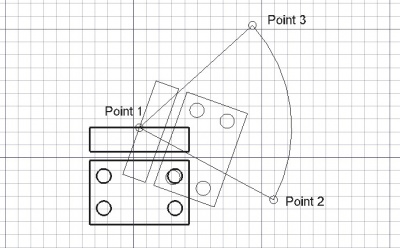
Rotating an object around a center point
Utilización
See also: Draft Snap and Draft Constrain.
- Selecciona los objetos que desees girar o copiar
- Presiona el botón
 girar, o presiona las teclas R y O
 - Designa un punto central en la vista 3D, o escribe unas coordenadas
- Designa un segundo punto en la vista 3D, o indica un ángulo de referencia
- Designa un tercer punto en la vista 3D, o indica un ángulo de rotación
Opciones
The single character keyboard shortcuts available in the task panel can be changed. See Draft Preferences. The shortcuts mentioned here are the default shortcuts.
- Presiona X, Y o Z después de un punto para restringir el siguiente punto sobre el eje indicado.
- Para introducir coordenadas manualmente, simplemente introduce los números y presiona ENTER entre cada componente X, Y y Z.
- Presiona T o selecciona la casilla para activar/desactivar el botón Continuar. Si el modo continuar está activado, la herramienta Girar se reiniciará al terminar permitiendo que gires o copies otros objetos sin necesidad de volver a presionar el botón de Girar.
- Presionando ALT o C o seleccionando el botón Copiar se creará una copia de los objetos, en lugar de girarlos. Si mantienes presionada la tecla ALT después de indicar el tercer punto, podrás situar más copias, hasta que liberes la tecla ALT.
- Presiona CTRL mientras dibujas para forzar el ajuste de tu punto a la posición de ajuste más cercana, independientemente de la distancia.
- Presiona SHIFT mientras dibujas para restringir tu siguiente punto horizontal o verticalmente en relación al centro de giro.
- Presiona ESC o el botón Cancelar para abortar el comando actual.
Notes
- An Object that is attached cannot be rotated with the Draft Rotate command. To rotate it either its DatosSupport object has to be rotated, or its DatosAttachment Offset has to be changed.
- The base angle concept can be somewhat confusing. Especially since it works only when selecting points, not when specifying the angle using the input field. An explanation of how it works, with an example, can be found in this forum thread.
Preferences
See also: Preferences Editor and Draft Preferences.
- To reselect the base objects after copying objects: Edit → Preferences → Draft → General → Select base objects after copying.
Scripting
Programación
La herramienta Girar puede utilizarse en macros y desde la consola de Python utilizando la siguiente función:
rotated_list = rotate(objectslist, angle, center=Vector(0,0,0), axis=Vector(0,0,1), copy=False)
- Gira el objeto dado o los objetos contenidos
en la lista dada alrededor de un centro indicado si se proporciona, utilizando el eje como eje de rotación.
- Si se omite el eje, la rotación se realizará alrededor del eje vertical Z.
- Si copymode es True, los objetos en realidad no se mueven sino que se crean unas copias.
- Devuelve los objetos (o sus copias si copymode es True).
Ejemplo:
import FreeCAD as App
import Draft

doc = App.newDocument()

polygon1 = Draft.make_polygon(3, radius=300)
Draft.move(polygon1, App.Vector(1000, 0, 0))

# Rotation around the origin
angle1 = 45
rot2 = Draft.rotate(polygon1, angle1, copy=True)
rot3 = Draft.rotate(polygon1, 2*angle1, copy=True)
rot4 = Draft.rotate(polygon1, 4*angle1, copy=True)

polygon2 = Draft.make_polygon(3, radius=1000)
polygon3 = Draft.make_polygon(5, radius=500)
Draft.move(polygon2, App.Vector(2000, 0, 0))
Draft.move(polygon3, App.Vector(2000, 0, 0))

# Rotation around another point
angle2 = 60
cen = App.Vector(3100, 0, 0)
list2 = [polygon2, polygon3]
rot_list2 = Draft.rotate(list2, angle2, center=cen, copy=True)
rot_list3 = Draft.rotate(list2, 2*angle2, center=cen, copy=True)
rot_list4 = Draft.rotate(list2, 4*angle2, center=cen, copy=True)

doc.recompute()
Esta página ha sido recuperada de https://wiki.freecad.org/Draft_Rotate