Wprowadzenie
To jest przykład tworzenia dialogu z PySide.
W tym przykładzie cały interfejs jest zdefiniowany w środowisku Python. Chociaż jest to możliwe w przypadku małych interfejsów, w przypadku większych interfejsów zaleca się tworzenie plików .ui za pomocą Qt Designer i ładowanie ich do programu.
Metoda 1
Przykład okna dialogowego wraz z połączeniami.
# -*- coding: utf-8 -*-
# Create by flachyjoe

from PySide import QtCore, QtGui

try:
    _fromUtf8 = QtCore.QString.fromUtf8
except AttributeError:
    def _fromUtf8(s):
        return s

try:
    _encoding = QtGui.QApplication.UnicodeUTF8
    def _translate(context, text, disambig):
        return QtGui.QApplication.translate(context, text, disambig, _encoding)
except AttributeError:
    def _translate(context, text, disambig):
        return QtGui.QApplication.translate(context, text, disambig)


class Ui_MainWindow(object):

     def __init__(self, MainWindow):
        self.window = MainWindow

        MainWindow.setObjectName(_fromUtf8("MainWindow"))
        MainWindow.resize(400, 300)
        self.centralWidget = QtGui.QWidget(MainWindow)
        self.centralWidget.setObjectName(_fromUtf8("centralWidget"))

        self.pushButton = QtGui.QPushButton(self.centralWidget)
        self.pushButton.setGeometry(QtCore.QRect(30, 170, 93, 28))
        self.pushButton.setObjectName(_fromUtf8("pushButton"))
        self.pushButton.clicked.connect(self.on_pushButton_clicked) #connection pushButton

        self.lineEdit = QtGui.QLineEdit(self.centralWidget)
        self.lineEdit.setGeometry(QtCore.QRect(30, 40, 211, 22))
        self.lineEdit.setObjectName(_fromUtf8("lineEdit"))
        self.lineEdit.returnPressed.connect(self.on_lineEdit_clicked) #connection lineEdit

        self.checkBox = QtGui.QCheckBox(self.centralWidget)
        self.checkBox.setGeometry(QtCore.QRect(30, 90, 81, 20))
        self.checkBox.setChecked(True)
        self.checkBox.setObjectName(_fromUtf8("checkBoxON"))
        self.checkBox.clicked.connect(self.on_checkBox_clicked) #connection checkBox

        self.radioButton = QtGui.QRadioButton(self.centralWidget)
        self.radioButton.setGeometry(QtCore.QRect(30, 130, 95, 20))
        self.radioButton.setObjectName(_fromUtf8("radioButton"))
        self.radioButton.clicked.connect(self.on_radioButton_clicked) #connection radioButton

        MainWindow.setCentralWidget(self.centralWidget)

        self.menuBar = QtGui.QMenuBar(MainWindow)
        self.menuBar.setGeometry(QtCore.QRect(0, 0, 400, 26))
        self.menuBar.setObjectName(_fromUtf8("menuBar"))
        MainWindow.setMenuBar(self.menuBar)

        self.mainToolBar = QtGui.QToolBar(MainWindow)
        self.mainToolBar.setObjectName(_fromUtf8("mainToolBar"))
        MainWindow.addToolBar(QtCore.Qt.TopToolBarArea, self.mainToolBar)

        self.statusBar = QtGui.QStatusBar(MainWindow)
        self.statusBar.setObjectName(_fromUtf8("statusBar"))
        MainWindow.setStatusBar(self.statusBar)

        self.retranslateUi(MainWindow)

     def retranslateUi(self, MainWindow):
        MainWindow.setWindowTitle(_translate("MainWindow", "MainWindow", None))
        self.pushButton.setText(_translate("MainWindow", "OK", None))
        self.lineEdit.setText(_translate("MainWindow", "tyty", None))
        self.checkBox.setText(_translate("MainWindow", "CheckBox", None))
        self.radioButton.setText(_translate("MainWindow", "RadioButton", None))

     def on_checkBox_clicked(self):
        if self.checkBox.checkState()==0:
            App.Console.PrintMessage(str(self.checkBox.checkState())+"  CheckBox KO\r\n")
        else:
            App.Console.PrintMessage(str(self.checkBox.checkState())+" CheckBox OK\r\n")
#        App.Console.PrintMessage(str(self.lineEdit.setText("tititi"))+" LineEdit\r\n") #write text to the lineEdit window !
#        str(self.lineEdit.setText("tititi")) #écrit le texte dans la fenêtre lineEdit
        App.Console.PrintMessage(str(self.lineEdit.displayText())+" LineEdit\r\n")

     def on_radioButton_clicked(self):
        if self.radioButton.isChecked():
             App.Console.PrintMessage(str(self.radioButton.isChecked())+" Radio OK\r\n")
        else:
             App.Console.PrintMessage(str(self.radioButton.isChecked())+"  Radio KO\r\n")

     def on_lineEdit_clicked(self):
#        if self.lineEdit.textChanged():
             App.Console.PrintMessage(str(self.lineEdit.displayText())+" LineEdit Display\r\n")

     def on_pushButton_clicked(self):
        App.Console.PrintMessage("Terminé\r\n")
        self.window.hide()

MainWindow = QtGui.QMainWindow()
ui = Ui_MainWindow(MainWindow)
MainWindow.show()
Tutaj to samo okno, ale z ikoną na każdym przycisku.
Pobierz powiązane ikony (kliknij prawym przyciskiem myszy "Kopiuj obraz poniżej ...").


# -*- coding: utf-8 -*-

from PySide import QtCore, QtGui

try:
    _fromUtf8 = QtCore.QString.fromUtf8
except AttributeError:
    def _fromUtf8(s):
        return s

try:
    _encoding = QtGui.QApplication.UnicodeUTF8
    def _translate(context, text, disambig):
        return QtGui.QApplication.translate(context, text, disambig, _encoding)
except AttributeError:
    def _translate(context, text, disambig):
        return QtGui.QApplication.translate(context, text, disambig)


class Ui_MainWindow(object):

     def __init__(self, MainWindow):
        self.window = MainWindow
        path = FreeCAD.ConfigGet("UserAppData")
#        path = FreeCAD.ConfigGet("AppHomePath")

        MainWindow.setObjectName(_fromUtf8("MainWindow"))
        MainWindow.resize(400, 300)
        self.centralWidget = QtGui.QWidget(MainWindow)
        self.centralWidget.setObjectName(_fromUtf8("centralWidget"))

        self.pushButton = QtGui.QPushButton(self.centralWidget)
        self.pushButton.setGeometry(QtCore.QRect(30, 170, 93, 28))
        self.pushButton.setObjectName(_fromUtf8("pushButton"))
        self.pushButton.clicked.connect(self.on_pushButton_clicked) #connection pushButton

        self.lineEdit = QtGui.QLineEdit(self.centralWidget)
        self.lineEdit.setGeometry(QtCore.QRect(30, 40, 211, 22))
        self.lineEdit.setObjectName(_fromUtf8("lineEdit"))
        self.lineEdit.returnPressed.connect(self.on_lineEdit_clicked) #connection lineEdit

        self.checkBox = QtGui.QCheckBox(self.centralWidget)
        self.checkBox.setGeometry(QtCore.QRect(30, 90, 100, 20))
        self.checkBox.setChecked(True)
        self.checkBox.setObjectName(_fromUtf8("checkBoxON"))
        self.checkBox.clicked.connect(self.on_checkBox_clicked) #connection checkBox

        self.radioButton = QtGui.QRadioButton(self.centralWidget)
        self.radioButton.setGeometry(QtCore.QRect(30, 130, 95, 20))
        self.radioButton.setObjectName(_fromUtf8("radioButton"))
        self.radioButton.clicked.connect(self.on_radioButton_clicked) #connection radioButton

        MainWindow.setCentralWidget(self.centralWidget)

        self.menuBar = QtGui.QMenuBar(MainWindow)
        self.menuBar.setGeometry(QtCore.QRect(0, 0, 400, 26))
        self.menuBar.setObjectName(_fromUtf8("menuBar"))
        MainWindow.setMenuBar(self.menuBar)

        self.mainToolBar = QtGui.QToolBar(MainWindow)
        self.mainToolBar.setObjectName(_fromUtf8("mainToolBar"))
        MainWindow.addToolBar(QtCore.Qt.TopToolBarArea, self.mainToolBar)

        self.statusBar = QtGui.QStatusBar(MainWindow)
        self.statusBar.setObjectName(_fromUtf8("statusBar"))
        MainWindow.setStatusBar(self.statusBar)

        self.retranslateUi(MainWindow)

        # Affiche un icone sur le bouton PushButton
        # self.image_01 = "C:\Program Files\FreeCAD0.13\Icone01.png" # adapt the icon name
        self.image_01 = path+"Icone01.png" # adapt the name of the icon
        icon01 = QtGui.QIcon()
        icon01.addPixmap(QtGui.QPixmap(self.image_01),QtGui.QIcon.Normal, QtGui.QIcon.Off)
        self.pushButton.setIcon(icon01)
        self.pushButton.setLayoutDirection(QtCore.Qt.RightToLeft) # This command reverses the direction of the button

        # Affiche un icone sur le bouton RadioButton
        # self.image_02 = "C:\Program Files\FreeCAD0.13\Icone02.png" # adapt the name of the icon
        self.image_02 = path+"Icone02.png" # adapter le nom de l'icone
        icon02 = QtGui.QIcon()
        icon02.addPixmap(QtGui.QPixmap(self.image_02),QtGui.QIcon.Normal, QtGui.QIcon.Off)
        self.radioButton.setIcon(icon02)
        # self.radioButton.setLayoutDirection(QtCore.Qt.RightToLeft) #  This command reverses the direction of the button

        # Affiche un icone sur le bouton CheckBox
        # self.image_03 = "C:\Program Files\FreeCAD0.13\Icone03.png" # the name of the icon
        self.image_03 = path+"Icone03.png" # adapter le nom de l'icone
        icon03 = QtGui.QIcon()
        icon03.addPixmap(QtGui.QPixmap(self.image_03),QtGui.QIcon.Normal, QtGui.QIcon.Off)
        self.checkBox.setIcon(icon03)
        # self.checkBox.setLayoutDirection(QtCore.Qt.RightToLeft) # This command reverses the direction of the button


     def retranslateUi(self, MainWindow):
        MainWindow.setWindowTitle(_translate("MainWindow", "FreeCAD", None))
        self.pushButton.setText(_translate("MainWindow", "OK", None))
        self.lineEdit.setText(_translate("MainWindow", "tyty", None))
        self.checkBox.setText(_translate("MainWindow", "CheckBox", None))
        self.radioButton.setText(_translate("MainWindow", "RadioButton", None))

     def on_checkBox_clicked(self):
        if self.checkBox.checkState()==0:
            App.Console.PrintMessage(str(self.checkBox.checkState())+"  CheckBox KO\r\n")
        else:
            App.Console.PrintMessage(str(self.checkBox.checkState())+" CheckBox OK\r\n")
           # App.Console.PrintMessage(str(self.lineEdit.setText("tititi"))+" LineEdit\r\n") # write text to the lineEdit window !
           # str(self.lineEdit.setText("tititi")) #écrit le texte dans la fenêtre lineEdit
        App.Console.PrintMessage(str(self.lineEdit.displayText())+" LineEdit\r\n")

     def on_radioButton_clicked(self):
        if self.radioButton.isChecked():
             App.Console.PrintMessage(str(self.radioButton.isChecked())+" Radio OK\r\n")
        else:
             App.Console.PrintMessage(str(self.radioButton.isChecked())+"  Radio KO\r\n")

     def on_lineEdit_clicked(self):
          # if self.lineEdit.textChanged():
          App.Console.PrintMessage(str(self.lineEdit.displayText())+" LineEdit Display\r\n")

     def on_pushButton_clicked(self):
        App.Console.PrintMessage("Terminé\r\n")
        self.window.hide()

MainWindow = QtGui.QMainWindow()
ui = Ui_MainWindow(MainWindow)
MainWindow.show()
Tutaj kod do wyświetlania ikony na przycisku pushButton, zmiana nazwy na inny przycisk (radioButton, checkBox) i ścieżka do ikony.
# Affiche un icône sur le bouton PushButton
        # self.image_01 = "C:\Program Files\FreeCAD0.13\icone01.png" # the name of the icon
        self.image_01 = path+"icone01.png" # the name of the icon
        icon01 = QtGui.QIcon()
        icon01.addPixmap(QtGui.QPixmap(self.image_01),QtGui.QIcon.Normal, QtGui.QIcon.Off)
        self.pushButton.setIcon(icon01)
        self.pushButton.setLayoutDirection(QtCore.Qt.RightToLeft) # This command reverses the direction of the button
Polecenie UserAppData podaje ścieżkę użytkownika AppHomePath podaje ścieżkę instalacji FreeCAD
#        path = FreeCAD.ConfigGet("UserAppData")
        path = FreeCAD.ConfigGet("AppHomePath")
To polecenie powoduje odwrócenie przycisku poziomego z prawej do lewej.
self.pushButton.setLayoutDirection(QtCore.Qt.RightToLeft) # This command reverses the direction of the button
Metoda 2
Inna metoda wyświetlania okna, tutaj poprzez utworzenie pliku QtForm.py, który zawiera program nagłówkowy (moduł wywoływany za pomocą import QtForm), oraz drugi moduł, który zawiera kod okna wszystkie te dodatki, oraz twój kod (moduł wywołujący).
Ta metoda wymaga dwóch oddzielnych plików, ale pozwala skrócić program za pomocą pliku ' ' QtForm.py ' ' import. Następnie należy rozprowadzić oba pliki razem, są one nierozłączne.
Plik QtForm.py
# -*- coding: utf-8 -*-
# Create by flachyjoe
from PySide import QtCore, QtGui

try:
    _fromUtf8 = QtCore.QString.fromUtf8
except AttributeError:
   def _fromUtf8(s):
      return s

try:
    _encoding = QtGui.QApplication.UnicodeUTF8
    def _translate(context, text, disambig):
      return QtGui.QApplication.translate(context, text, disambig, _encoding)
except AttributeError:
   def _translate(context, text, disambig):
      return QtGui.QApplication.translate(context, text, disambig)

class Form(object):
   def __init__(self, title, width, height):
      self.window = QtGui.QMainWindow()
      self.title=title
      self.window.setObjectName(_fromUtf8(title))
      self.window.setWindowTitle(_translate(self.title, self.title, None))
      self.window.resize(width, height)

   def show(self):
      self.createUI()
      self.retranslateUI()
      self.window.show()

   def setText(self, control, text):
      control.setText(_translate(self.title, text, None))
Plik wywołujący, który zawiera okno i kod.
Plik my_file.py
Połączenia są do zrobienia, dobre ćwiczenie.
# -*- coding: utf-8 -*-
# Create by flachyjoe
from PySide import QtCore, QtGui
import QtForm

class myForm(QtForm.Form):
   def createUI(self):
      self.centralWidget = QtGui.QWidget(self.window)
      self.window.setCentralWidget(self.centralWidget)

      self.pushButton = QtGui.QPushButton(self.centralWidget)
      self.pushButton.setGeometry(QtCore.QRect(30, 170, 93, 28))
      self.pushButton.clicked.connect(self.on_pushButton_clicked)

      self.lineEdit = QtGui.QLineEdit(self.centralWidget)
      self.lineEdit.setGeometry(QtCore.QRect(30, 40, 211, 22))

      self.checkBox = QtGui.QCheckBox(self.centralWidget)
      self.checkBox.setGeometry(QtCore.QRect(30, 90, 81, 20))
      self.checkBox.setChecked(True)

      self.radioButton = QtGui.QRadioButton(self.centralWidget)
      self.radioButton.setGeometry(QtCore.QRect(30, 130, 95, 20))

   def retranslateUI(self):
      self.setText(self.pushButton, "Fermer")
      self.setText(self.lineEdit, "essais de texte")
      self.setText(self.checkBox, "CheckBox")
      self.setText(self.radioButton, "RadioButton")

   def on_pushButton_clicked(self):
      self.window.hide()

myWindow=myForm("Fenetre de test",400,300)
myWindow.show()
Inny przykład
-
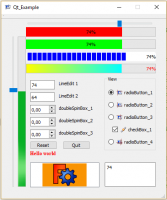 Qt example 1
 -
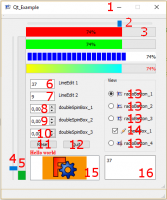 Qt example details
Są traktowane:
- icon for window
- horizontalSlider
- progressBar horizontal
- verticalSlider
- progressBar vertical
- lineEdit
- lineEdit
- doubleSpinBox
- doubleSpinBox
- doubleSpinBox
- button
- button
- radioButton with icons
- checkBox with icon checked and unchecked
- textEdit
- graphicsView with 2 graphes
Strona z kodem i ikonami przykłady Qt
Ta strona pochodzi z https://wiki.freecad.org/Dialog_creation_with_various_widgets