Einleitung
Dies ist ein Beispiel für Dialogerstellung mit PySide.
In diesem Beispiel ist die gesamte Oberfläche in Python definiert. Obwohl dies für kleine Oberflächen möglich ist, wird für größere Oberflächen empfohlen, .ui Dateien mit Qt Designer zu erstellen und diese in das Programm zu laden.
Methode 1
Ein Beispiel für ein vollständiges Dialogfeld mit seinen Verbindungen.
# -*- coding: utf-8 -*-
# Create by flachyjoe

from PySide import QtCore, QtGui

try:
    _fromUtf8 = QtCore.QString.fromUtf8
except AttributeError:
    def _fromUtf8(s):
        return s

try:
    _encoding = QtGui.QApplication.UnicodeUTF8
    def _translate(context, text, disambig):
        return QtGui.QApplication.translate(context, text, disambig, _encoding)
except AttributeError:
    def _translate(context, text, disambig):
        return QtGui.QApplication.translate(context, text, disambig)


class Ui_MainWindow(object):

     def __init__(self, MainWindow):
        self.window = MainWindow

        MainWindow.setObjectName(_fromUtf8("MainWindow"))
        MainWindow.resize(400, 300)
        self.centralWidget = QtGui.QWidget(MainWindow)
        self.centralWidget.setObjectName(_fromUtf8("centralWidget"))

        self.pushButton = QtGui.QPushButton(self.centralWidget)
        self.pushButton.setGeometry(QtCore.QRect(30, 170, 93, 28))
        self.pushButton.setObjectName(_fromUtf8("pushButton"))
        self.pushButton.clicked.connect(self.on_pushButton_clicked) #connection pushButton

        self.lineEdit = QtGui.QLineEdit(self.centralWidget)
        self.lineEdit.setGeometry(QtCore.QRect(30, 40, 211, 22))
        self.lineEdit.setObjectName(_fromUtf8("lineEdit"))
        self.lineEdit.returnPressed.connect(self.on_lineEdit_clicked) #connection lineEdit

        self.checkBox = QtGui.QCheckBox(self.centralWidget)
        self.checkBox.setGeometry(QtCore.QRect(30, 90, 81, 20))
        self.checkBox.setChecked(True)
        self.checkBox.setObjectName(_fromUtf8("checkBoxON"))
        self.checkBox.clicked.connect(self.on_checkBox_clicked) #connection checkBox

        self.radioButton = QtGui.QRadioButton(self.centralWidget)
        self.radioButton.setGeometry(QtCore.QRect(30, 130, 95, 20))
        self.radioButton.setObjectName(_fromUtf8("radioButton"))
        self.radioButton.clicked.connect(self.on_radioButton_clicked) #connection radioButton

        MainWindow.setCentralWidget(self.centralWidget)

        self.menuBar = QtGui.QMenuBar(MainWindow)
        self.menuBar.setGeometry(QtCore.QRect(0, 0, 400, 26))
        self.menuBar.setObjectName(_fromUtf8("menuBar"))
        MainWindow.setMenuBar(self.menuBar)

        self.mainToolBar = QtGui.QToolBar(MainWindow)
        self.mainToolBar.setObjectName(_fromUtf8("mainToolBar"))
        MainWindow.addToolBar(QtCore.Qt.TopToolBarArea, self.mainToolBar)

        self.statusBar = QtGui.QStatusBar(MainWindow)
        self.statusBar.setObjectName(_fromUtf8("statusBar"))
        MainWindow.setStatusBar(self.statusBar)

        self.retranslateUi(MainWindow)

     def retranslateUi(self, MainWindow):
        MainWindow.setWindowTitle(_translate("MainWindow", "MainWindow", None))
        self.pushButton.setText(_translate("MainWindow", "OK", None))
        self.lineEdit.setText(_translate("MainWindow", "tyty", None))
        self.checkBox.setText(_translate("MainWindow", "CheckBox", None))
        self.radioButton.setText(_translate("MainWindow", "RadioButton", None))

     def on_checkBox_clicked(self):
        if self.checkBox.checkState()==0:
            App.Console.PrintMessage(str(self.checkBox.checkState())+"  CheckBox KO\r\n")
        else:
            App.Console.PrintMessage(str(self.checkBox.checkState())+" CheckBox OK\r\n")
#        App.Console.PrintMessage(str(self.lineEdit.setText("tititi"))+" LineEdit\r\n") #write text to the lineEdit window !
#        str(self.lineEdit.setText("tititi")) #écrit le texte dans la fenêtre lineEdit
        App.Console.PrintMessage(str(self.lineEdit.displayText())+" LineEdit\r\n")

     def on_radioButton_clicked(self):
        if self.radioButton.isChecked():
             App.Console.PrintMessage(str(self.radioButton.isChecked())+" Radio OK\r\n")
        else:
             App.Console.PrintMessage(str(self.radioButton.isChecked())+"  Radio KO\r\n")

     def on_lineEdit_clicked(self):
#        if self.lineEdit.textChanged():
             App.Console.PrintMessage(str(self.lineEdit.displayText())+" LineEdit Display\r\n")

     def on_pushButton_clicked(self):
        App.Console.PrintMessage("Terminé\r\n")
        self.window.hide()

MainWindow = QtGui.QMainWindow()
ui = Ui_MainWindow(MainWindow)
MainWindow.show()
Hier dasselbe Fenster, aber mit einem Symbol auf jeder Schaltfläche.
Zugehörige Symbole herunterladen (rechts klicken "Das Bild unten kopieren ...)"


# -*- coding: utf-8 -*-

from PySide import QtCore, QtGui

try:
    _fromUtf8 = QtCore.QString.fromUtf8
except AttributeError:
    def _fromUtf8(s):
        return s

try:
    _encoding = QtGui.QApplication.UnicodeUTF8
    def _translate(context, text, disambig):
        return QtGui.QApplication.translate(context, text, disambig, _encoding)
except AttributeError:
    def _translate(context, text, disambig):
        return QtGui.QApplication.translate(context, text, disambig)


class Ui_MainWindow(object):

     def __init__(self, MainWindow):
        self.window = MainWindow
        path = FreeCAD.ConfigGet("UserAppData")
#        path = FreeCAD.ConfigGet("AppHomePath")

        MainWindow.setObjectName(_fromUtf8("MainWindow"))
        MainWindow.resize(400, 300)
        self.centralWidget = QtGui.QWidget(MainWindow)
        self.centralWidget.setObjectName(_fromUtf8("centralWidget"))

        self.pushButton = QtGui.QPushButton(self.centralWidget)
        self.pushButton.setGeometry(QtCore.QRect(30, 170, 93, 28))
        self.pushButton.setObjectName(_fromUtf8("pushButton"))
        self.pushButton.clicked.connect(self.on_pushButton_clicked) #connection pushButton

        self.lineEdit = QtGui.QLineEdit(self.centralWidget)
        self.lineEdit.setGeometry(QtCore.QRect(30, 40, 211, 22))
        self.lineEdit.setObjectName(_fromUtf8("lineEdit"))
        self.lineEdit.returnPressed.connect(self.on_lineEdit_clicked) #connection lineEdit

        self.checkBox = QtGui.QCheckBox(self.centralWidget)
        self.checkBox.setGeometry(QtCore.QRect(30, 90, 100, 20))
        self.checkBox.setChecked(True)
        self.checkBox.setObjectName(_fromUtf8("checkBoxON"))
        self.checkBox.clicked.connect(self.on_checkBox_clicked) #connection checkBox

        self.radioButton = QtGui.QRadioButton(self.centralWidget)
        self.radioButton.setGeometry(QtCore.QRect(30, 130, 95, 20))
        self.radioButton.setObjectName(_fromUtf8("radioButton"))
        self.radioButton.clicked.connect(self.on_radioButton_clicked) #connection radioButton

        MainWindow.setCentralWidget(self.centralWidget)

        self.menuBar = QtGui.QMenuBar(MainWindow)
        self.menuBar.setGeometry(QtCore.QRect(0, 0, 400, 26))
        self.menuBar.setObjectName(_fromUtf8("menuBar"))
        MainWindow.setMenuBar(self.menuBar)

        self.mainToolBar = QtGui.QToolBar(MainWindow)
        self.mainToolBar.setObjectName(_fromUtf8("mainToolBar"))
        MainWindow.addToolBar(QtCore.Qt.TopToolBarArea, self.mainToolBar)

        self.statusBar = QtGui.QStatusBar(MainWindow)
        self.statusBar.setObjectName(_fromUtf8("statusBar"))
        MainWindow.setStatusBar(self.statusBar)

        self.retranslateUi(MainWindow)

        # Affiche un icone sur le bouton PushButton
        # self.image_01 = "C:\Program Files\FreeCAD0.13\Icone01.png" # adapt the icon name
        self.image_01 = path+"Icone01.png" # adapt the name of the icon
        icon01 = QtGui.QIcon()
        icon01.addPixmap(QtGui.QPixmap(self.image_01),QtGui.QIcon.Normal, QtGui.QIcon.Off)
        self.pushButton.setIcon(icon01)
        self.pushButton.setLayoutDirection(QtCore.Qt.RightToLeft) # This command reverses the direction of the button

        # Affiche un icone sur le bouton RadioButton
        # self.image_02 = "C:\Program Files\FreeCAD0.13\Icone02.png" # adapt the name of the icon
        self.image_02 = path+"Icone02.png" # adapter le nom de l'icone
        icon02 = QtGui.QIcon()
        icon02.addPixmap(QtGui.QPixmap(self.image_02),QtGui.QIcon.Normal, QtGui.QIcon.Off)
        self.radioButton.setIcon(icon02)
        # self.radioButton.setLayoutDirection(QtCore.Qt.RightToLeft) #  This command reverses the direction of the button

        # Affiche un icone sur le bouton CheckBox
        # self.image_03 = "C:\Program Files\FreeCAD0.13\Icone03.png" # the name of the icon
        self.image_03 = path+"Icone03.png" # adapter le nom de l'icone
        icon03 = QtGui.QIcon()
        icon03.addPixmap(QtGui.QPixmap(self.image_03),QtGui.QIcon.Normal, QtGui.QIcon.Off)
        self.checkBox.setIcon(icon03)
        # self.checkBox.setLayoutDirection(QtCore.Qt.RightToLeft) # This command reverses the direction of the button


     def retranslateUi(self, MainWindow):
        MainWindow.setWindowTitle(_translate("MainWindow", "FreeCAD", None))
        self.pushButton.setText(_translate("MainWindow", "OK", None))
        self.lineEdit.setText(_translate("MainWindow", "tyty", None))
        self.checkBox.setText(_translate("MainWindow", "CheckBox", None))
        self.radioButton.setText(_translate("MainWindow", "RadioButton", None))

     def on_checkBox_clicked(self):
        if self.checkBox.checkState()==0:
            App.Console.PrintMessage(str(self.checkBox.checkState())+"  CheckBox KO\r\n")
        else:
            App.Console.PrintMessage(str(self.checkBox.checkState())+" CheckBox OK\r\n")
           # App.Console.PrintMessage(str(self.lineEdit.setText("tititi"))+" LineEdit\r\n") # write text to the lineEdit window !
           # str(self.lineEdit.setText("tititi")) #écrit le texte dans la fenêtre lineEdit
        App.Console.PrintMessage(str(self.lineEdit.displayText())+" LineEdit\r\n")

     def on_radioButton_clicked(self):
        if self.radioButton.isChecked():
             App.Console.PrintMessage(str(self.radioButton.isChecked())+" Radio OK\r\n")
        else:
             App.Console.PrintMessage(str(self.radioButton.isChecked())+"  Radio KO\r\n")

     def on_lineEdit_clicked(self):
          # if self.lineEdit.textChanged():
          App.Console.PrintMessage(str(self.lineEdit.displayText())+" LineEdit Display\r\n")

     def on_pushButton_clicked(self):
        App.Console.PrintMessage("Terminé\r\n")
        self.window.hide()

MainWindow = QtGui.QMainWindow()
ui = Ui_MainWindow(MainWindow)
MainWindow.show()
Hier der Code, um das Symbol auf dem pushButton anzuzeigen, den Namen für einen anderen Knopf ändern (radioButton, checkBox) und den Pfad zum Symbol.
# Affiche un icône sur le bouton PushButton
        # self.image_01 = "C:\Program Files\FreeCAD0.13\icone01.png" # the name of the icon
        self.image_01 = path+"icone01.png" # the name of the icon
        icon01 = QtGui.QIcon()
        icon01.addPixmap(QtGui.QPixmap(self.image_01),QtGui.QIcon.Normal, QtGui.QIcon.Off)
        self.pushButton.setIcon(icon01)
        self.pushButton.setLayoutDirection(QtCore.Qt.RightToLeft) # This command reverses the direction of the button
Der Befehl UserAppData gibt den Installationspfad an AppHomePath gibt den Installationspfad von FreeCAD an
#        path = FreeCAD.ConfigGet("UserAppData")
        path = FreeCAD.ConfigGet("AppHomePath")
Dieser Befehl kehrt die horizontale Schaltfläche von rechts nach links um.
self.pushButton.setLayoutDirection(QtCore.Qt.RightToLeft) # This command reverses the direction of the button
Methode 2
Eine andere Methode zur Anzeige eines Fensters, hier durch die Erstellung einer Datei QtForm.py, die das Kopfzeilenprogramm (Modul, das mit import QtForm aufgerufen wird) und ein zweites Modul enthält, das das Code Fenster, all dieses Zubehör und deinen Code (das aufrufende Modul) enthält.
Diese Methode erfordert zwei separate Dateien, erlaubt es aber, dein Programm mit Hilfe der Datei QtForm.py import zu kürzen. Verteile dann die beiden Dateien zusammen, sie sind untrennbar.
Die Datei QtForm.py
# -*- coding: utf-8 -*-
# Create by flachyjoe
from PySide import QtCore, QtGui

try:
    _fromUtf8 = QtCore.QString.fromUtf8
except AttributeError:
   def _fromUtf8(s):
      return s

try:
    _encoding = QtGui.QApplication.UnicodeUTF8
    def _translate(context, text, disambig):
      return QtGui.QApplication.translate(context, text, disambig, _encoding)
except AttributeError:
   def _translate(context, text, disambig):
      return QtGui.QApplication.translate(context, text, disambig)

class Form(object):
   def __init__(self, title, width, height):
      self.window = QtGui.QMainWindow()
      self.title=title
      self.window.setObjectName(_fromUtf8(title))
      self.window.setWindowTitle(_translate(self.title, self.title, None))
      self.window.resize(width, height)

   def show(self):
      self.createUI()
      self.retranslateUI()
      self.window.show()

   def setText(self, control, text):
      control.setText(_translate(self.title, text, None))
Die aufrufende Datei, die das Fenster und Ihren Code enthält.
Die Datei my_file.py
Die Verbindungen fehlen noch, eine gute Übung.
# -*- coding: utf-8 -*-
# Create by flachyjoe
from PySide import QtCore, QtGui
import QtForm

class myForm(QtForm.Form):
   def createUI(self):
      self.centralWidget = QtGui.QWidget(self.window)
      self.window.setCentralWidget(self.centralWidget)

      self.pushButton = QtGui.QPushButton(self.centralWidget)
      self.pushButton.setGeometry(QtCore.QRect(30, 170, 93, 28))
      self.pushButton.clicked.connect(self.on_pushButton_clicked)

      self.lineEdit = QtGui.QLineEdit(self.centralWidget)
      self.lineEdit.setGeometry(QtCore.QRect(30, 40, 211, 22))

      self.checkBox = QtGui.QCheckBox(self.centralWidget)
      self.checkBox.setGeometry(QtCore.QRect(30, 90, 81, 20))
      self.checkBox.setChecked(True)

      self.radioButton = QtGui.QRadioButton(self.centralWidget)
      self.radioButton.setGeometry(QtCore.QRect(30, 130, 95, 20))

   def retranslateUI(self):
      self.setText(self.pushButton, "Fermer")
      self.setText(self.lineEdit, "essais de texte")
      self.setText(self.checkBox, "CheckBox")
      self.setText(self.radioButton, "RadioButton")

   def on_pushButton_clicked(self):
      self.window.hide()

myWindow=myForm("Fenetre de test",400,300)
myWindow.show()
Weiteres Beispiel
-
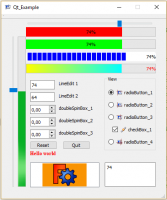 Qt-Beispiel 1
 -
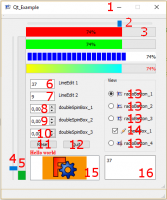 Qt-Beispiel-Details
Behandelt werden:
- Piktogramm für Fenster
- horizontaler Schieber (horizontalSlider)
- Fortschrittbalken, horizontal (progressBar horizontal)
- vertikaler Schieber (verticalSlider)
- Fortschrittbalken, vertikal (progressBar vertical)
- lineEdit
- lineEdit
- doubleSpinBox
- doubleSpinBox
- doubleSpinBox
- Knopf (button)
- Knopf (button)
- Radio-Knopf mit Piktogrammen (radioButton with icons)
- Ankreuzfeld mit Piktogramm [aktiviert/deaktiviert] (checkBox with icon checked and unchecked)
- textEdit
- Grafikansicht mit zwei Graphen (graphicsView with 2 graphes)
Die Code-Seite und die Piktogramme Qt_Beispiel
Diese Seite wird abgerufen von https://wiki.freecad.org/Dialog_creation_with_various_widgets