Introduzione
Questo è un esempio di creazione di dialoghi con PySide.
In questo esempio, l'intera interfaccia è definita in Python. Sebbene ciò sia possibile per interfacce di piccole dimensioni, per le interfacce più grandi si raccomanda di creare i file .ui tramite Qt Designer e caricarli nel programma.
Method 1
An example of a dialog box complete with its connections.
# -*- coding: utf-8 -*-
# Create by flachyjoe

from PySide import QtCore, QtGui

try:
    _fromUtf8 = QtCore.QString.fromUtf8
except AttributeError:
    def _fromUtf8(s):
        return s

try:
    _encoding = QtGui.QApplication.UnicodeUTF8
    def _translate(context, text, disambig):
        return QtGui.QApplication.translate(context, text, disambig, _encoding)
except AttributeError:
    def _translate(context, text, disambig):
        return QtGui.QApplication.translate(context, text, disambig)


class Ui_MainWindow(object):

     def __init__(self, MainWindow):
        self.window = MainWindow

        MainWindow.setObjectName(_fromUtf8("MainWindow"))
        MainWindow.resize(400, 300)
        self.centralWidget = QtGui.QWidget(MainWindow)
        self.centralWidget.setObjectName(_fromUtf8("centralWidget"))

        self.pushButton = QtGui.QPushButton(self.centralWidget)
        self.pushButton.setGeometry(QtCore.QRect(30, 170, 93, 28))
        self.pushButton.setObjectName(_fromUtf8("pushButton"))
        self.pushButton.clicked.connect(self.on_pushButton_clicked) #connection pushButton

        self.lineEdit = QtGui.QLineEdit(self.centralWidget)
        self.lineEdit.setGeometry(QtCore.QRect(30, 40, 211, 22))
        self.lineEdit.setObjectName(_fromUtf8("lineEdit"))
        self.lineEdit.returnPressed.connect(self.on_lineEdit_clicked) #connection lineEdit

        self.checkBox = QtGui.QCheckBox(self.centralWidget)
        self.checkBox.setGeometry(QtCore.QRect(30, 90, 81, 20))
        self.checkBox.setChecked(True)
        self.checkBox.setObjectName(_fromUtf8("checkBoxON"))
        self.checkBox.clicked.connect(self.on_checkBox_clicked) #connection checkBox

        self.radioButton = QtGui.QRadioButton(self.centralWidget)
        self.radioButton.setGeometry(QtCore.QRect(30, 130, 95, 20))
        self.radioButton.setObjectName(_fromUtf8("radioButton"))
        self.radioButton.clicked.connect(self.on_radioButton_clicked) #connection radioButton

        MainWindow.setCentralWidget(self.centralWidget)

        self.menuBar = QtGui.QMenuBar(MainWindow)
        self.menuBar.setGeometry(QtCore.QRect(0, 0, 400, 26))
        self.menuBar.setObjectName(_fromUtf8("menuBar"))
        MainWindow.setMenuBar(self.menuBar)

        self.mainToolBar = QtGui.QToolBar(MainWindow)
        self.mainToolBar.setObjectName(_fromUtf8("mainToolBar"))
        MainWindow.addToolBar(QtCore.Qt.TopToolBarArea, self.mainToolBar)

        self.statusBar = QtGui.QStatusBar(MainWindow)
        self.statusBar.setObjectName(_fromUtf8("statusBar"))
        MainWindow.setStatusBar(self.statusBar)

        self.retranslateUi(MainWindow)

     def retranslateUi(self, MainWindow):
        MainWindow.setWindowTitle(_translate("MainWindow", "MainWindow", None))
        self.pushButton.setText(_translate("MainWindow", "OK", None))
        self.lineEdit.setText(_translate("MainWindow", "tyty", None))
        self.checkBox.setText(_translate("MainWindow", "CheckBox", None))
        self.radioButton.setText(_translate("MainWindow", "RadioButton", None))

     def on_checkBox_clicked(self):
        if self.checkBox.checkState()==0:
            App.Console.PrintMessage(str(self.checkBox.checkState())+"  CheckBox KO\r\n")
        else:
            App.Console.PrintMessage(str(self.checkBox.checkState())+" CheckBox OK\r\n")
#        App.Console.PrintMessage(str(self.lineEdit.setText("tititi"))+" LineEdit\r\n") #write text to the lineEdit window !
#        str(self.lineEdit.setText("tititi")) #écrit le texte dans la fenêtre lineEdit
        App.Console.PrintMessage(str(self.lineEdit.displayText())+" LineEdit\r\n")

     def on_radioButton_clicked(self):
        if self.radioButton.isChecked():
             App.Console.PrintMessage(str(self.radioButton.isChecked())+" Radio OK\r\n")
        else:
             App.Console.PrintMessage(str(self.radioButton.isChecked())+"  Radio KO\r\n")

     def on_lineEdit_clicked(self):
#        if self.lineEdit.textChanged():
             App.Console.PrintMessage(str(self.lineEdit.displayText())+" LineEdit Display\r\n")

     def on_pushButton_clicked(self):
        App.Console.PrintMessage("Terminé\r\n")
        self.window.hide()

MainWindow = QtGui.QMainWindow()
ui = Ui_MainWindow(MainWindow)
MainWindow.show()
Here the same window but with an icon on each button.
Download associated icons (click right "Copy the image below ...)"


# -*- coding: utf-8 -*-

from PySide import QtCore, QtGui

try:
    _fromUtf8 = QtCore.QString.fromUtf8
except AttributeError:
    def _fromUtf8(s):
        return s

try:
    _encoding = QtGui.QApplication.UnicodeUTF8
    def _translate(context, text, disambig):
        return QtGui.QApplication.translate(context, text, disambig, _encoding)
except AttributeError:
    def _translate(context, text, disambig):
        return QtGui.QApplication.translate(context, text, disambig)


class Ui_MainWindow(object):

     def __init__(self, MainWindow):
        self.window = MainWindow
        path = FreeCAD.ConfigGet("UserAppData")
#        path = FreeCAD.ConfigGet("AppHomePath")

        MainWindow.setObjectName(_fromUtf8("MainWindow"))
        MainWindow.resize(400, 300)
        self.centralWidget = QtGui.QWidget(MainWindow)
        self.centralWidget.setObjectName(_fromUtf8("centralWidget"))

        self.pushButton = QtGui.QPushButton(self.centralWidget)
        self.pushButton.setGeometry(QtCore.QRect(30, 170, 93, 28))
        self.pushButton.setObjectName(_fromUtf8("pushButton"))
        self.pushButton.clicked.connect(self.on_pushButton_clicked) #connection pushButton

        self.lineEdit = QtGui.QLineEdit(self.centralWidget)
        self.lineEdit.setGeometry(QtCore.QRect(30, 40, 211, 22))
        self.lineEdit.setObjectName(_fromUtf8("lineEdit"))
        self.lineEdit.returnPressed.connect(self.on_lineEdit_clicked) #connection lineEdit

        self.checkBox = QtGui.QCheckBox(self.centralWidget)
        self.checkBox.setGeometry(QtCore.QRect(30, 90, 100, 20))
        self.checkBox.setChecked(True)
        self.checkBox.setObjectName(_fromUtf8("checkBoxON"))
        self.checkBox.clicked.connect(self.on_checkBox_clicked) #connection checkBox

        self.radioButton = QtGui.QRadioButton(self.centralWidget)
        self.radioButton.setGeometry(QtCore.QRect(30, 130, 95, 20))
        self.radioButton.setObjectName(_fromUtf8("radioButton"))
        self.radioButton.clicked.connect(self.on_radioButton_clicked) #connection radioButton

        MainWindow.setCentralWidget(self.centralWidget)

        self.menuBar = QtGui.QMenuBar(MainWindow)
        self.menuBar.setGeometry(QtCore.QRect(0, 0, 400, 26))
        self.menuBar.setObjectName(_fromUtf8("menuBar"))
        MainWindow.setMenuBar(self.menuBar)

        self.mainToolBar = QtGui.QToolBar(MainWindow)
        self.mainToolBar.setObjectName(_fromUtf8("mainToolBar"))
        MainWindow.addToolBar(QtCore.Qt.TopToolBarArea, self.mainToolBar)

        self.statusBar = QtGui.QStatusBar(MainWindow)
        self.statusBar.setObjectName(_fromUtf8("statusBar"))
        MainWindow.setStatusBar(self.statusBar)

        self.retranslateUi(MainWindow)

        # Affiche un icone sur le bouton PushButton
        # self.image_01 = "C:\Program Files\FreeCAD0.13\Icone01.png" # adapt the icon name
        self.image_01 = path+"Icone01.png" # adapt the name of the icon
        icon01 = QtGui.QIcon()
        icon01.addPixmap(QtGui.QPixmap(self.image_01),QtGui.QIcon.Normal, QtGui.QIcon.Off)
        self.pushButton.setIcon(icon01)
        self.pushButton.setLayoutDirection(QtCore.Qt.RightToLeft) # This command reverses the direction of the button

        # Affiche un icone sur le bouton RadioButton
        # self.image_02 = "C:\Program Files\FreeCAD0.13\Icone02.png" # adapt the name of the icon
        self.image_02 = path+"Icone02.png" # adapter le nom de l'icone
        icon02 = QtGui.QIcon()
        icon02.addPixmap(QtGui.QPixmap(self.image_02),QtGui.QIcon.Normal, QtGui.QIcon.Off)
        self.radioButton.setIcon(icon02)
        # self.radioButton.setLayoutDirection(QtCore.Qt.RightToLeft) #  This command reverses the direction of the button

        # Affiche un icone sur le bouton CheckBox
        # self.image_03 = "C:\Program Files\FreeCAD0.13\Icone03.png" # the name of the icon
        self.image_03 = path+"Icone03.png" # adapter le nom de l'icone
        icon03 = QtGui.QIcon()
        icon03.addPixmap(QtGui.QPixmap(self.image_03),QtGui.QIcon.Normal, QtGui.QIcon.Off)
        self.checkBox.setIcon(icon03)
        # self.checkBox.setLayoutDirection(QtCore.Qt.RightToLeft) # This command reverses the direction of the button


     def retranslateUi(self, MainWindow):
        MainWindow.setWindowTitle(_translate("MainWindow", "FreeCAD", None))
        self.pushButton.setText(_translate("MainWindow", "OK", None))
        self.lineEdit.setText(_translate("MainWindow", "tyty", None))
        self.checkBox.setText(_translate("MainWindow", "CheckBox", None))
        self.radioButton.setText(_translate("MainWindow", "RadioButton", None))

     def on_checkBox_clicked(self):
        if self.checkBox.checkState()==0:
            App.Console.PrintMessage(str(self.checkBox.checkState())+"  CheckBox KO\r\n")
        else:
            App.Console.PrintMessage(str(self.checkBox.checkState())+" CheckBox OK\r\n")
           # App.Console.PrintMessage(str(self.lineEdit.setText("tititi"))+" LineEdit\r\n") # write text to the lineEdit window !
           # str(self.lineEdit.setText("tititi")) #écrit le texte dans la fenêtre lineEdit
        App.Console.PrintMessage(str(self.lineEdit.displayText())+" LineEdit\r\n")

     def on_radioButton_clicked(self):
        if self.radioButton.isChecked():
             App.Console.PrintMessage(str(self.radioButton.isChecked())+" Radio OK\r\n")
        else:
             App.Console.PrintMessage(str(self.radioButton.isChecked())+"  Radio KO\r\n")

     def on_lineEdit_clicked(self):
          # if self.lineEdit.textChanged():
          App.Console.PrintMessage(str(self.lineEdit.displayText())+" LineEdit Display\r\n")

     def on_pushButton_clicked(self):
        App.Console.PrintMessage("Terminé\r\n")
        self.window.hide()

MainWindow = QtGui.QMainWindow()
ui = Ui_MainWindow(MainWindow)
MainWindow.show()
Here the code to display the icon on the pushButton, change the name for another button, (radioButton, checkBox) and the path to the icon.
# Affiche un icône sur le bouton PushButton
        # self.image_01 = "C:\Program Files\FreeCAD0.13\icone01.png" # the name of the icon
        self.image_01 = path+"icone01.png" # the name of the icon
        icon01 = QtGui.QIcon()
        icon01.addPixmap(QtGui.QPixmap(self.image_01),QtGui.QIcon.Normal, QtGui.QIcon.Off)
        self.pushButton.setIcon(icon01)
        self.pushButton.setLayoutDirection(QtCore.Qt.RightToLeft) # This command reverses the direction of the button
The command UserAppData gives the user path AppHomePath gives the installation path of FreeCAD
#        path = FreeCAD.ConfigGet("UserAppData")
        path = FreeCAD.ConfigGet("AppHomePath")
This command reverses the horizontal button, right to left.
self.pushButton.setLayoutDirection(QtCore.Qt.RightToLeft) # This command reverses the direction of the button
Method 2
Another method to display a window, here by creating a file QtForm.py which contains the header program (module called with import QtForm), and a second module that contains the code window all these accessories, and your code (the calling module).
This method requires two separate files, but allows to shorten your program using the file ' ' QtForm.py ' ' import. Then distribute the two files together, they are inseparable.
The file QtForm.py
# -*- coding: utf-8 -*-
# Create by flachyjoe
from PySide import QtCore, QtGui

try:
    _fromUtf8 = QtCore.QString.fromUtf8
except AttributeError:
   def _fromUtf8(s):
      return s

try:
    _encoding = QtGui.QApplication.UnicodeUTF8
    def _translate(context, text, disambig):
      return QtGui.QApplication.translate(context, text, disambig, _encoding)
except AttributeError:
   def _translate(context, text, disambig):
      return QtGui.QApplication.translate(context, text, disambig)

class Form(object):
   def __init__(self, title, width, height):
      self.window = QtGui.QMainWindow()
      self.title=title
      self.window.setObjectName(_fromUtf8(title))
      self.window.setWindowTitle(_translate(self.title, self.title, None))
      self.window.resize(width, height)

   def show(self):
      self.createUI()
      self.retranslateUI()
      self.window.show()

   def setText(self, control, text):
      control.setText(_translate(self.title, text, None))
The calling file that contains the window and your code.
The file my_file.py
The connections are to do, a good exercise.
# -*- coding: utf-8 -*-
# Create by flachyjoe
from PySide import QtCore, QtGui
import QtForm

class myForm(QtForm.Form):
   def createUI(self):
      self.centralWidget = QtGui.QWidget(self.window)
      self.window.setCentralWidget(self.centralWidget)

      self.pushButton = QtGui.QPushButton(self.centralWidget)
      self.pushButton.setGeometry(QtCore.QRect(30, 170, 93, 28))
      self.pushButton.clicked.connect(self.on_pushButton_clicked)

      self.lineEdit = QtGui.QLineEdit(self.centralWidget)
      self.lineEdit.setGeometry(QtCore.QRect(30, 40, 211, 22))

      self.checkBox = QtGui.QCheckBox(self.centralWidget)
      self.checkBox.setGeometry(QtCore.QRect(30, 90, 81, 20))
      self.checkBox.setChecked(True)

      self.radioButton = QtGui.QRadioButton(self.centralWidget)
      self.radioButton.setGeometry(QtCore.QRect(30, 130, 95, 20))

   def retranslateUI(self):
      self.setText(self.pushButton, "Fermer")
      self.setText(self.lineEdit, "essais de texte")
      self.setText(self.checkBox, "CheckBox")
      self.setText(self.radioButton, "RadioButton")

   def on_pushButton_clicked(self):
      self.window.hide()

myWindow=myForm("Fenetre de test",400,300)
myWindow.show()
Other example
-
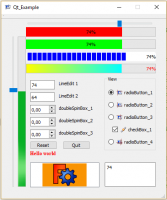 Qt example 1
 -
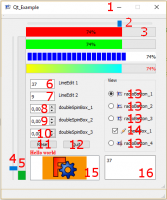 Qt example details
Are treated :
- icon for window
- horizontalSlider
- progressBar horizontal
- verticalSlider
- progressBar vertical
- lineEdit
- lineEdit
- doubleSpinBox
- doubleSpinBox
- doubleSpinBox
- button
- button
- radioButton with icons
- checkBox with icon checked and unchecked
- textEdit
- graphicsView with 2 graphes
The code page and the icons Qt_Example
Questa pagina è recuperata da https://wiki.freecad.org/Dialog_creation_with_various_widgets