


Introduzione
La libreria PySide dà accesso al toolkit Qt dell'interfaccia utente grafica multipiattaforma (GUI) di Python. Qt è una raccolta di librerie C++, ma con l'aiuto di PySide, gli stessi componenti possono essere usati da Python. Ogni interfaccia grafica che può essere creata in C++, può anche essere creata e modificata in Python. Un vantaggio dell'utilizzo di Python è che le interfacce Qt possono essere sviluppate e testate dal vivo, poiché non è necessario compilare i file sorgente.
The recommended way to import PySide (of any version) in FreeCAD is:
from PySide import QtCore, QtGui, QtWidgets
Qt & PySide versions
- Version 1.0 of Qt was released in mid 1990’s
- Version 4.0 of Qt was released in 2005 and the 4.x series was officially retired in 2015
- The python wrapper for Qt4.x has the name PySide
- Version 5.0 of Qt was released in 2012 and the 5.x series was officially retired in 2020.
- The python wrapper for Qt5.x has the name PySide2
- Version 6.0 of Qt was released in 2020, it is the current version-series
- The python wrapper for Qt6.x has the name PySide6
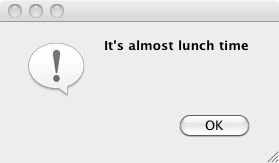
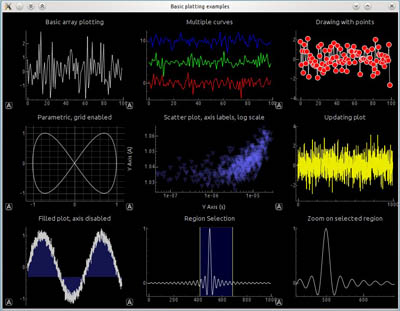
Esempi creati con PySide. A sinistra: una semplice finestra di dialogo. A destra: una finestra di dialogo più complessa con grafici.
FreeCAD and PySide
The original idea behind FreeCAD was to bring Cas.CADE (geometric kernel), Qt (gui toolkit) and Python together to create a free 3D parametric CAD program with a built-in scripting engine. This was in the early 2000’s, i.e. prior to the existence of PySide, thus a different wrapper – PyQt – was used for the first good decade of FreeCAD’s life. PySide came about to solve licensing issues with PyQt, and the switch for FreeCAD to PySide was made in 2013 (commit 1dc122dc9a).
If you would like to know which Qt version your installation uses, the About dialog has version listings where Qt is included.
Per ulteriori informazioni, vedere:
Quando si installa FreeCAD, si dovrebbe ottenere sia Qt che PySide come parte del pacchetto. Se si sta compilando, si deve verificare che queste due librerie siano installate affinché FreeCAD funzioni correttamente. Naturalmente, PySide funzionerà solo se è presente Qt.
PySide in FreeCAD con Qt5
The main difference between the PySide and subsequent PySide2 and PySide6 libraries is the namespacing. PySide (Qt4) has the main namespaces QtGui and QtCore, whereas PySide2 (Qt5) and PySide6 (Qt6) introduced the additional namespace QtWidgets, where all the widgets are now located, they used to be in QtGui namespace.
FreeCAD’s approach to handle the different versions of Qt/PySide is to call them all PySide, which really should be thought of as PySideX. It does not matter which Qt/PySide version is installed, they are all imported with PySide.
Questo modulo PySide si trova nella directory Ext/ di un'installazione di FreeCAD compilata per Qt5.
/usr/share/freecad/Ext/PySide
Questo modulo importa solo le classi necessarie da PySide2 e le inserisce nel namespace PySide. Ciò significa che nella maggior parte dei casi lo stesso codice può essere utilizzato sia con Qt4 che con Qt5, purché utilizziamo il singolo modulo PySide.
PySide2.QtCore -> PySide.QtCore
PySide2.QtGui -> PySide.QtGui
PySide2.QtWidgets -> PySide.QtWidgets
PySide2.QtSvg -> PySide.QtSvg
PySide2.QtUiTools -> PySide.QtUiTools
L'unico aspetto insolito è che le classi PySide2.QtWidgets sono posizionate nel namespace PySide.QtGui.
PySide2.QtWidgets.QCheckBox -> PySide.QtGui.QCheckBox
But the current recommended way is to use the modern namespacing.
from PySide import QtCore, QtGui, QtWidgets

my_check_box = QtWidgets.QCheckBox()
Esempi di utilizzo di PySide
- Esempi di livello base di PySide, Hello World, avvisi, inserire un testo, inserire un numero.
- Esempi di livello medio di PySide, dimensionare le finestre, nascondere i widget, i menu popup, la posizione del mouse, gli eventi del mouse.
- Esempi di livello avanzato di PySide, widget etc.
Gli esempi di PySide sono divisi in 3 parti, differenziate per livello di esposizione a PySide, Python e alle parti incorporate in FreeCAD. La prima pagina contiene una panoramica e le basi della materia, fornisce una descrizione di PySide e di come è organizzato, mentre la seconda e la terza pagina contengono soprattutto degli esempi di codice di diversi livelli.
Si ritiene che questi esempi siano utili per iniziare, dopodiché l'utente potrà consultare altre risorse online o la documentazione ufficiale.
Documentazione
Ci sono alcune differenze nella gestione dei widget in Qt4 (PySide) e Qt5 (PySide2). Il programmatore dovrebbe essere consapevole di queste incompatibilità e dovrebbe consultare la documentazione ufficiale se qualcosa non sembra funzionare come previsto su una data piattaforma. Tuttavia, Qt4 è considerato obsoleto, quindi la maggior parte dello sviluppo dovrebbe mirare a Qt5 e Python 3.
La documentazione di PySide fa riferimento alle classi in stile Python; tuttavia, poiché Qt è originariamente una libreria C++, le stesse informazioni dovrebbero essere disponibili nel riferimento C++ corrispondente.
- Moduli Qt disponibile da PySide2 (Qt5).
- Tutte le classi Qt per modulo in Qt5 per C++.
- Moduli Qt disponibile da PySide (Qt4).
Questa pagina è recuperata da https://wiki.freecad.org/PySide