


概要
PySideライブラリを使うと、Pythonから、クロスプラットフォームのGUIツールキットのQtにアクセスできます。QtはC++のライブラリ集ですが、PySideを使うことで、PythonからもQtの機能を活用することができます。C++で作れるユーザーインタフェースは、同じようにPythonでも作成したり変更したりできます。ソースコードをコンパイルせずに開発とテストをその場で行うことができるのが、Pythonを使ってQtを用いたインタフェースを作成する利点の1つです。
The recommended way to import PySide (of any version) in FreeCAD is:
from PySide import QtCore, QtGui, QtWidgets
Qt & PySide versions
- Version 1.0 of Qt was released in mid 1990’s
- Version 4.0 of Qt was released in 2005 and the 4.x series was officially retired in 2015
- The python wrapper for Qt4.x has the name PySide
- Version 5.0 of Qt was released in 2012 and the 5.x series was officially retired in 2020.
- The python wrapper for Qt5.x has the name PySide2
- Version 6.0 of Qt was released in 2020, it is the current version-series
- The python wrapper for Qt6.x has the name PySide6
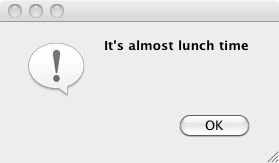
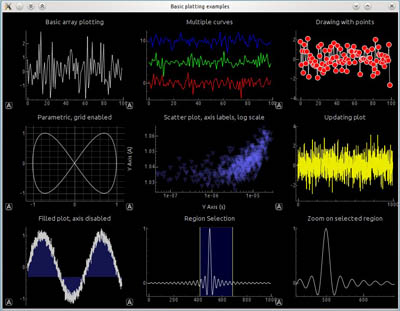
PySideを使って作成したユーザーインタフェースの例。左:単純なダイアログの例。右:グラフを含む複雑なダイアログの例。
FreeCAD and PySide
The original idea behind FreeCAD was to bring Cas.CADE (geometric kernel), Qt (gui toolkit) and Python together to create a free 3D parametric CAD program with a built-in scripting engine. This was in the early 2000’s, i.e. prior to the existence of PySide, thus a different wrapper – PyQt – was used for the first good decade of FreeCAD’s life. PySide came about to solve licensing issues with PyQt, and the switch for FreeCAD to PySide was made in 2013 (commit 1dc122dc9a).
If you would like to know which Qt version your installation uses, the About dialog has version listings where Qt is included.
詳細は以下を参照してください。
FreeCADをインストールすると、QtとPySideも同梱されているはずです。自分でコンパイルした場合は、これら2つのライブラリがインストールされているか確認してください。FreeCADを正しく動作させるためにはこれらが必要です。もちろん、QtがないとPySideは動作しません。
Multi version compatibility
The main difference between the PySide and subsequent PySide2 and PySide6 libraries is the namespacing. PySide (Qt4) has the main namespaces QtGui and QtCore, whereas PySide2 (Qt5) and PySide6 (Qt6) introduced the additional namespace QtWidgets, where all the widgets are now located, they used to be in QtGui namespace.
FreeCAD’s approach to handle the different versions of Qt/PySide is to call them all PySide, which really should be thought of as PySideX. It does not matter which Qt/PySide version is installed, they are all imported with PySide.
A shim handles the differences between the versions. This PySide shim is located in the Ext/ directory of an installation of FreeCAD compiled for Qt5/Qt6.
/usr/share/freecad/Ext/PySide
This module just imports the necessary classes from PySide2/6, and places them in the PySide namespace. This approach was chosen for it's ability to provide backwards compatibility from a Qt4 perspective.
PySide2.QtCore -> PySide.QtCore
PySide2.QtGui -> PySide.QtGui
PySide2.QtWidgets -> PySide.QtWidgets
PySide2.QtSvg -> PySide.QtSvg
PySide2.QtUiTools -> PySide.QtUiTools
For this reason the PySide2.QtWidgets classes are also placed in the PySide.QtGui namespace.
PySide2.QtWidgets.QCheckBox -> PySide.QtGui.QCheckBox
But the current recommended way is to use the modern namespacing.
from PySide import QtCore, QtGui, QtWidgets

my_check_box = QtWidgets.QCheckBox()
Examples of PySide use
- Beginner PySide Examples ( Hello World、お知らせ、テキストを入力、番号を入力
- PySide Intermediate Examples (ウィンドウのサイズ変更、ウィジェットの非表示、ポップアップメニュー、マウスの位置、マウスイベント)
- Advanced PySide Examples (ウィジェットなど)
彼らは主題を3つの部分に分け、PySide、PythonそしてFreeCAD内部への露出のレベルによって区別しました。最初のページには概要と背景資料があり、PySideとそのまとめ方について説明していますが、2ページ目と3ページ目は、ほとんどが異なるレベルのコード例です。
その意図は、問題に取り組むユーザがコードを簡単にコピーして自分の作業に貼り付け、必要に応じてそれを修正し、FreeCADによる問題解決に戻ることができるように、関連ページがPySideを実行する単純なPythonコードを提供することです。うまくいけば、彼らはPySideの質問に対する答えを探すためにインターネットを越えて追いかけに行く必要はありません。同時にこのページは、Web上で利用可能なさまざまな包括的なPySideチュートリアルと参照サイトを置き換えることを意図していません。
Documentation
There are some differences in the handling of widgets between the different versions. Programmers should be aware of these incompatibilities, and consult the official documentation if something doesn't work as expected on a given platform. Although rare, sometimes it may be required to make versioned calls through if-clauses.
The PySide documentation refers to the Python-style classes; however, since Qt is originally a C++ library, the same information should be available in the corresponding C++ reference.
- Qt Modules available from PySide2/PySide6 (Qt5/Qt6).
- All Qt classes by module in Qt5 for C++.
- Qt Modules available from PySide (Qt4).
このページは以下から取得されています https://wiki.freecad.org/PySide