


Введение
PySide - это библиотека, дающая доступ к инструментарий кроссплатформенного графического интерфейса пользователя Qt. Qt представляет собой набор библиотек C++, но с помощью PySide можно использовать те же компоненты из Python. Любой сложный графический интерфейс, который может быть создан в C++, может быть так же создан и изменен в Python. Преимущество использования Python заключается в том, что интерфейсы Qt можно разрабатывать и тестировать вживую, без нужды компилировать исходные файлы.
The recommended way to import PySide (of any version) in FreeCAD is:
from PySide import QtCore, QtGui, QtWidgets
Qt & PySide versions
- Version 1.0 of Qt was released in mid 1990’s
- Version 4.0 of Qt was released in 2005 and the 4.x series was officially retired in 2015
- The python wrapper for Qt4.x has the name PySide
- Version 5.0 of Qt was released in 2012 and the 5.x series was officially retired in 2020.
- The python wrapper for Qt5.x has the name PySide2
- Version 6.0 of Qt was released in 2020, it is the current version-series
- The python wrapper for Qt6.x has the name PySide6
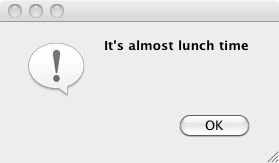
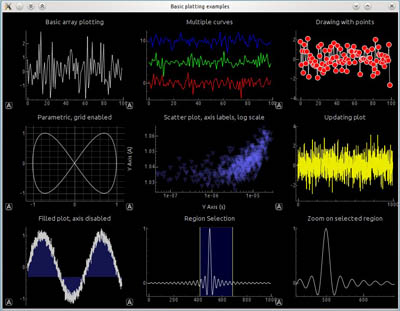
Examples created with PySide. Left: a simple dialog. Right: a more complex dialog with graphs.
FreeCAD and PySide
The original idea behind FreeCAD was to bring Cas.CADE (geometric kernel), Qt (gui toolkit) and Python together to create a free 3D parametric CAD program with a built-in scripting engine. This was in the early 2000’s, i.e. prior to the existence of PySide, thus a different wrapper – PyQt – was used for the first good decade of FreeCAD’s life. PySide came about to solve licensing issues with PyQt, and the switch for FreeCAD to PySide was made in 2013 (commit 1dc122dc9a).
If you would like to know which Qt version your installation uses, the About dialog has version listings where Qt is included.
For more information see:
When you install FreeCAD, you will get both Qt and a matching PySide as part of the package. If you are compiling yourself, you must verify that matching versions of these two libraries are installed in order for FreeCAD to run correctly. Of course, PySide will only work if Qt is present.
PySide в FreeCAD с Qt5
The main difference between the PySide and subsequent PySide2 and PySide6 libraries is the namespacing. PySide (Qt4) has the main namespaces QtGui and QtCore, whereas PySide2 (Qt5) and PySide6 (Qt6) introduced the additional namespace QtWidgets, where all the widgets are now located, they used to be in QtGui namespace.
FreeCAD’s approach to handle the different versions of Qt/PySide is to call them all PySide, which really should be thought of as PySideX. It does not matter which Qt/PySide version is installed, they are all imported with PySide.
Модуль PySide располагается в каталоге Ext/ установки FreeCAD, скомпилированной для Qt5.
/usr/share/freecad/Ext/PySide
Этот модуль просто импортирует необходимые классы из PySide2, но размещает их в пространстве имён PySide. Это значит, что в большинстве случаев тот же самый код может быть использован как с Qt4, так и с Qt5, когда тот импортирует единый модуль PySide.
PySide2.QtCore -> PySide.QtCore
PySide2.QtGui -> PySide.QtGui
PySide2.QtWidgets -> PySide.QtWidgets
PySide2.QtSvg -> PySide.QtSvg
PySide2.QtUiTools -> PySide.QtUiTools
Единственный необычный аспект это то, что классы PySide2.QtWidgets помещены в пространстве имён PySide.QtGui.
PySide2.QtWidgets.QCheckBox -> PySide.QtGui.QCheckBox
But the current recommended way is to use the modern namespacing.
from PySide import QtCore, QtGui, QtWidgets

my_check_box = QtWidgets.QCheckBox()
Примеры использования PySide
- Примеры PySide для начинающих, Hello World, анонсы, ввод текста, ввод чисел.
- Примеры PySide среднего уровня сложности, изменение размеров окон, сокрытие виджетов, всплывающие меню, позиционирование мыши, события мыши.
- Примеры PySide для продвинутых пользователей, много виджетов.
Примеры PySide разделены на 3 части, дифференцированные по уровню воздействия PySide, Python и внутренних компонентов FreeCAD. На первой странице представлен обзор PySide, а на второй и третьей страницах приведены примеры кода на разных уровнях.
Ожидается, что эти примеры полезны для начала, и после этого пользователь может обратиться к другим ресурсам онлайн или официальной документации.
Документация
There are some differences in the handling of widgets between the different versions. Programmers should be aware of these incompatibilities, and consult the official documentation if something doesn't work as expected on a given platform. Although rare, sometimes it may be required to make versioned calls through if-clauses.
The PySide documentation refers to the Python-style classes; however, since Qt is originally a C++ library, the same information should be available in the corresponding C++ reference.
- Qt Modules available from PySide2/PySide6 (Qt5/Qt6).
- All Qt classes by module in Qt5 for C++.
- Qt Modules available from PySide (Qt4).
Эта страница получена от https://wiki.freecad.org/PySide