Introduction
Exemple de création de fenêtre de dialogue avec PySide.
Dans cet exemple, l'interface entière est définie en Python. Bien que cela soit possible pour les petites interfaces, pour les interfaces plus importantes, il est recommandé de créer des fichiers .ui via Qt Designer et de les charger dans le programme.
Méthode 1
Un exemple de fenêtre de dialogue complète avec ses connections.
# -*- coding: utf-8 -*-
# Create by flachyjoe

from PySide import QtCore, QtGui

try:
    _fromUtf8 = QtCore.QString.fromUtf8
except AttributeError:
    def _fromUtf8(s):
        return s

try:
    _encoding = QtGui.QApplication.UnicodeUTF8
    def _translate(context, text, disambig):
        return QtGui.QApplication.translate(context, text, disambig, _encoding)
except AttributeError:
    def _translate(context, text, disambig):
        return QtGui.QApplication.translate(context, text, disambig)


class Ui_MainWindow(object):

     def __init__(self, MainWindow):
        self.window = MainWindow

        MainWindow.setObjectName(_fromUtf8("MainWindow"))
        MainWindow.resize(400, 300)
        self.centralWidget = QtGui.QWidget(MainWindow)
        self.centralWidget.setObjectName(_fromUtf8("centralWidget"))

        self.pushButton = QtGui.QPushButton(self.centralWidget)
        self.pushButton.setGeometry(QtCore.QRect(30, 170, 93, 28))
        self.pushButton.setObjectName(_fromUtf8("pushButton"))
        self.pushButton.clicked.connect(self.on_pushButton_clicked) #connection pushButton

        self.lineEdit = QtGui.QLineEdit(self.centralWidget)
        self.lineEdit.setGeometry(QtCore.QRect(30, 40, 211, 22))
        self.lineEdit.setObjectName(_fromUtf8("lineEdit"))
        self.lineEdit.returnPressed.connect(self.on_lineEdit_clicked) #connection lineEdit

        self.checkBox = QtGui.QCheckBox(self.centralWidget)
        self.checkBox.setGeometry(QtCore.QRect(30, 90, 81, 20))
        self.checkBox.setChecked(True)
        self.checkBox.setObjectName(_fromUtf8("checkBoxON"))
        self.checkBox.clicked.connect(self.on_checkBox_clicked) #connection checkBox

        self.radioButton = QtGui.QRadioButton(self.centralWidget)
        self.radioButton.setGeometry(QtCore.QRect(30, 130, 95, 20))
        self.radioButton.setObjectName(_fromUtf8("radioButton"))
        self.radioButton.clicked.connect(self.on_radioButton_clicked) #connection radioButton

        MainWindow.setCentralWidget(self.centralWidget)

        self.menuBar = QtGui.QMenuBar(MainWindow)
        self.menuBar.setGeometry(QtCore.QRect(0, 0, 400, 26))
        self.menuBar.setObjectName(_fromUtf8("menuBar"))
        MainWindow.setMenuBar(self.menuBar)

        self.mainToolBar = QtGui.QToolBar(MainWindow)
        self.mainToolBar.setObjectName(_fromUtf8("mainToolBar"))
        MainWindow.addToolBar(QtCore.Qt.TopToolBarArea, self.mainToolBar)

        self.statusBar = QtGui.QStatusBar(MainWindow)
        self.statusBar.setObjectName(_fromUtf8("statusBar"))
        MainWindow.setStatusBar(self.statusBar)

        self.retranslateUi(MainWindow)

     def retranslateUi(self, MainWindow):
        MainWindow.setWindowTitle(_translate("MainWindow", "MainWindow", None))
        self.pushButton.setText(_translate("MainWindow", "OK", None))
        self.lineEdit.setText(_translate("MainWindow", "tyty", None))
        self.checkBox.setText(_translate("MainWindow", "CheckBox", None))
        self.radioButton.setText(_translate("MainWindow", "RadioButton", None))

     def on_checkBox_clicked(self):
        if self.checkBox.checkState()==0:
            App.Console.PrintMessage(str(self.checkBox.checkState())+"  CheckBox KO\r\n")
        else:
            App.Console.PrintMessage(str(self.checkBox.checkState())+" CheckBox OK\r\n")
#        App.Console.PrintMessage(str(self.lineEdit.setText("tititi"))+" LineEdit\r\n") #write text to the lineEdit window !
#        str(self.lineEdit.setText("tititi")) #écrit le texte dans la fenêtre lineEdit
        App.Console.PrintMessage(str(self.lineEdit.displayText())+" LineEdit\r\n")

     def on_radioButton_clicked(self):
        if self.radioButton.isChecked():
             App.Console.PrintMessage(str(self.radioButton.isChecked())+" Radio OK\r\n")
        else:
             App.Console.PrintMessage(str(self.radioButton.isChecked())+"  Radio KO\r\n")

     def on_lineEdit_clicked(self):
#        if self.lineEdit.textChanged():
             App.Console.PrintMessage(str(self.lineEdit.displayText())+" LineEdit Display\r\n")

     def on_pushButton_clicked(self):
        App.Console.PrintMessage("Terminé\r\n")
        self.window.hide()

MainWindow = QtGui.QMainWindow()
ui = Ui_MainWindow(MainWindow)
MainWindow.show()
Ici la même fenêtre mais avec un icône sur chaque bouton.
Téléchargez les icônes associés (Faites clic droit sur l'icône "Enregistrer l'image sous ...)"


# -*- coding: utf-8 -*-

from PySide import QtCore, QtGui

try:
    _fromUtf8 = QtCore.QString.fromUtf8
except AttributeError:
    def _fromUtf8(s):
        return s

try:
    _encoding = QtGui.QApplication.UnicodeUTF8
    def _translate(context, text, disambig):
        return QtGui.QApplication.translate(context, text, disambig, _encoding)
except AttributeError:
    def _translate(context, text, disambig):
        return QtGui.QApplication.translate(context, text, disambig)


class Ui_MainWindow(object):

     def __init__(self, MainWindow):
        self.window = MainWindow
        path = FreeCAD.ConfigGet("UserAppData")
#        path = FreeCAD.ConfigGet("AppHomePath")

        MainWindow.setObjectName(_fromUtf8("MainWindow"))
        MainWindow.resize(400, 300)
        self.centralWidget = QtGui.QWidget(MainWindow)
        self.centralWidget.setObjectName(_fromUtf8("centralWidget"))

        self.pushButton = QtGui.QPushButton(self.centralWidget)
        self.pushButton.setGeometry(QtCore.QRect(30, 170, 93, 28))
        self.pushButton.setObjectName(_fromUtf8("pushButton"))
        self.pushButton.clicked.connect(self.on_pushButton_clicked) #connection pushButton

        self.lineEdit = QtGui.QLineEdit(self.centralWidget)
        self.lineEdit.setGeometry(QtCore.QRect(30, 40, 211, 22))
        self.lineEdit.setObjectName(_fromUtf8("lineEdit"))
        self.lineEdit.returnPressed.connect(self.on_lineEdit_clicked) #connection lineEdit

        self.checkBox = QtGui.QCheckBox(self.centralWidget)
        self.checkBox.setGeometry(QtCore.QRect(30, 90, 100, 20))
        self.checkBox.setChecked(True)
        self.checkBox.setObjectName(_fromUtf8("checkBoxON"))
        self.checkBox.clicked.connect(self.on_checkBox_clicked) #connection checkBox

        self.radioButton = QtGui.QRadioButton(self.centralWidget)
        self.radioButton.setGeometry(QtCore.QRect(30, 130, 95, 20))
        self.radioButton.setObjectName(_fromUtf8("radioButton"))
        self.radioButton.clicked.connect(self.on_radioButton_clicked) #connection radioButton

        MainWindow.setCentralWidget(self.centralWidget)

        self.menuBar = QtGui.QMenuBar(MainWindow)
        self.menuBar.setGeometry(QtCore.QRect(0, 0, 400, 26))
        self.menuBar.setObjectName(_fromUtf8("menuBar"))
        MainWindow.setMenuBar(self.menuBar)

        self.mainToolBar = QtGui.QToolBar(MainWindow)
        self.mainToolBar.setObjectName(_fromUtf8("mainToolBar"))
        MainWindow.addToolBar(QtCore.Qt.TopToolBarArea, self.mainToolBar)

        self.statusBar = QtGui.QStatusBar(MainWindow)
        self.statusBar.setObjectName(_fromUtf8("statusBar"))
        MainWindow.setStatusBar(self.statusBar)

        self.retranslateUi(MainWindow)

        # Affiche un icone sur le bouton PushButton
        # self.image_01 = "C:\Program Files\FreeCAD0.13\Icone01.png" # adapt the icon name
        self.image_01 = path+"Icone01.png" # adapt the name of the icon
        icon01 = QtGui.QIcon()
        icon01.addPixmap(QtGui.QPixmap(self.image_01),QtGui.QIcon.Normal, QtGui.QIcon.Off)
        self.pushButton.setIcon(icon01)
        self.pushButton.setLayoutDirection(QtCore.Qt.RightToLeft) # This command reverses the direction of the button

        # Affiche un icone sur le bouton RadioButton
        # self.image_02 = "C:\Program Files\FreeCAD0.13\Icone02.png" # adapt the name of the icon
        self.image_02 = path+"Icone02.png" # adapter le nom de l'icone
        icon02 = QtGui.QIcon()
        icon02.addPixmap(QtGui.QPixmap(self.image_02),QtGui.QIcon.Normal, QtGui.QIcon.Off)
        self.radioButton.setIcon(icon02)
        # self.radioButton.setLayoutDirection(QtCore.Qt.RightToLeft) #  This command reverses the direction of the button

        # Affiche un icone sur le bouton CheckBox
        # self.image_03 = "C:\Program Files\FreeCAD0.13\Icone03.png" # the name of the icon
        self.image_03 = path+"Icone03.png" # adapter le nom de l'icone
        icon03 = QtGui.QIcon()
        icon03.addPixmap(QtGui.QPixmap(self.image_03),QtGui.QIcon.Normal, QtGui.QIcon.Off)
        self.checkBox.setIcon(icon03)
        # self.checkBox.setLayoutDirection(QtCore.Qt.RightToLeft) # This command reverses the direction of the button


     def retranslateUi(self, MainWindow):
        MainWindow.setWindowTitle(_translate("MainWindow", "FreeCAD", None))
        self.pushButton.setText(_translate("MainWindow", "OK", None))
        self.lineEdit.setText(_translate("MainWindow", "tyty", None))
        self.checkBox.setText(_translate("MainWindow", "CheckBox", None))
        self.radioButton.setText(_translate("MainWindow", "RadioButton", None))

     def on_checkBox_clicked(self):
        if self.checkBox.checkState()==0:
            App.Console.PrintMessage(str(self.checkBox.checkState())+"  CheckBox KO\r\n")
        else:
            App.Console.PrintMessage(str(self.checkBox.checkState())+" CheckBox OK\r\n")
           # App.Console.PrintMessage(str(self.lineEdit.setText("tititi"))+" LineEdit\r\n") # write text to the lineEdit window !
           # str(self.lineEdit.setText("tititi")) #écrit le texte dans la fenêtre lineEdit
        App.Console.PrintMessage(str(self.lineEdit.displayText())+" LineEdit\r\n")

     def on_radioButton_clicked(self):
        if self.radioButton.isChecked():
             App.Console.PrintMessage(str(self.radioButton.isChecked())+" Radio OK\r\n")
        else:
             App.Console.PrintMessage(str(self.radioButton.isChecked())+"  Radio KO\r\n")

     def on_lineEdit_clicked(self):
          # if self.lineEdit.textChanged():
          App.Console.PrintMessage(str(self.lineEdit.displayText())+" LineEdit Display\r\n")

     def on_pushButton_clicked(self):
        App.Console.PrintMessage("Terminé\r\n")
        self.window.hide()

MainWindow = QtGui.QMainWindow()
ui = Ui_MainWindow(MainWindow)
MainWindow.show()
Ici le code pour afficher l'icône sur le pushButton, modifiez le nom pour un autre bouton, (radioButton, checkBox) ainsi que le chemin de l'icône.
# Affiche un icône sur le bouton PushButton
        # self.image_01 = "C:\Program Files\FreeCAD0.13\icone01.png" # the name of the icon
        self.image_01 = path+"icone01.png" # the name of the icon
        icon01 = QtGui.QIcon()
        icon01.addPixmap(QtGui.QPixmap(self.image_01),QtGui.QIcon.Normal, QtGui.QIcon.Off)
        self.pushButton.setIcon(icon01)
        self.pushButton.setLayoutDirection(QtCore.Qt.RightToLeft) # This command reverses the direction of the button
La commande UserAppData donne le chemin utilisateur AppHomePath donne le chemin d'installation de FreeCAD
#        path = FreeCAD.ConfigGet("UserAppData")
        path = FreeCAD.ConfigGet("AppHomePath")
Cette commande inverse le sens horizontal du bouton, droite à gauche
self.pushButton.setLayoutDirection(QtCore.Qt.RightToLeft) # This command reverses the direction of the button
Méthode 2
Une autre méthode pour afficher une fenêtre, ici en créant un fichier QtForm.py qui renferme l'entête du programme (module appelé avec import QtForm), et d'un deuxième module qui renferme le code de la fenêtre tous ces accessoires, et votre code (le module appelant).
Cette méthode nécessite 2 fichiers distincts, mais permet de raccourcir votre programme, en utilisant le fichier QtForm.py en import. Il faut alors distribuer les deux fichiers ensemble, ils sont indissociables.
Le fichier QtForm.py
# -*- coding: utf-8 -*-
# Create by flachyjoe
from PySide import QtCore, QtGui

try:
    _fromUtf8 = QtCore.QString.fromUtf8
except AttributeError:
   def _fromUtf8(s):
      return s

try:
    _encoding = QtGui.QApplication.UnicodeUTF8
    def _translate(context, text, disambig):
      return QtGui.QApplication.translate(context, text, disambig, _encoding)
except AttributeError:
   def _translate(context, text, disambig):
      return QtGui.QApplication.translate(context, text, disambig)

class Form(object):
   def __init__(self, title, width, height):
      self.window = QtGui.QMainWindow()
      self.title=title
      self.window.setObjectName(_fromUtf8(title))
      self.window.setWindowTitle(_translate(self.title, self.title, None))
      self.window.resize(width, height)

   def show(self):
      self.createUI()
      self.retranslateUI()
      self.window.show()

   def setText(self, control, text):
      control.setText(_translate(self.title, text, None))
Le fichier appelant, qui contient la fenêtre et votre code.
Le fichier my_file.py
Les connections sont à faire, un bon exercice.
# -*- coding: utf-8 -*-
# Create by flachyjoe
from PySide import QtCore, QtGui
import QtForm

class myForm(QtForm.Form):
   def createUI(self):
      self.centralWidget = QtGui.QWidget(self.window)
      self.window.setCentralWidget(self.centralWidget)

      self.pushButton = QtGui.QPushButton(self.centralWidget)
      self.pushButton.setGeometry(QtCore.QRect(30, 170, 93, 28))
      self.pushButton.clicked.connect(self.on_pushButton_clicked)

      self.lineEdit = QtGui.QLineEdit(self.centralWidget)
      self.lineEdit.setGeometry(QtCore.QRect(30, 40, 211, 22))

      self.checkBox = QtGui.QCheckBox(self.centralWidget)
      self.checkBox.setGeometry(QtCore.QRect(30, 90, 81, 20))
      self.checkBox.setChecked(True)

      self.radioButton = QtGui.QRadioButton(self.centralWidget)
      self.radioButton.setGeometry(QtCore.QRect(30, 130, 95, 20))

   def retranslateUI(self):
      self.setText(self.pushButton, "Fermer")
      self.setText(self.lineEdit, "essais de texte")
      self.setText(self.checkBox, "CheckBox")
      self.setText(self.radioButton, "RadioButton")

   def on_pushButton_clicked(self):
      self.window.hide()

myWindow=myForm("Fenetre de test",400,300)
myWindow.show()
Autre exemple
-
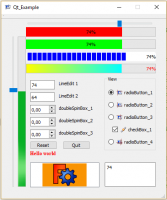 Qt example 1
 -
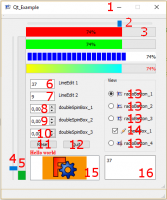 Qt example details
Sont traités :
- icon for window : l'icône affiché sur le coin supérieur gauche de la fenêtre principale
- horizontalSlider : horizontal slider sa connexion et extraction / affectation de données
- progressBar horizontal : progress bar horizontal sa connexion et extraction / affectation de données
- verticalSlider : vertical slider sa connexion et extraction / affectation de données
- progressBar vertical : progress bar verticale sa connexion et extraction / affectation de données
- lineEdit : line edit sa connexion et extraction / affectation de données
- lineEdit :
- doubleSpinBox : double spinbox sa connexion et extraction / affectation de données
- doubleSpinBox :
- doubleSpinBox :
- button : button et sa connexion
- button :
- radioButton : radio button avec icône sa connexion checked
- checkBox : checkbox with avec icône sa connexion checked and unchecked
- textEdit : text edit sa connexion et extraction / affectation de données
- graphicsView : graphic view avec 2 images et la méthode pour changer d'image
La page de code et les icônes Qt Exemples
Cette page est extraite de https://wiki.freecad.org/Dialog_creation_with_various_widgets