|
|
| Opis |
|---|
| Opisuje polecenia Qt Macro version: 0.4 Last modified: 2019-06-19 FreeCAD version: wszystkie Download: MEpipe01 |
| Autor |
| Mario52 |
| Do pobrania |
MEpipe01 |
| Odnośniki |
| Przepisy na makropolecenia Jak zainstalować makrodefinicje Dostosowanie pasków narzędzi |
| Wersja Makrodefinicji |
| 0.4 |
| Data zmian |
| 2019-06-19 |
| Wersja FreeCAD |
| wszystkie |
| Domyślny skrót |
| Brak |
| Zobacz również |
| - |
Ta makrodefinicja jest przykładem użycia poleceń Qt do łączenia, ekstrakcji i przypisywania danych.
-
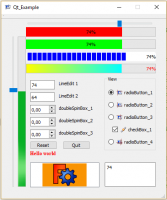 Przykład Qt
 -
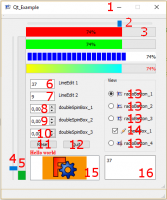 Szczegóły przykładu Qt
Są traktowane:
- icon for window : Ikona wyświetlana w oknie głównym
- horizontalSlider : poziomy suwak, jego połączenie i pobieranie danych / przypisanie
- progressBar horizontal : poziomy pasek postępu, jego połączenie i pobieranie danych / przypisanie
- verticalSlider : pionowy suwak jego połączenie i ekstrakcja danych / przypisanie
- progressBar vertical : pionowy pasek postępu jego połączenie i ekstrakcja danych / przypisanie
- lineEdit : edycja linii jej połączenie i ekstrakcja danych / przypisanie
- lineEdit : edycja linii jej połączenia i ekstrakcja danych / przypisanie
- doubleSpinBox : podwójny spinbox jego połączenie i ekstrakcja danych / przypisanie
- doubleSpinBox :
- doubleSpinBox :
- button : przycisk jego połączenie
- button :
- radioButton : przycisk radiowy z ikonami jego połączenia i zaznaczony
- checkBox : pole wyboru z ikoną jego połączenia zaznaczone i odznaczone
- textEdit : edycja tekstu z połączeniem i pobieraniem/przypisywaniem danych
- graphicsView : widok graficzny z 2 wykresami i metodą zmiany obrazu
Zastosowane narzędzia to:
PyQt4-4.11.4-gpl-Py2.7-Qt4.8.7-x32
Do konwersji pliku .ui w .py należy użyć pliku pyuic.py znajdującego się w "C:\Python27\Lib\site-packages\PyQt4\uic\pyuic.py" (dla Windows).
można utworzyć plik convertuitopy.bat, aby zautomatyzować proces:
1: Utwórz nowy plik w katalogu roboczym Qt i nazwij go convertuitopy.bat.
2: Edytuj plik i wklej tam następującą linię:
@"C:\Python27\python" "C:\Python27\Lib\site-packages\PyQt4\uic\pyuic.py" -x %1.ui > %1.py
3: następnie w konsoli CLI wpisz convertuitopy myproject (nie podawaj rozszerzenia, polecenie doda je automatycznie)
4: monprojet.py twój plik został utworzony.
Użyte ikony




Musisz skopiować i wkleić obrazy do tego samego katalogu co makrodefinicje, tutaj:
Linux : "home/user/.FreeCAD/Macro"
Windows : "C:\Users\UserName\AppData\Roaming\FreeCAD\Macro"
Tworzenie skryptów
Zawartość pliku Qt_Example.FCMacro jest podana poniżej:
# -*- coding: utf-8 -*-
"""
***************************************************************************
* Copyright (c) 2015 2017 2019 <mario52> *
* *
* This file is a supplement to the FreeCAD CAx development system. *
* *
* This program is free software; you can redistribute it and/or modify *
* it under the terms of the GNU Lesser General Public License (LGPL) *
* as published by the Free Software Foundation; either version 2 of *
* the License, or (at your option) any later version. *
* for detail see the LICENCE text file. *
* *
* This software is distributed in the hope that it will be useful, *
* but WITHOUT ANY WARRANTY; without even the implied warranty of *
* MERCHANTABILITY or FITNESS FOR A PARTICULAR PURPOSE. See the *
* GNU Library General Public License for more details. *
* *
* You should have received a copy of the GNU Library General Public *
* License along with this macro; if not, write to the Free Software *
* Foundation, Inc., 59 Temple Place, Suite 330, Boston, MA 02111-1307 *
* USA *
***************************************************************************
* WARNING! All changes in this file will be lost and *
* may cause malfunction of the program *
***************************************************************************
"""
# this macro is made with Python 2.7 and Qt 4.8.7
#
# the modules used hare :
# python-2.7.8.msi # https://www.python.org/downloads/
# PyQt4-4.11.4-gpl-Py2.7-Qt4.8.7-x32.exe # https://riverbankcomputing.com/software/pyqt/download
#
# FreeCAD
##OS: Windows 8 # OS: Windows 10 # OS: Windows 10 (10.0)
##Word size of OS: 64-bit # Word size of OS: 64-bit # Word size of OS: 64-bit
##Word size of FreeCAD: 64-bit # Word size of FreeCAD: 64-bit # Word size of FreeCAD: 64-bit
##Version: 0.15.4671 (Git) # Version: 0.16.6706 (Git) # Version: 0.19.16624 (Git)
##"Branch: releases/FreeCAD-0-15 # Build type: Release # Build type: Release
##Hash: 244b3aef360841646cbfe80a1b225c8b39c8380c # Branch: releases/FreeCAD-0-16 # Branch: master
##Python version: 2.7.8 # Hash: f86a4e411ff7848dea98d7242f43b7774bee8fa0# Hash: 222ae7305fdf1097e4ef3d050f69dff47dbd8786
##Qt version: 4.8.6 # Python version: 2.7.8 # Python version: 3.6.8
##Coin version: 4.0.0a # Qt version: 4.8.7 # Qt version: 5.12.1
##OCC version: 6.8.0.oce-0.17 # Coin version: 4.0.0a # Coin version: 4.0.0a
# # OCC version: 6.8.0.oce-0.17 # OCC version: 7.3.0
#
# this macro is an example of use some buttons and connection :
# ********** is a connection ** references lines **********
#
# horizontalScrollBar lines 151 to 161, 431, 432, 642
# def on_horizontal_scrolling(self, val_X): #connection lines 161, 526, 531
# verticalScrollBar lines 163 to 173, 393, 394, 433, 643
# def on_vertical_scrolling(self, val_Y): #connection lines 173, 534, 539
# horizontalSlider lines 174 to 181, 575, 577, 644
# def on_horizontal_slider(self, val_X): #connection lines 181, 542, 553
# verticalSlider lines 183 to 188, 593, 595, 645
# def on_vertical_slider(self, val_Y): #connection lines 188, 556, 564
# progressBar
# progressBar_1_Red lines 190 to 199, 533, 548, 579
# progressBar_1_Green lines 205 to 214, 552, 583
# progressBar_1_Blue lines 217 to 228, 553, 584
# progressBar_1_gradient lines 230 to 242, 554, 585
# progressBar_2 lines 244 to 252, 540, 565, 600
# lineEdit
# lineEdit_1 lines 256 to 262, 455, 531, 550, 644
# def on_lineEdit_1_Pressed(self): #connection lines 261, 262, 572
# lineEdit_2 lines 264 to 270, 458, 539, 564, 645
# def on_lineEdit_2_Pressed(self): #connection lines 269, 270, 590
# doubleSpinBox
# doubleSpinBox_1 lines 272 to 279, 461, 462, 641
# def on_doubleSpinBox_1_valueChanged(self,echelle): #connection lines 279, 674
# doubleSpinBox_2 lines 281 to 287, 464, 465, 642
# def on_doubleSpinBox_2_valueChanged(self,angle): #connection lines 287, 681
# doubleSpinBox_3 lines 289 to 295, 467, 468, 643
# def on_doubleSpinBox_3_valueChanged(self,epaisseur): #connection lines 295, 687
# pushButton
# pushButton_1 lines 297 to 301, 450, 451, 631, 663, 670
# def on_pushButton_1_clicked(self): #connection lines 301, 636
# pushButton_2 lines 303 to 307, 452, 453
# def on_pushButton_2_clicked(self): #connection lines 307, 627
# groupBox lines 309 to 312, 315, 326, 336, 346, 356, 439
# radioButton
# radioButton_1 lines 315 to 323, 440, 441, 486, 487, 651
# def on_radioButton_1_clicked(self): #connection lines 323, 482
# radioButton_2 lines 325 to 333, 442, 443, 494, 495
# def on_radioButton_2_clicked(self): #connection lines 333, 490
# radioButton_3 lines 335 to 343, 444, 445, 501, 502
# def on_radioButton_3_clicked(self): #connection lines 343, 498
# radioButton_4 lines 345 to 353, 446, 447, 509, 510
# def on_radioButton_4_clicked(self): #connection lines 353, 505
# checkBox
# checkBox_1 lines 355 to 364, 448, 449, 610, 614, 615, 621, 622, 652, 655
# def on_checkBox_1_clicked(self): #connection lines 360, 606
# textEdit
# textEdit lines 391 to 399, 534, 542, 556, 567, 650, 695
# def on_textEdit_Changed(self): #connection lines 399, 694
# graphicsView lines 401 to 410, 662, 669
#
#
#
#
__title__ = "Examples_QT "
__author__ = "mario52"
__version__ = "00.04"
__date__ = "14/06/2019"
__url__ = "https://freecad.org/index-fr.html"
__Comment__ = "Example make and use buttom and . . . ."
__Communication__ = "https://wiki.freecad.org/index.php?title=User:Mario52"
__IconL__ = "home/user/.FreeCAD"
__IconW__ = "C:/Users/Mario/AppData/Roaming/FreeCAD/Macro"
import PySide
from PySide import QtCore, QtGui
#from PySide.QtGui import qApp, QApplication, QGridLayout, QLineEdit, QPushButton, QTextBrowser, QWidget, QProgressBar
global switch ; switch = 0
global path
#path = FreeCAD.ConfigGet("AppHomePath") # path FreeCAD installation
#path = FreeCAD.ConfigGet("UserAppData") # path FreeCAD User data
#path = "your path" # your directory path
param = FreeCAD.ParamGet("User parameter:BaseApp/Preferences/Macro")# macro path
path = param.GetString("MacroPath","") + "/" # macro path
path = path.replace("\\","/") # convert the "\" to "/"
print( "Path for the icons : " , path ) #
try:
_fromUtf8 = QtCore.QString.fromUtf8
except AttributeError:
def _fromUtf8(s):
return s
try:
_encoding = QtGui.QApplication.UnicodeUTF8
def _translate(context, text, disambig):
return QtGui.QApplication.translate(context, text, disambig, _encoding)
except AttributeError:
def _translate(context, text, disambig):
return QtGui.QApplication.translate(context, text, disambig)
class Ui_MainWindow(object):
def setupUi(self, MainWindow):
self.window = MainWindow
global switch
MainWindow.setObjectName(_fromUtf8("MainWindow"))
MainWindow.resize(400, 450)
MainWindow.setMinimumSize(QtCore.QSize(400, 450))
MainWindow.setMaximumSize(QtCore.QSize(400, 450))
self.widget = QtGui.QWidget(MainWindow)
self.widget.setObjectName(_fromUtf8("widget"))
## section horizontalScrollBar (same Slider)
# self.horizontalScrollBar = QtGui.QScrollBar(self.widget) # create horizontalScrollBar
# self.horizontalScrollBar.setGeometry(QtCore.QRect(64, 5, 302, 16)) # coordinates position
# #self.horizontalScrollBar.setMinimum(-100) # minimum value
# self.horizontalScrollBar.setMaximum(100) # maximum value
# #self.horizontalScrollBar.setSingleStep(3) # here step 3 ..
# self.horizontalScrollBar.setValue( 5) # value by default
# self.horizontalScrollBar.setOrientation(QtCore.Qt.Horizontal) # orientation Horizontal
# #self.horizontalScrollBar.setInvertedAppearance(True) # displacement rigth to left or left to rigth value "True" or "False"
# self.horizontalScrollBar.setObjectName(_fromUtf8("horizontalScrollBar")) # object Name
# self.horizontalScrollBar.valueChanged.connect(self.on_horizontal_scrolling) # connect on "def on_horizontal_scrolling:" for execute action
#
## section verticalScrollBar
# self.verticalScrollBar = QtGui.QScrollBar(self.widget) # create verticalScrollBar
# self.verticalScrollBar.setGeometry(QtCore.QRect(20, 44, 20, 250)) # coordinates position
# #self.verticalScrollBar.setMinimum(-100) # minimum value
# self.verticalScrollBar.setMaximum(100) # maximum value
# #self.verticalScrollBar.setSingleStep(3) # here step 3 .. degault 1
# self.verticalScrollBar.setValue(5) # value by default
# self.verticalScrollBar.setOrientation(QtCore.Qt.Vertical) # orientation Vertical
# self.verticalScrollBar.setInvertedAppearance(True) # displacement top to bottom or botton to top value "True" or "False"
# self.verticalScrollBar.setObjectName(_fromUtf8("verticalScrollBar")) # object Name
# self.verticalScrollBar.valueChanged.connect(self.on_vertical_scrolling) # connect on "def on_vertical_scrolling:" for execute action
# section horizontalSlider
self.horizontalSlider = QtGui.QSlider(self.widget) # create horizontalSlider
self.horizontalSlider.setGeometry(QtCore.QRect(64, 5, 302, 16)) # coordinates position
self.horizontalSlider.setOrientation(QtCore.Qt.Horizontal) # orientation Horizontal
self.horizontalSlider.setInvertedAppearance(False) # displacement rigth to left or left to rigth value "True" or "False"
self.horizontalSlider.setObjectName(_fromUtf8("horizontalSlider")) # object Name
self.horizontalSlider.valueChanged.connect(self.on_horizontal_slider) # connect on "def on_horizontal_slider:" for execute action
# section verticalSlider
self.verticalSlider = QtGui.QSlider(self.widget) # create verticalSlider
self.verticalSlider.setGeometry(QtCore.QRect(20, 44, 20, 365)) # coordinates position
self.verticalSlider.setOrientation(QtCore.Qt.Vertical) # orientation Vertical
self.verticalSlider.setObjectName(_fromUtf8("verticalSlider")) # object Name
self.verticalSlider.valueChanged.connect(self.on_vertical_slider) # connect on "def on_vertical_slider:" for execute action
# section progressBar 1 Red
self.progressBar_1_Red = QtGui.QProgressBar(self.widget) # create object progressBar_1
self.progressBar_1_Red.setGeometry(QtCore.QRect(60, 21, 315, 23)) # coordinates position
self.progressBar_1_Red.setValue(0) # value by default
self.progressBar_1_Red.setOrientation(QtCore.Qt.Horizontal) # orientation Horizontal
self.progressBar_1_Red.setAlignment(QtCore.Qt.AlignCenter) # align text center
self.progressBar_1_Red.setObjectName(_fromUtf8("progressBar_1_Red")) # object Name
self.progressBar_1_Red.setToolTip(_translate("MainWindow", "progressBar_1_Red for lineEdit 1 and horizontal ScrollBar", None)) # tooltip for explanation
# a tooltip can be set to all objects
self.progressBar_1_Red.setStyleSheet("QProgressBar {color:black; }"
"QProgressBar:chunk {background-color: #FF0000;}") # modify the progressBar color
# section progressBar 1 Green
self.progressBar_1_Green = QtGui.QProgressBar(self.widget) # create object progressBar_1
self.progressBar_1_Green.setGeometry(QtCore.QRect(60, 51, 315, 23)) # coordinates position
self.progressBar_1_Green.setValue(0) # value by default
self.progressBar_1_Green.setOrientation(QtCore.Qt.Horizontal) # orientation Horizontal
self.progressBar_1_Green.setAlignment(QtCore.Qt.AlignCenter) # align text center
self.progressBar_1_Green.setObjectName(_fromUtf8("progressBar_1_Green")) # object Name
self.progressBar_1_Green.setToolTip(_translate("MainWindow", "progressBar_1_Green for lineEdit 1 and horizontal ScrollBar", None)) # tooltip for explanation
# a tooltip can be set to all objects
self.progressBar_1_Green.setStyleSheet("QProgressBar {color:black; }"
"QProgressBar:chunk {background-color: #00FF00;}") # modify the progressBar color
# section progressBar 1 Blue
self.progressBar_1_Blue = QtGui.QProgressBar(self.widget) # create object progressBar_1
self.progressBar_1_Blue.setGeometry(QtCore.QRect(60, 81, 315, 23)) # coordinates position
self.progressBar_1_Blue.setValue(0) # value by default
self.progressBar_1_Blue.setOrientation(QtCore.Qt.Horizontal) # orientation Horizontal
self.progressBar_1_Blue.setAlignment(QtCore.Qt.AlignCenter) # align text center
self.progressBar_1_Blue.setObjectName(_fromUtf8("progressBar_1_Blue")) # object Name
self.progressBar_1_Blue.setToolTip(_translate("MainWindow", "progressBar_1_Blue for lineEdit 1 and horizontal ScrollBar", None)) # tooltip for explanation
# a tooltip can be set to all objects
self.progressBar_1_Blue.setStyleSheet(
"QProgressBar {color:black; text-align:right; padding:2px; border-radius: 5px;}" # modify the progressBar color and display
"QProgressBar:chunk {background-color: #0000FF; width: 10px; margin-left:2px;}")
# section progressBar 1 gradient
self.progressBar_1_gradient = QtGui.QProgressBar(self.widget) # create object progressBar_1
self.progressBar_1_gradient.setGeometry(QtCore.QRect(60, 110, 315, 23)) # coordinates position
self.progressBar_1_gradient.setValue(0) # value by default
self.progressBar_1_gradient.setOrientation(QtCore.Qt.Horizontal) # orientation Horizontal
self.progressBar_1_gradient.setAlignment(QtCore.Qt.AlignCenter) # align text center
self.progressBar_1_gradient.setObjectName(_fromUtf8("progressBar_1_gradient")) # object Name
self.progressBar_1_gradient.setToolTip(_translate("MainWindow", "progressBar_1_gradient for lineEdit 1 and horizontal ScrollBar", None)) # tooltip for explanation
# a tooltip can be set to all objects
##http://pyqt.sourceforge.net/Docs/PyQt4/qlineargradient.html
self.progressBar_1_gradient.setStyleSheet(
"QProgressBar {color:red; text-align:right; padding:1px; }" # modify the progressBar color and display
"QProgressBar:chunk {text-align: center; background: qlineargradient(x1: 0, y1: 0.5, x2: 1, y2: 0.5, stop: 0 #FFFF00, stop: 1 #00FFFF);}")
# section progressBar 2
self.progressBar_2 = QtGui.QProgressBar(self.widget) # create object progressBar_2
self.progressBar_2.setGeometry(QtCore.QRect(40, 44, 20, 365)) # coordinates position
self.progressBar_2.setValue(0) # value by default
self.progressBar_2.setOrientation(QtCore.Qt.Vertical) # position Vertical
self.progressBar_2.setAlignment(QtCore.Qt.AlignCenter) # align text center (not text displayed ?)
self.progressBar_2.setOrientation(QtCore.Qt.Vertical) # orientation Vertical
self.progressBar_2.setObjectName(_fromUtf8("progressBar_2")) # progressBar 2 Y Vertical
self.progressBar_2.setToolTip(_translate("MainWindow", "progressBar_2 for lineEdit 2 and vertical ScrollBar", None)) # tooltip for explanation
# a tooltip can be set to all objects
# section lineEdit 1
self.lineEdit_1 = QtGui.QLineEdit(self.widget) # create object lineEdit_1
self.lineEdit_1.setGeometry(QtCore.QRect(70, 150, 60, 22)) # coordinates position
self.lineEdit_1.setObjectName(_fromUtf8("lineEdit_1")) # name of object
self.lineEdit_1.setText("0") # text by default
#self.lineEdit_1.returnPressed.connect(self.on_lineEdit_1_Pressed) # connect on def "on_lineEdit_1_Pressed" for execute actionn # for validate the data with press on return touch
self.lineEdit_1.textChanged.connect(self.on_lineEdit_1_Pressed) # connect on def "on_lineEdit_1_Pressed" for execute actionn # with tips key char by char
# a tooltip can be set to all objects
# section lineEdit 2
self.lineEdit_2 = QtGui.QLineEdit(self.widget) # create object lineEdit_2
self.lineEdit_2.setGeometry(QtCore.QRect(70, 180, 60, 22)) # coordinates position
self.lineEdit_2.setObjectName(_fromUtf8("lineEdit_2")) # name of object
self.lineEdit_2.setText("0") # text by default
# self.lineEdit_2.returnPressed.connect(self.on_lineEdit_2_Pressed) # connect on def "on_lineEdit_2_Pressed" for execute actionn # for validate the data with press on return touch
self.lineEdit_2.textChanged.connect(self.on_lineEdit_2_Pressed) # connect on def "on_lineEdit_2_Pressed" for execute actionn # with tips key char by char
# accelerated minimum maximum singleStep prefix suffix
self.doubleSpinBox_1 = QtGui.QDoubleSpinBox(self.widget) # create object doubleSpinBox_1
self.doubleSpinBox_1.setGeometry(QtCore.QRect(70, 210, 62, 22)) # coordinates position
self.doubleSpinBox_1.setMinimum(-10000.0) # minimum value
self.doubleSpinBox_1.setMaximum(10000.0) # maximum value
self.doubleSpinBox_1.setSingleStep(0.1) # step for increase or decrease value here 0.1
self.doubleSpinBox_1.setObjectName(_fromUtf8("doubleSpinBox_1")) # name of object
self.doubleSpinBox_1.valueChanged.connect(self.on_doubleSpinBox_1_valueChanged) #connect on def "on_doubleSpinBox_1_valueChanged"
self.doubleSpinBox_2 = QtGui.QDoubleSpinBox(self.widget) # create object doubleSpinBox_2
self.doubleSpinBox_2.setGeometry(QtCore.QRect(70, 240, 62, 22)) # coordinates position
self.doubleSpinBox_2.setMinimum(-361.0) # minimum value
self.doubleSpinBox_2.setMaximum(361.0) # maximum value
self.doubleSpinBox_2.setSingleStep(1) # step for increase or decrease value here 1
self.doubleSpinBox_2.setObjectName(_fromUtf8("doubleSpinBox_2")) # name of object
self.doubleSpinBox_2.valueChanged.connect(self.on_doubleSpinBox_2_valueChanged) # connect on def "on_doubleSpinBox_2_valueChanged"
self.doubleSpinBox_3 = QtGui.QDoubleSpinBox(self.widget) # create object doubleSpinBox_3
self.doubleSpinBox_3.setGeometry(QtCore.QRect(70, 270, 62, 22)) # coordinates position
self.doubleSpinBox_3.setMinimum(0) # minimum value
self.doubleSpinBox_3.setMaximum(100.0) # maximum value
self.doubleSpinBox_3.setSingleStep(0.05) # step for increase or decrease value here 0.05
self.doubleSpinBox_3.setObjectName(_fromUtf8("doubleSpinBox_3")) # name of object
self.doubleSpinBox_3.valueChanged.connect(self.on_doubleSpinBox_3_valueChanged) # connect on def "on_doubleSpinBox_3_valueChanged"
# section pushButton 1
self.pushButton_1 = QtGui.QPushButton(self.widget) # create object PushButton_1
self.pushButton_1.setGeometry(QtCore.QRect(70, 298, 65, 20)) # coordinates position
self.pushButton_1.setObjectName(_fromUtf8("pushButton_1")) # name of object
self.pushButton_1.clicked.connect(self.on_pushButton_1_clicked) # connect on def "on_pushButton_1_clicked"
# section pushButton 2
self.pushButton_2 = QtGui.QPushButton(self.widget) # create object pushButton_2
self.pushButton_2.setGeometry(QtCore.QRect(150, 298, 65, 20)) # coordinates position
self.pushButton_2.setObjectName(_fromUtf8("pushButton_2")) # name of object
self.pushButton_2.clicked.connect(self.on_pushButton_2_clicked) # connect on def "on_pushButton_2_clicked"
# section groupBox for the four radioButton
self.groupBox = QtGui.QGroupBox(self.widget) # this is the group for associate the four radioButton
self.groupBox.setGeometry(QtCore.QRect(250, 140, 125, 181)) # coordinates position
self.groupBox.setObjectName(_fromUtf8("groupBox")) # name of window groupBox
# section radioButton 1
self.radioButton_1 = QtGui.QRadioButton(self.groupBox) # create object QRadioButton in groupBox
self.radioButton_1.setGeometry(QtCore.QRect(10, 30, 110, 20)) # coordinates position
self.radioButton_1.setObjectName(_fromUtf8("radioButton_1")) # name of object
self.radioButton_1.setChecked(True) # by default True or False (one in the group))
self.image_01 = path+"MEPlanT.png" # image dedicate of the button
icon01 = QtGui.QIcon() # create image name
icon01.addPixmap(QtGui.QPixmap(self.image_01),QtGui.QIcon.Normal, QtGui.QIcon.Off) #
self.radioButton_1.setIcon(icon01) # associate button and image
self.radioButton_1.clicked.connect(self.on_radioButton_1_clicked) # connect radioButton_1 on "def on_radioButton_1_clicked:"
# section radioButton 2
self.radioButton_2 = QtGui.QRadioButton(self.groupBox) # create object QRadioButton in groupBox
self.radioButton_2.setGeometry(QtCore.QRect(10, 60, 110, 20)) # coordinates position
self.radioButton_2.setObjectName(_fromUtf8("radioButton_2")) # name of object
self.image_02 = path+"MEPlanF.png" # image dedicate of the button
icon02 = QtGui.QIcon() # create image name
icon02.addPixmap(QtGui.QPixmap(self.image_02),QtGui.QIcon.Normal, QtGui.QIcon.Off) #
self.radioButton_2.setIcon(icon02) # associate button and image
self.radioButton_2.clicked.connect(self.on_radioButton_2_clicked) # connect radioButton_2 on "def on_radioButton_2_clicked:"
# section radioButton 3
self.radioButton_3 = QtGui.QRadioButton(self.groupBox) # create object QRadioButton in groupBox
self.radioButton_3.setGeometry(QtCore.QRect(10, 90, 110, 20)) # coordinates position
self.radioButton_3.setObjectName(_fromUtf8("radioButton_3")) # name of object
self.image_03 = path+"MEPlanD.png" # image dedicate of the button
icon03 = QtGui.QIcon() # create image name
icon03.addPixmap(QtGui.QPixmap(self.image_03),QtGui.QIcon.Normal, QtGui.QIcon.Off) #
self.radioButton_3.setIcon(icon03) # associate button and image
self.radioButton_3.clicked.connect(self.on_radioButton_3_clicked) # connect radioButton_3 on "def on_radioButton_3_clicked:"
# section radioButton 4
self.radioButton_4 = QtGui.QRadioButton(self.groupBox) # create object QRadioButton in groupBox
self.radioButton_4.setGeometry(QtCore.QRect(10, 150, 110, 20)) # coordinates position
self.radioButton_4.setObjectName(_fromUtf8("radioButton_4")) # name of object
self.image_04 = path+"MEPlanI.png" # image dedicate of the button
icon04 = QtGui.QIcon() # create image name
icon04.addPixmap(QtGui.QPixmap(self.image_04),QtGui.QIcon.Normal, QtGui.QIcon.Off) #
self.radioButton_4.setIcon(icon04) # associate button and image
self.radioButton_4.clicked.connect(self.on_radioButton_4_clicked) # connect radioButton_4 on "def on_radioButton_4_clicked:"
# section checkBox 1
self.checkBox_1 = QtGui.QCheckBox(self.groupBox) # create object QRadioButton in groupBox
self.checkBox_1.setGeometry(QtCore.QRect(20, 120, 110, 20)) # coordinates position
self.checkBox_1.setObjectName(_fromUtf8("checkBox_1")) # name of object
self.checkBox_1.setChecked(True) # Check by default True or False
self.checkBox_1.clicked.connect(self.on_checkBox_1_clicked) # connect on def "on_checkBox_1_clicked"
self.image_1 = path+"MEpipe01.png" # image dedicate of the button
icon1 = QtGui.QIcon() # create image name
icon1.addPixmap(QtGui.QPixmap(self.image_1),QtGui.QIcon.Normal, QtGui.QIcon.Off) #
self.checkBox_1.setIcon(icon1) # associate button and image
self.label_1 = QtGui.QLabel(self.widget) # labels displayed on widget
self.label_1.setGeometry(QtCore.QRect(140, 150, 110, 16)) # label coordinates
self.label_1.setObjectName(_fromUtf8("label_1")) # label name
self.label_2 = QtGui.QLabel(self.widget)
self.label_2.setGeometry(QtCore.QRect(140, 180, 110, 16))
self.label_2.setObjectName(_fromUtf8("label_2"))
self.label_3 = QtGui.QLabel(self.widget)
self.label_3.setGeometry(QtCore.QRect(140, 210, 100, 16))
self.label_3.setObjectName(_fromUtf8("label_3"))
self.label_4 = QtGui.QLabel(self.widget)
self.label_4.setGeometry(QtCore.QRect(140, 240, 100, 16))
self.label_4.setObjectName(_fromUtf8("label_4"))
self.label_5 = QtGui.QLabel(self.widget)
self.label_5.setGeometry(QtCore.QRect(140, 270, 100, 16))
self.label_5.setObjectName(_fromUtf8("label_5"))
self.label_6 = QtGui.QLabel(self.widget)
self.label_6.setGeometry(QtCore.QRect(70, 315, 159, 25))
self.label_6.setObjectName(_fromUtf8("label_6"))
self.textEdit = QtGui.QTextEdit(self.widget)
self.textEdit.setGeometry(QtCore.QRect(251, 350, 124, 58))
self.textEdit.setObjectName(_fromUtf8("textEdit"))
#self.textEdit.setTextInteractionFlags(QtCore.Qt.TextSelectableByMouse) #
self.textEdit.setText("TexEdit ")
self.textEdit.setToolTip(_translate("MainWindow", "textEdit", None))
#self.textEdit.verticalScrollBar().setValue(0) # verticalScrollBar Position
#self.textEdit.verticalScrollBar().setSliderPosition(0) # Slider Position
self.textEdit.textChanged.connect(self.on_textEdit_Changed) #connection on_textEdit_Changed
### ---graphicsView---
self.graphicsView = QtGui.QGraphicsView(self.widget) # graphic view declaration
self.graphicsView.setGeometry(QtCore.QRect(70, 350, 168, 60)) # coordinates position
self.graphicsView.setFrameShape(QtGui.QFrame.StyledPanel) # Frame for the gaphic view
self.graphicsView.setObjectName(_fromUtf8("graphicsView")) # name gaphicView
pic = QtGui.QPixmap(path+"MEPlanFC.png") # image displayed in the graphicView
self.scene = QtGui.QGraphicsScene() #
self.scene.addPixmap(QtGui.QPixmap(pic)) # adding image in the graphicView
self.graphicsView.setScene(ui.scene) # display image in the graphicView
### ---graphicsView---
MainWindow.setCentralWidget(self.widget)
self.menuBar = QtGui.QMenuBar(MainWindow)
self.menuBar.setGeometry(QtCore.QRect(0, 0, 400, 26))
self.menuBar.setObjectName(_fromUtf8("menuBar"))
MainWindow.setMenuBar(self.menuBar)
self.mainToolBar = QtGui.QToolBar(MainWindow)
self.mainToolBar.setObjectName(_fromUtf8("mainToolBar"))
MainWindow.addToolBar(QtCore.Qt.TopToolBarArea, self.mainToolBar)
self.statusBar = QtGui.QStatusBar(MainWindow)
self.statusBar.setObjectName(_fromUtf8("statusBar"))
MainWindow.setStatusBar(self.statusBar)
self.statusbar = QtGui.QStatusBar(MainWindow)
self.statusbar.setObjectName(_fromUtf8("statusbar"))
MainWindow.setStatusBar(self.statusbar)
self.retranslateUi(MainWindow)
QtCore.QMetaObject.connectSlotsByName(MainWindow)
def retranslateUi(self, MainWindow):
MainWindow.setWindowFlags(PySide.QtCore.Qt.WindowStaysOnTopHint) # this function turns the front window (stay to hint)
MainWindow.setWindowTitle(_translate("MainWindow", "Qt_Example", None)) # title main window
MainWindow.setWindowIcon(QtGui.QIcon(path+'MEPlan.png')) # change the icon of the main window
# for horizontalScrollBar
# self.horizontalScrollBar.setToolTip(_translate("MainWindow", "horizontalScrollBar", None))
# self.verticalScrollBar.setToolTip(_translate("MainWindow", "verticalScrollBar", None))
self.groupBox.setTitle(_translate("MainWindow", "View", None))
self.radioButton_1.setToolTip(_translate("MainWindow", "radioButton_1", None))
self.radioButton_1.setText(_translate("MainWindow", "radioButton_1", None))
self.radioButton_2.setToolTip(_translate("MainWindow", "radioButton_2", None))
self.radioButton_2.setText(_translate("MainWindow", "radioButton_2", None))
self.radioButton_3.setToolTip(_translate("MainWindow", "radioButton_3" , None))
self.radioButton_3.setText(_translate("MainWindow", "radioButton_3", None))
self.radioButton_4.setToolTip(_translate("MainWindow", "radioButton_4", None))
self.radioButton_4.setText(_translate("MainWindow", "radioButton_4", None))
self.checkBox_1.setToolTip(_translate("MainWindow", "checkBox_1", None))
self.checkBox_1.setText(_translate("MainWindow", "checkBox_1", None))
self.pushButton_1.setToolTip(_translate("MainWindow", "pushButton_1", None))
self.pushButton_1.setText(_translate("MainWindow", "Reset", None))
self.pushButton_2.setToolTip(_translate("MainWindow", "pushButton_2", None))
self.pushButton_2.setText(_translate("MainWindow", "Quit", None))
self.lineEdit_1.setToolTip(_translate("MainWindow", "LineEdit 1", None))
self.label_1.setText(_translate("MainWindow", "LineEdit 1", None))
self.lineEdit_2.setToolTip(_translate("MainWindow", "LineEdit_2", None))
self.label_2.setText(_translate("MainWindow", "LineEdit 2", None))
self.label_3.setText(_translate("MainWindow", "doubleSpinBox_1", None))
self.doubleSpinBox_1.setToolTip(_translate("MainWindow", "doubleSpinBox_1", None))
self.label_4.setText(_translate("MainWindow", "doubleSpinBox_2", None))
self.doubleSpinBox_2.setToolTip(_translate("MainWindow", "doubleSpinBox_2", None))
self.label_5.setText(_translate("MainWindow", "doubleSpinBox_3", None))
self.doubleSpinBox_3.setToolTip(_translate("MainWindow", "doubleSpinBox_3", None))
font = QtGui.QFont() # see http://doc.qt.io/qt-4.8/qfont.html # label text displayed and colored in red
font.setFamily("Times New Roman") # font used (Windows)
font.setPointSize(10) # font PointSize
font.setWeight(10) # font Weight
font.setBold(True) # Bolt True or False
self.label_6.setFont(font) # associate label_6 and font
self.label_6.setObjectName("label_6") # name of object
self.label_6.setStyleSheet("color : #ff0000") # Color text
self.label_6.setText(_translate("MainWindow", "Hello world", None)) # same resultt with "<b>Hello world</b>"
########### section connections on def #############################
# radioboutons
def on_radioButton_1_clicked(self): # connection on_radioButton_1_clicked
#
#here your code
#
self.label_6.setText(_translate("MainWindow", "radioButton_1 ", None)) # display in the label_6 (red)
print( "radioButton_1")
#
def on_radioButton_2_clicked(self): # connection on_radioButton_2_clicked
#
#here your code
#
self.label_6.setText(_translate("MainWindow", "radioButton_2 ", None)) # display in the label_6 (red)
print( "radioButton_2")
#
def on_radioButton_3_clicked(self): # connection on_radioButton_3_clicked
#
#here your code
self.label_6.setText(_translate("MainWindow", "radioButton_3 ", None)) # display in the label_6 (red)
print( "radioButton_3")
#
def on_radioButton_4_clicked(self): # connection on_radioButton_4_clicked
#
#here your code
#
self.label_6.setText(_translate("MainWindow", "radioButton_4 ", None)) # display in the label_6 (red)
print( "radioButton_4")
#
def affectation_X (self,val_X0): # connection affectation_X
#val_X = float(val_X0) # extract the value and transform it in float
#
#here your code
#
print( val_X0)
#
def affectation_Y (self,val_Y0): # connection affectation_Y
#val_Y = float(val_Y0) # extract the value and transform it in float
#
#here your code
#
print( val_Y0)
#
# # scroll bar barres coulissantes
# def on_horizontal_scrolling(self, val_X): # connection on_horizontal_scrolling
# self.lineEdit_1.setText(str(val_X))
# self.affectation_X(val_X)
# self.progressBar_1_Red.setValue(val_X)
# self.textEdit.setText(str(val_X))
# print( "on_horizontal_scrolling")
#
#
# def on_vertical_scrolling(self, val_Y): # connection on_vertical_scrolling
# self.lineEdit_2.setText(str(val_Y))
# self.affectation_Y(val_Y)
# self.progressBar_2.setValue(val_Y)
# self.textEdit.setText(str(val_Y))
# print( "on_vertical_scrolling")
# slider barres coulissantes
def on_horizontal_slider(self, val_X): # connection on_horizontal_slider
#
#here your code
#
self.lineEdit_1.setText(str(val_X)) # affect the value "val_X" and displayed in lineEdit_1
self.affectation_X(val_X)
self.progressBar_1_Red.setValue(val_X) # affect the value "val_X" in progressbar_1
self.progressBar_1_Green.setValue(val_X) # affect the value "val_X" in progressbar_1
self.progressBar_1_Blue.setValue(val_X) # affect the value "val_X" in progressbar_1
self.progressBar_1_gradient.setValue(int(val_X)) # affect the value "val_X" on progressBar_1 and modify this
self.textEdit.setText(str(val_X)) # affect the value "val_X" in textEdit
print( "on_horizontal_slider" ) # displayed on View repport
#
def on_vertical_slider(self, val_Y): # connection on_vertical_slider
#
#here your code
#
self.lineEdit_2.setText(str(val_Y)) # affect the value "val_Y" and displayed in lineEdit_2
self.affectation_Y(val_Y)
self.progressBar_2.setValue(val_Y) # affect the value "val_Y" in progressbar_2
self.textEdit.setText(str(val_Y)) # affect the value "val_Y" in textEdit
print( "on_vertical_slider" ) # displayed on View repport
#
# lineEdit
def on_lineEdit_1_Pressed(self): # connection on_lineEdit_1_Pressed
val_X = self.lineEdit_1.text() # extract the string in the lineEdit
#
#here your code
#
self.affectation_X(val_X)
try:
self.horizontalSlider.setValue(int(val_X)) # affect the value "val_X" on horizontalSlider and modify this
except Exception: # if error
self.horizontalSlider.setValue(int(0)) # affect the value "0" on horizontalSlider and modify this
val_X = "0"
self.progressBar_1_Red.setValue(int(val_X)) # affect the value "val_X" on progressBar_1 and modify this
self.progressBar_1_Green.setValue(int(val_X)) # affect the value "val_X" on progressBar_1 and modify this
self.progressBar_1_Blue.setValue(int(val_X)) # affect the value "val_X" on progressBar_1 and modify this
self.progressBar_1_gradient.setValue(int(val_X)) # affect the value "val_X" on progressBar_1 and modify this
print( val_X)
#
def on_lineEdit_2_Pressed(self): # connection on_lineEdit_2_Pressed
val_Y = self.lineEdit_2.text() # extract the string in the lineEdit
#
#here your code
#
self.affectation_Y(val_Y)
try:
self.verticalSlider.setValue(int(val_Y)) # affect the value "val_Y" on verticalSlider and modify this
except Exception: # if error
self.verticalSlider.setValue(int(0)) # affect the value "0" on verticalSlider and modify this
val_Y = "0"
self.progressBar_2.setValue(int(val_Y)) # affect the value "val_Y" on progressBar_2 and modify this
print( val_Y)
#
# checkbox_01
def on_checkBox_1_clicked(self): # connection on_checkBox_1_clicked
#
#here your code
#
if self.checkBox_1.isChecked(): # if checkbox_01 is checked then ....
self.image_1 = path+"MEpipe01.png" # configure image_1
icon1 = QtGui.QIcon()
icon1.addPixmap(QtGui.QPixmap(self.image_1),QtGui.QIcon.Normal, QtGui.QIcon.Off)
self.checkBox_1.setIcon(icon1) # affect image_1 to checkBox_1
self.checkBox_1.setText(_translate("MainWindow", "Attached", None)) # text for checkBox_1
print( "Mode attached") # diplayed on View Repport
else: # if checkbox_01 is not checked then ....
self.image_2 = path+"MEpipe02.png" # configure image_2
icon2 = QtGui.QIcon()
icon2.addPixmap(QtGui.QPixmap(self.image_2),QtGui.QIcon.Normal, QtGui.QIcon.Off)
self.checkBox_1.setIcon(icon2) # affect image_2 to checkBox_1
self.checkBox_1.setText(_translate("MainWindow", "Free", None)) # text for checkBox_1
print( "Mode free" ) # diplayed on View Repport
#
# Buttons
def on_pushButton_2_clicked(self): # Button Quit # connection on_pushButton_2_clicked
#
#here your code
#
self.pushButton_1.setStyleSheet("background-color: QPalette.Base") # origin system color pushButton_1
App.Console.PrintMessage("End\r\n")
self.window.hide() # hide the window and close the macro
#
def on_pushButton_1_clicked(self): # Button Reset # connection on_pushButton_1_clicked
#
#here your code
#
global switch
self.doubleSpinBox_1.setValue(0) # gives the value "0" to the doubleSpinBox_1
self.doubleSpinBox_2.setValue(0) # gives the value "0" to the doubleSpinBox_2
self.doubleSpinBox_3.setValue(0) # gives the value "0" to the doubleSpinBox_3
self.lineEdit_1.setText("0") # gives the value "0" to the lineEdit_1
self.lineEdit_2.setText("0") # gives the value "0" to the lineEdit_2
#self.horizontalScrollBar.setValue(0) # gives the value "0" to the horizontalScrollBar
#self.verticalScrollBar.setValue(0) # gives the value "0" to the verticalScrollBar
self.horizontalSlider.setValue(0) # gives the value "0" to the horizontalSlider
self.verticalSlider.setValue(0) # gives the value "0" to the verticalSlider
self.textEdit.clear() # cleans the textEdit
self.radioButton_1.setChecked(True) # by default True or False (one in the group))
self.checkBox_1.setChecked(True) # Check by default True or False
icon1 = QtGui.QIcon() # create image name
icon1.addPixmap(QtGui.QPixmap(self.image_1),QtGui.QIcon.Normal, QtGui.QIcon.Off) #
self.checkBox_1.setIcon(icon1) # associate button and image
if switch == 0: # switch for image in the graphic view Py or FC
switch = 1
pic = QtGui.QPixmap(path+"MEPlanPY.png") # image (Python)
self.scene = QtGui.QGraphicsScene() # name of image
self.scene.addPixmap(QtGui.QPixmap(pic)) # add image "pic" (MEPlanPY.png)
self.graphicsView.setScene(ui.scene) # display the image in graphicview
self.pushButton_1.setStyleSheet("color : #ff0000; background-color : #0000ff;") # text color; background color pushButton_1
else:
switch = 0
pic = QtGui.QPixmap(path+"MEPlanFC.png") # image (FreeCAD)
self.scene = QtGui.QGraphicsScene() # name of image
self.scene.addPixmap(QtGui.QPixmap(pic)) # add image "pic" (MEPlanFC.png)
self.graphicsView.setScene(ui.scene) # display the image in graphicview
self.pushButton_1.setStyleSheet("color : #0000ff; background-color : #ff0000;") # text color; background color pushButton_1
print( "Reset")
#
def on_doubleSpinBox_1_valueChanged(self,echelle): # connection on_doubleSpinBox_1_valueChanged
#
#here your code
#
print( "SpinBox 1 ", echelle)
#
def on_doubleSpinBox_2_valueChanged(self,angle): # connection on_doubleSpinBox_2_valueChanged
#
#here your code
#
print( "SpinBox 2 ", angle)
def on_doubleSpinBox_3_valueChanged(self,epaisseur): # connection on_doubleSpinBox_3_valueChanged
#
#here your code
#
print( "SpinBox 3 ", epaisseur)
#
def on_textEdit_Changed(self): # conection on_textEdit_Changed
texte = str(self.textEdit.toPlainText()) # extract the string of textEdit
#
#here your code
#
print( texte)
#
#######################################
MainWindow = QtGui.QMainWindow()
ui = Ui_MainWindow()
ui.setupUi(MainWindow)
MainWindow.show()
Dobrej zabawy.
Ta strona pochodzi z https://wiki.freecad.org/Qt_Example