


|
|
| Menu location |
|---|
| Modify → Add Component |
| Workbenches |
| BIM |
| Default shortcut |
| None |
| Introduced in version |
| - |
| See also |
| Arch Remove |
Description
The  Arch Add tool allows you to do 4 kinds of operations:
- Add shape-based objects to an Arch component, such as a
 wall or
  structure. These objects are merged with the Arch component, modifying its shape while keeping its base properties such as width and height.
 - Add Arch components to a group-based arch object such as
 levels.
 - Add
 axis systems to structural objects.
 - Add objects to
 section planes.
The counterpart of this tool is the  Remove Component tool.
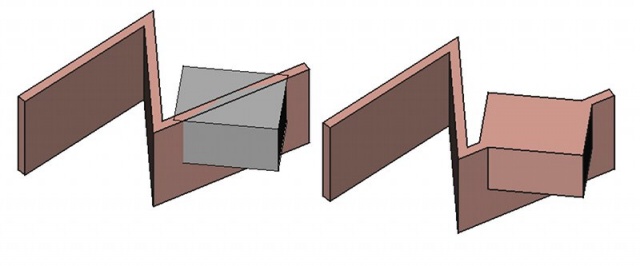
A box added to a wall as a component.
Usage
- Select the objects to be added together. The last object selected will be the host Arch object.
- Press the Add Component button, or use Modify → Add Component from the top menu.
Scripting
See also: Arch API and FreeCAD Scripting Basics.
The Add tool can be used in macros and from the Python console by using the following function:
addComponents(objectsList, host)
- The above code snippet adds the given objects in
objectsListto the givenhostobject. - Note:
objectsListcan be a single object or a list of objects.
Example:
import FreeCAD, Arch, Draft, Part

p1 = FreeCAD.Vector(0, 0, 0)
p2 = FreeCAD.Vector(2000, 2000, 0)

Line = Draft.makeWire([p1, p2])
Wall = Arch.makeWall(Line, width=150, height=2000)

p3 = FreeCAD.Vector(0, 2000, 0)
p4 = FreeCAD.Vector(3000, 0, 0)

Line2 = Draft.makeWire([p3, p4])
Wall2 = Arch.makeWall(Line2, width=150, height=2000)
FreeCAD.ActiveDocument.recompute()

Arch.addComponents(Wall2, Wall)
FreeCAD.ActiveDocument.recompute()
This page is retrieved from https://wiki.freecad.org/Arch_Add